
Napkin AI Review 2026: Text to Diagrams, Pricing & Limits
A Research-based look at Napkin AI, which turns written text into diagrams and visuals. Worth knowing up front: free-plan exports always carry a Napkin watermark, and you own finished visuals for commercial use but not the icons inside them.


Quick Verdict
// Research-basedTeknexia AI Tool Evaluation Framework
This is a Research-based review. We did not use Napkin AI ourselves. Every score below is judged on Napkin AI's official pricing page, help center, terms, and refund policy, and on published third-party reviews from 2026, not on hands-on use. Where a criterion such as ease of use would normally come from our own testing, it is assessed here from documentation, tutorials, and what user reports describe, and each description says what it rests on.
Overall: 7.2/ 10
Napkin AI, from Second Layer, Inc., turns text you have written into diagrams, flowcharts, and other visuals that you can edit and export. It is the eighth review in our AI Productivity category, after Notion AI, Taskade, Reclaim.ai, Gamma, ClickUp, Otter.ai, and Motion. Gamma builds whole presentations; Napkin focuses on individual visuals, though it now also offers a Slides product. This review is built from named sources only; we have not used Napkin AI ourselves.
Watermark and rights: Napkin's help center says free-plan exports always carry a small Napkin logo, which only Plus and Pro users can turn off. You can use complete visuals commercially, including on websites, in books, and in presentations, but Napkin keeps ownership of the individual icons and illustrations inside them, and visuals are not guaranteed to be unique.
- According to the official pricing page, the free plan includes 500 AI credits a week, unlimited editing, and unlimited PNG and PDF exports, with Napkin branding on visuals.
- Credits are used at about 1 credit per selected word, per the pricing FAQ.
- Plus costs $12 a month or $9 billed annually and removes the watermark; Pro costs $30 or $22 and adds custom brands and fonts.
- Napkin AI has no reviews on Trustpilot yet, so user sentiment comes from published third-party reviews.
What Napkin AI Does, per Its Own Documentation
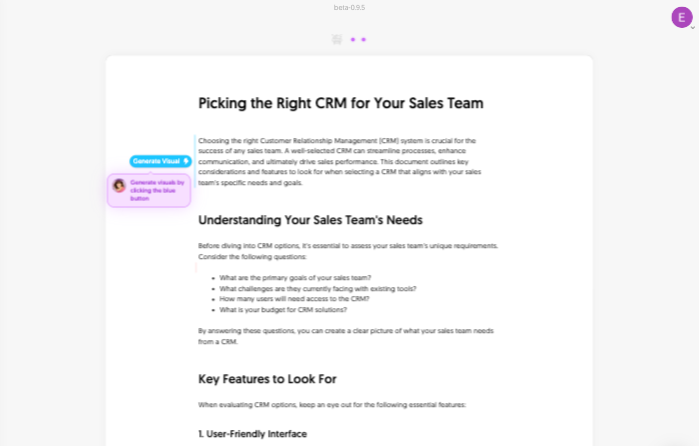
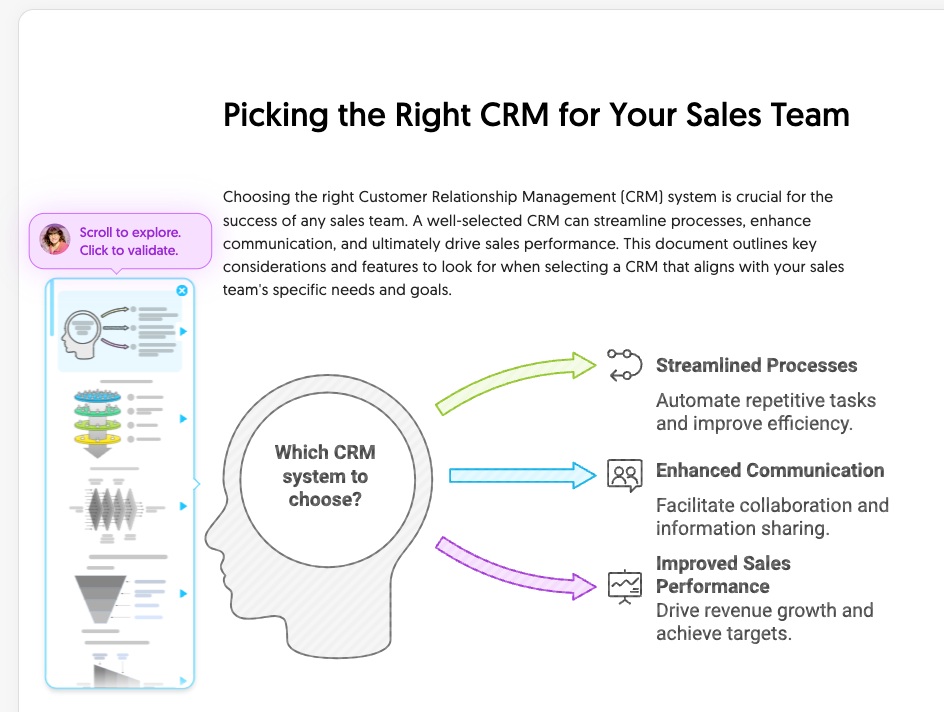
Napkin works inside a document. Per its getting-started guide, you paste or write text, select a passage, and click the Generate Visual button; Napkin then proposes several visual options, and you pick one and a style to add it to the page. Its help center now presents two products under one subscription: Napkin Visuals, for individual graphics, and Napkin Slides, for full presentations, both available on every plan. The two images below are official screenshots from Napkin's help center.
Editing and Exporting Visuals
Generated visuals stay editable. Napkin's customization guide describes swapping icons, resizing elements, adding shapes through its Spark Search tool, and changing colors. Manual edits do not use credits, per the credits article; only generation and AI actions do. To export, you select a visual and choose PNG, SVG, PPT, or PDF in the export preview. The pricing page lists unlimited PNG and PDF exports on every plan and unlimited PPT and SVG exports from Plus, while the help center adds that free users can export PPT and SVG a limited number of times. Napkin notes that some exports include machine-readable information identifying them as AI-generated, separate from the visible watermark.
Pricing, Credits, and the Free Plan
We read Napkin AI's pricing page in a browser on 13 October 2026, in both monthly and annual views.
| Plan | Monthly | Billed annually | Credits and features |
|---|---|---|---|
| Free | $0 | $0 | 500 AI credits/week · unlimited PNG and PDF export · built-in styles · Napkin branding on visuals |
| Plus | $12/person | $9/person/mo | 10,000 credits/mo · unlimited PPT and SVG export · 3 brand styles · no watermark |
| Pro | $30/person | $22/person/mo | 30,000 credits/mo · exclusive designs · unlimited custom brands · font upload · credit top-ups |
Per the pricing FAQ, credits are used at about 1 credit per selected word, a rate Napkin says may change for more complex features. Plan credits do not roll over: free credits refresh weekly and paid credits monthly. The refund policy is strict: a refund is only possible within 24 hours of a monthly purchase or 48 hours of an annual one, and only if no credits have been used since the payment.
Usage Rights and Data
Napkin's help center says you can use complete visuals on websites, in presentations and books, and in commercial applications under its terms. Two limits apply: permission to use the finished visual does not give you ownership of its individual icons or assets, which should stay inside the visual, and generated visuals are not guaranteed to be unique. On data, the help center says Napkin may use anonymized interaction data, such as the text you select and the visuals you choose, to improve its AI, and that you can turn this off in Account Settings under Data Privacy. This is a summary of Napkin's published policies, not legal advice.
What Other Users Say
What Other Users Say
With no Trustpilot reviews and G2 inaccessible to us, we rely on published reviews from 2026. Fast.io's review, updated in June 2026, reports that users on G2 rate Napkin 4.4 out of 5, a figure we could not verify directly, with praise for generation speed and a low learning curve. Its main criticism is that Napkin needs structured input: dense paragraphs without headings or bullet points tend to produce generic or confused visuals, and several flowcharts in a row can start to look alike. It also lists limited integrations as a weakness. Treat these as a reviewer's observations rather than broad user data.
Sources: Trustpilot (checked 13 October 2026); Fast.io, updated 26 June 2026.
Napkin AI vs Gamma vs Canva AI
Napkin creates individual diagrams from text, Gamma generates whole presentations and documents, and Canva AI adds AI tools to a full design platform. Gamma and Canva AI were tested hands-on for our earlier reviews; Napkin AI was assessed from research only.
| Criteria | Napkin AI |
 Gamma Gamma |
 Canva AI Canva AI |
|---|---|---|---|
| Our framework score | 7.2/10 | 6.0/10 | 7.6/10 |
| How we assessed it | Research only | Hands-on test | Hands-on test |
| Main job | Diagrams from your own text | Full presentations and documents | General design with AI tools |
| Free plan | 500 credits every week, watermark | 400 credits, one-time | Limited shared AI quota |
| Entry paid price, billed annually | $9/mo | Roughly $9–12/mo per seat | About $10/mo |
Pros
- Turns selected text into several diagram options in one click
- Editable visuals, with manual edits free of credits
- Free plan with 500 credits every week and unlimited PNG and PDF export
- Commercial use of complete visuals allowed
- Low annual price: $9 a month for Plus
Cons
- Free exports always carry a Napkin watermark
- You do not own the individual icons inside a visual
- Limited integrations: visuals are exported, then inserted elsewhere
- Refunds only within 24 or 48 hours, and only if no credits were used
- No Trustpilot reviews yet to gauge user satisfaction
FAQ
Do Napkin AI free-plan visuals have a watermark?
Yes. Napkin's help center says free-plan exports always carry a small Napkin logo, and the toggle to remove it is locked for free users. Plus and Pro users can switch it off.
Can I use Napkin AI visuals commercially?
Yes, for complete visuals. Napkin says you can use them on websites, in presentations and books, and in commercial applications, but you do not own the individual icons or assets inside them, and visuals are not guaranteed to be unique.
What file formats can Napkin AI export?
Per the help center, PNG, SVG, PPT, and PDF. PNG and PDF are unlimited on every plan; PPT and SVG are unlimited from the Plus plan and limited on Free.
How many visuals can I make with Napkin AI for free?
It depends on your text. The free plan gives 500 AI credits a week, and generation uses about 1 credit per selected word, so shorter selections stretch further. Manual edits do not use credits.
Is Napkin AI better than Gamma?
They do different jobs. Napkin focuses on individual diagrams from your text, while Gamma builds full presentations. In our framework, Napkin scored 7.2 from research and Gamma 6.0 from a hands-on test, so the scores rest on different evidence.
Is this review based on hands-on testing?
No. It is Research-based, built from Napkin AI's official pricing page, help center, and policies, plus a published third-party review. We have not used Napkin AI ourselves.
Final Verdict
Napkin AI does a narrow job well on paper: you select a passage of text and it proposes diagrams you can edit and export. That makes it a natural fit for illustrating blog posts, training materials, and slides. The free plan is usable thanks to 500 weekly credits and unlimited PNG and PDF exports, but every free export carries a Napkin watermark, so published work realistically needs Plus at $9 a month billed annually. Third-party reviewers note that results depend heavily on well-structured input. There are almost no user ratings to go on yet, so try it on your own text before paying. For full presentations rather than single visuals, compare it with Gamma.
Check Napkin AI's Current Pricing
Try it on a well-structured passage of your own text, and upgrade only if you need watermark-free exports.
See Napkin AI pricing →