
Taskade AI Review 2026: We Tested the AI Workspace Firsthand


Quick Verdict
// Hands-on testedTeknexia AI Tool Evaluation Framework
Scored against our site-wide 5-criteria framework. This is the canonical score for Taskade AI — it also appears on the AI Productivity category page, pulled live from this page.
Overall: 7.6/ 10
Taskade AI bundles AI chat, AI agents, task and project management, and real-time docs into one workspace, aiming to replace the usual stack of a separate notes app, task manager, and chatbot. We ran it hands-on with three real prompts — two generative and one agent-based — to see whether the output holds up as an actual usable project tool, not just a list of ideas.
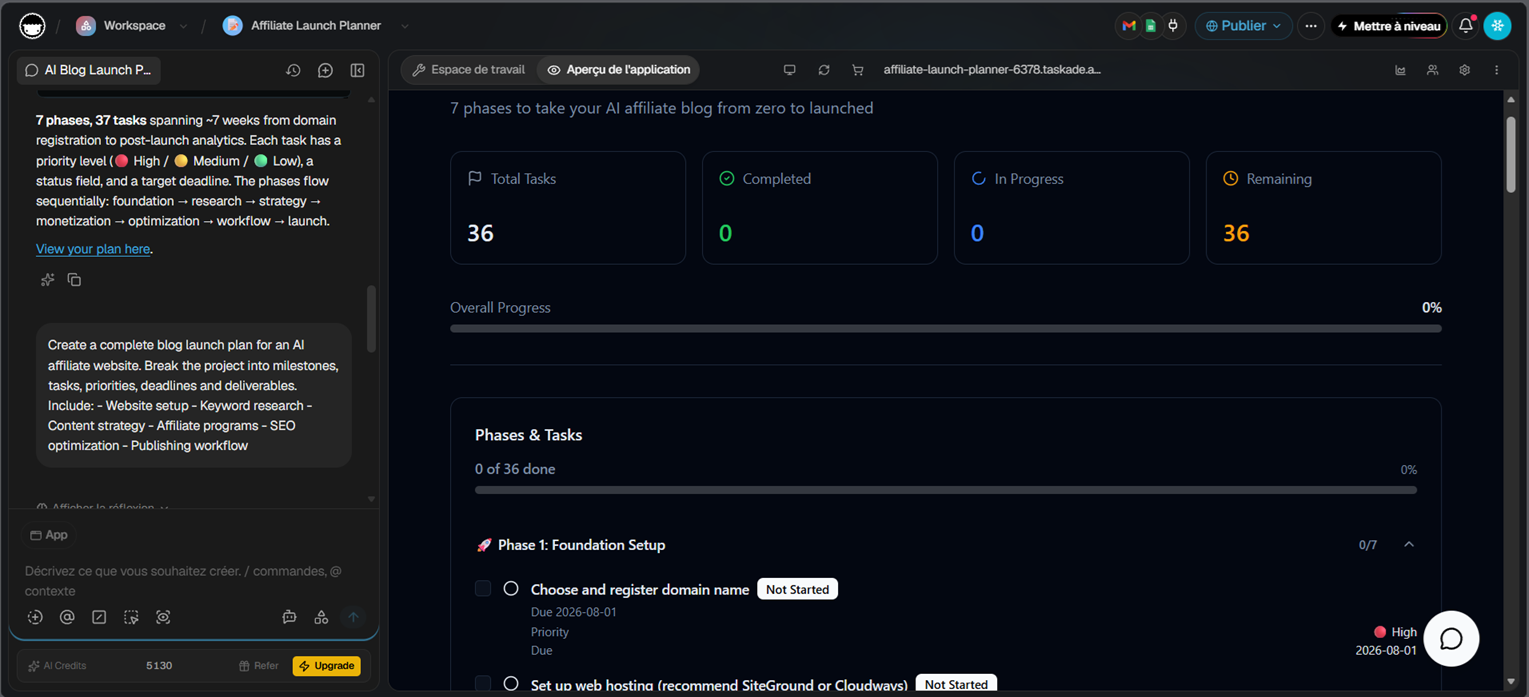
- A single prompt describing a 6-part blog launch project came back as a fully interactive app: 7 phases, 37 tasks, priority levels, deadlines, and a live progress dashboard, not a plain text list (our own test, Taskade workspace, 2026).
- Taskade's built-in "SEO Coach" AI agent gave specific, prioritized advice for an 8-review affiliate site — internal linking first, then content volume, with concrete next actions — not a generic AI pep talk.
- Taskade's Free plan gives 3,000 one-time AI credits with no credit card required — genuinely usable, not a crippled trial (Taskade, 2026).
- The main friction across all three tests wasn't output quality — it was the interface itself. It's dense for a newcomer, and getting comfortable navigating it takes real time.
What Is Taskade AI Used For?
Taskade positions itself as an all-in-one AI workspace: AI chat and agents sit alongside real-time docs, task lists, mind maps, and project boards in the same app, rather than as a separate add-on bolted onto a productivity tool built for something else (Taskade, 2026).
The pitch is that instead of switching between a notes app, a task manager, and a chatbot, one prompt can generate a working project structure directly inside the workspace — phases, tasks, deadlines, and a dashboard to track it, not just a wall of text to copy elsewhere.
What We Actually Tested
We ran three real prompts inside a live Taskade workspace to see whether that "prompt in, working app out" pitch actually holds up, and whether Taskade's AI agents go beyond a one-shot text generator. The first asked for a complete project plan for launching an AI affiliate blog; the second asked for a daily productivity checklist for an SEO blogger; the third handed a real SEO question to Taskade's built-in "SEO Coach" agent. All three used plain-English, one-shot prompts — no follow-up corrections, no prompt engineering.
Our Test Protocol
These notes document what we did during testing — they are separate from the 5-criteria Teknexia AI Tool Evaluation Framework score in the Quick Verdict above, not a replacement or duplicate of it.
| Test | Prompt / Action | Result | Note |
|---|---|---|---|
| AI project plan generation | "Create a complete blog launch plan for an AI affiliate website. Break the project into milestones, tasks, priorities, deadlines and deliverables. Include: Website setup, Keyword research, Content strategy, Affiliate programs, SEO optimization, Publishing workflow" | Generated a full interactive app: 7 phases, 37 tasks, priority levels (High/Medium/Low), status tracking, target deadlines, and a live progress dashboard | Usable on the first attempt, no follow-up prompt needed |
| AI daily checklist generation | "Create a daily productivity checklist for an SEO blogger working on an AI affiliate website." | Generated a "Daily SEO Checklist" app: 20 tasks split into Morning, Content, SEO, and Evening tabs, each with a priority tag and a time estimate | Same one-shot quality as the project plan test |
| "SEO Coach" AI agent | "My top priority right now is improving search rankings for my AI tools review website, which currently has 8 published reviews. What should I focus on first — technical SEO, content volume, or internal linking?" | Agent read the workspace's own SEO checklist project first, then gave a specific, prioritized answer: internal linking first, content volume close second, with concrete next actions | Advice was specific to our stated situation (8 reviews), not generic AI filler |
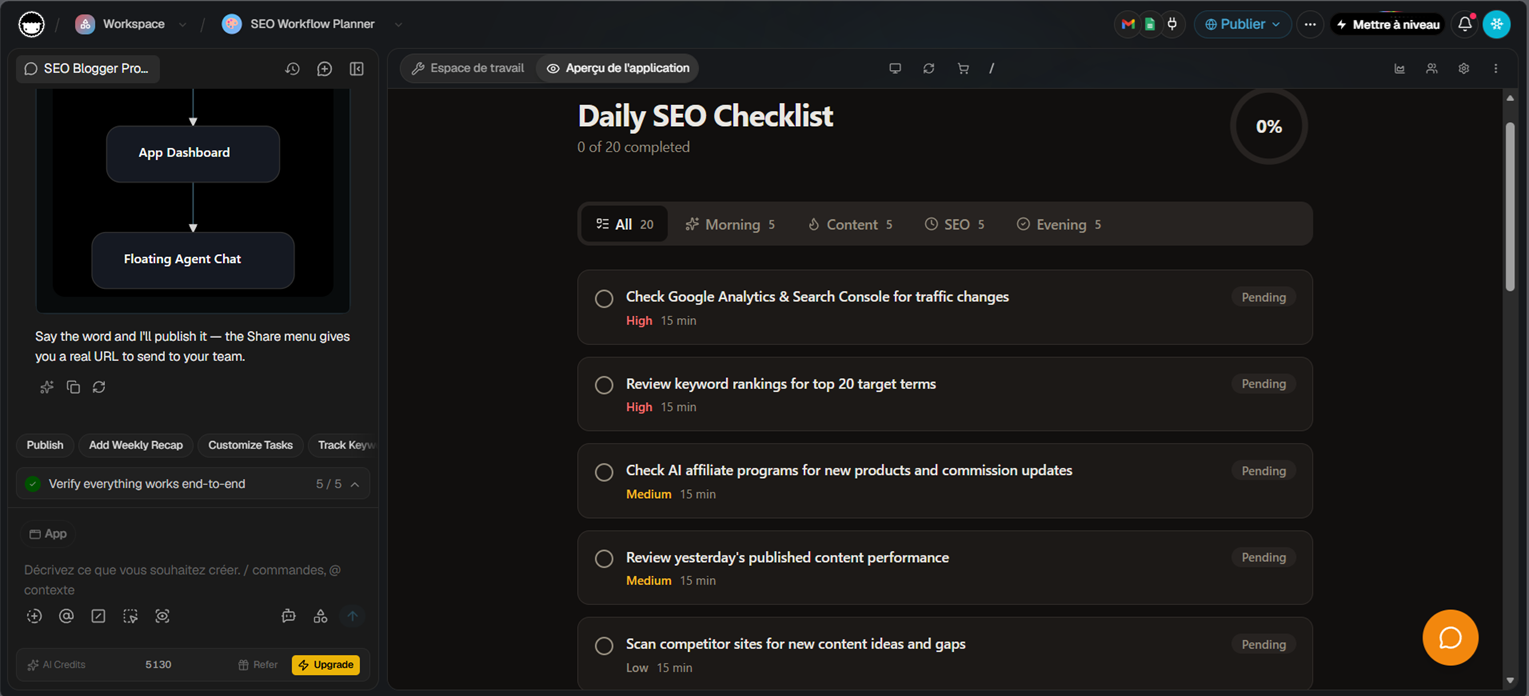
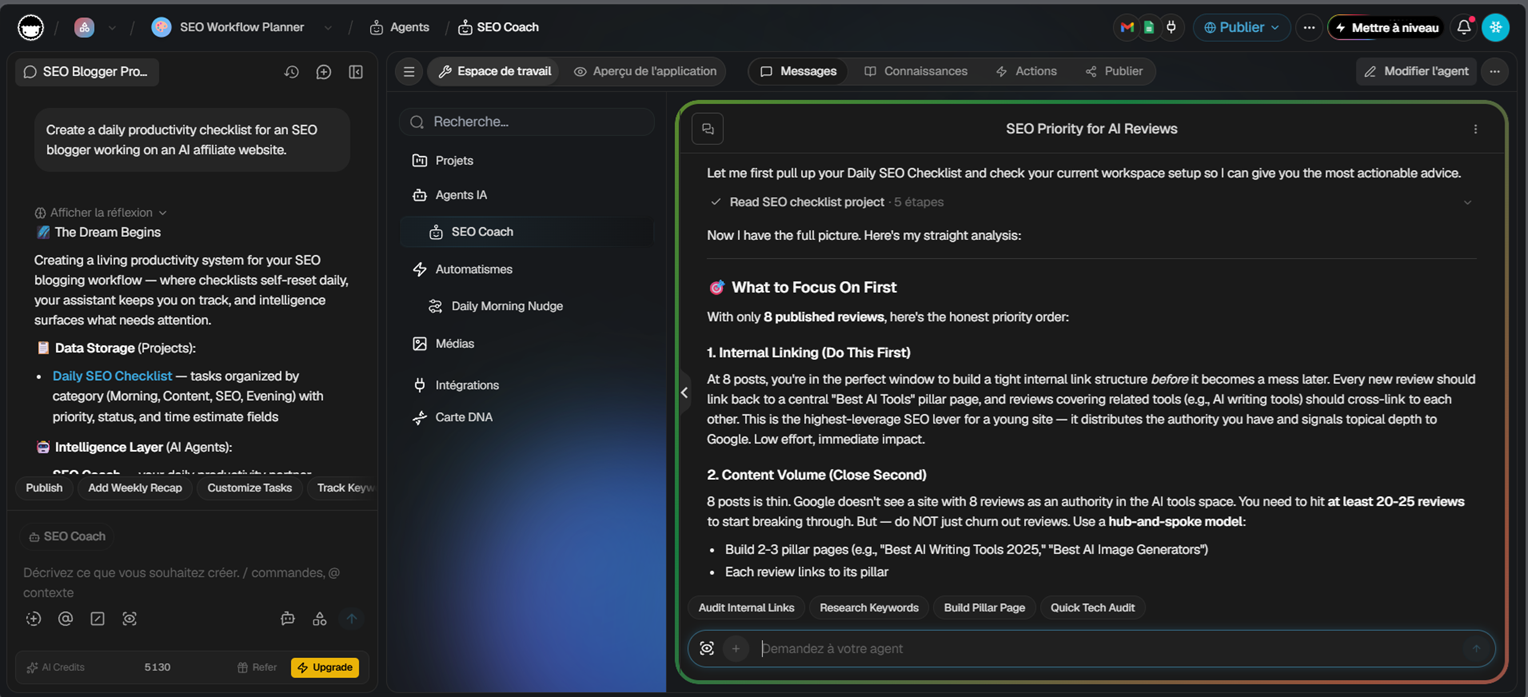
What stood out across all three tests was that the output was never just text. Taskade turned each prompt into either a small working app — complete with a dashboard, progress bar, tabs, and priority tags — or a genuinely specific agent answer grounded in our own workspace content. The one honest catch: getting to that point meant navigating a genuinely dense interface, with a chat sidebar and a separate live-app preview pane running side by side. For a complete beginner, that's a real adjustment period before things feel natural.
Pricing in 2026: What's Actually Free vs. Gated
Taskade's pricing is credit-based rather than a simple per-seat AI gate. The Free plan is $0/month with no credit card required: it includes 3,000 one-time starter AI credits, 1 team member, 1 AI agent, 3 AI automations, and up to 3 live AI apps — a real, usable allotment rather than a time-limited trial (Taskade, 2026). Both of our test prompts ran comfortably within this budget.
Pro, at $10/month billed annually ($20/month if billed monthly), unlocks unlimited AI apps, agents, and automations plus 50,000 AI credits/month and room for 10 team members. Business ($25/month annually) raises that to 150,000 credits/month with unlimited team members and 1 TB of storage. Max ($100/month annually) and Enterprise ($250/month annually) exist for teams running much heavier agent workloads, with 400,000 and 1.1 million monthly credits respectively (Taskade, 2026).
The practical read: casual AI use — a handful of generated plans or checklists a month — genuinely works on Free. The moment you want more than one active agent or unlimited automations, Pro is the real entry point, and credits, not seats, are what actually caps usage as you scale up.
Taskade AI vs Notion AI: Which One Should You Actually Pick?
The clearest difference we found in testing is what the AI actually produces. Notion AI answers questions about, summarizes, and edits pages you've already written; Taskade AI can generate the structure itself — a full project plan with phases, tasks, and a dashboard, or a tabbed checklist, from a single prompt. If what you need is a workspace that already knows your existing documents, Notion AI wins that specific job. If what you need is AI that builds a working project or task tracker from scratch, Taskade AI did that more directly in our test.
Price also favors Taskade for full access: Pro unlocks unlimited AI apps, agents, and automations at $10/month (billed annually), versus Notion AI's $20/user/month Business plan for full ongoing access. The tradeoff is the interface itself — Notion's is the more familiar, gentler on-ramp for a total beginner, where Taskade asks you to get comfortable with a denser, more agent-and-app-oriented workspace first.
What Other Users Say
Taskade's Trustpilot reviews are strongly positive and line up closely with what we found testing it: reviewers repeatedly single out the AI features specifically as helpful, alongside a clean, intuitive interface. Critical reviews are a small minority and don't cluster around one specific recurring complaint the way some other tools in this category do.
Source: Trustpilot (retrieved 28 July 2026).
| Criteria | Taskade AI | Notion AI |
|---|---|---|
| Genuinely usable free plan (no card) | ✓ Yes | ✗ Limited trial only |
| Cheapest full-access entry point | $10/mo (Pro, billed annually) | $20/user/mo (Business) |
| Generates a project/task structure from one prompt | ✓ Yes, confirmed in our test | ✗ Works with existing pages, doesn't generate a project structure |
| Beginner-friendly interface | Dense, real learning curve in our test | More familiar, gentler on-ramp |
| Best for | Turning a single prompt into a structured, trackable project | Teams whose docs already live in Notion |
If you want one prompt to turn into an actual structured project — phases, tasks, deadlines, a dashboard to track it — Taskade AI delivered that directly in our test, and its Free plan is generous enough to try it properly before paying anything. It's a harder sell if you're not comfortable spending time learning a denser interface, or if your priority is AI that works with documents you've already written rather than generating new structure from scratch.
Does Taskade AI Struggle With Anything?
The biggest friction we hit wasn't output quality — all three of our tests came back complete and usable on the first try, including a specialized agent giving genuinely specific advice rather than generic filler. It was the interface itself: a chat sidebar and a separate live-app preview pane, with several toolbar options, that takes real time for a newcomer to feel comfortable navigating. We tested project-plan generation, checklist generation, and one specialized agent in this pass, not Taskade's broader multi-agent automations, so this review can't yet speak to how those hold up under heavier, ongoing use.
Pros & Cons of Taskade AI
Pros
- All three test prompts produced complete, ready-to-use results in one shot — two interactive apps and one specialized agent answer — with no follow-up corrections needed
- Output goes beyond plain text: dashboards, progress bars, priority tags, and tabbed views were generated automatically
- The built-in "SEO Coach" agent read our own workspace content before answering and gave specific, prioritized advice instead of generic AI filler
- Real project-management depth: a single prompt broke our test project into 7 phases and 37 individually tracked tasks with deadlines
- Free plan includes 3,000 one-time AI credits with no credit card required, and all three of our tests ran comfortably within it
Cons
- Dense interface with a real learning curve — a newcomer will need time to get comfortable before working efficiently (our own test)
- We tested one specialized agent ("SEO Coach"), not Taskade's broader multi-agent automations, so this review can't yet speak to heavier ongoing agent use
- Credit-based pricing means heavier AI automation use will draw down the monthly pool faster than a flat per-seat plan
Frequently Asked Questions
Is Taskade AI actually free?
Is Taskade AI worth it over Notion AI?
How much does Taskade AI cost in 2026?
Is Taskade AI hard to learn for beginners?
Our Taskade AI Verdict
Taskade AI earns its place if you want a single prompt to turn into a genuinely usable, structured project or checklist — both of our tests came back complete, well-organized, and ready to work from immediately, not just a text outline to reformat ourselves. It's a harder sell for a complete beginner unwilling to spend time getting comfortable with a dense interface, or for anyone whose priority is AI that already knows documents they've written rather than AI that builds new structure from scratch.