
ClickUp Review 2026: Powerful, but Is It Too Much for One Person?


Quick Verdict
// Hands-on testedTeknexia AI Tool Evaluation Framework
Scored against our site-wide 5-criteria framework, from our own hands-on test on a real ClickUp workspace, using ClickUp Brain to build a custom AI Agent and analyze our own editorial workflow, combined with ClickUp's own pricing page for the tiers we didn't need to test directly. This is the fifth entry in our AI Productivity category, alongside Notion AI, Taskade, Reclaim.ai, and Gamma.
Overall: 6.2/ 10
ClickUp is a project management and productivity platform that bundles tasks, docs, dashboards, automations, and team communication into one product, with ClickUp Brain layered on top as an AI assistant that can chat, build custom agents, and act on your workspace. We tested it on a real, active workspace: building a custom AI agent with ClickUp Brain, running it against two real prompts, and evaluating how the platform holds up for a solo creator managing an entire blog. This is the fifth review in our AI Productivity category, and it's most directly comparable to Notion AI, which we compare below.
The paradox worth understanding before you sign up: ClickUp's biggest strength and its biggest weakness come from the same place. The sheer depth of customization, statuses, custom fields, views, automations, all adaptable to your exact workflow, is genuinely powerful for a team or agency running complex, multi-person projects. But that same depth means a solo creator who just wants to track a handful of tasks ends up wading through far more menus, settings, and options than the job actually requires. We felt this directly in our test: ClickUp isn't badly designed, it's designed for a scale of work most solo users simply don't have.
- ClickUp Brain built a working custom AI agent from a detailed prompt in our test, and its output on both a content-brief task and a workflow-automation analysis was structured and genuinely usable.
- ClickUp Brain is not included free on any workspace tier: it's a separate paid add-on layered on top of Free, Unlimited, Business, or Enterprise, confirmed directly on ClickUp's pricing page.
- The learning curve is real, not overstated marketing-speak: we found the interface genuinely crowded, with enough menus and options that even simple task management felt more complicated than it should.
- ClickUp is explicitly built for teams and agencies with complex workflows; a solo creator will use a fraction of what's available, and the setup time to get there is a real cost.
What We Tested, and What Happened
We ran this test on a real, active ClickUp workspace, using ClickUp Brain for two specific tasks rather than just browsing the interface.
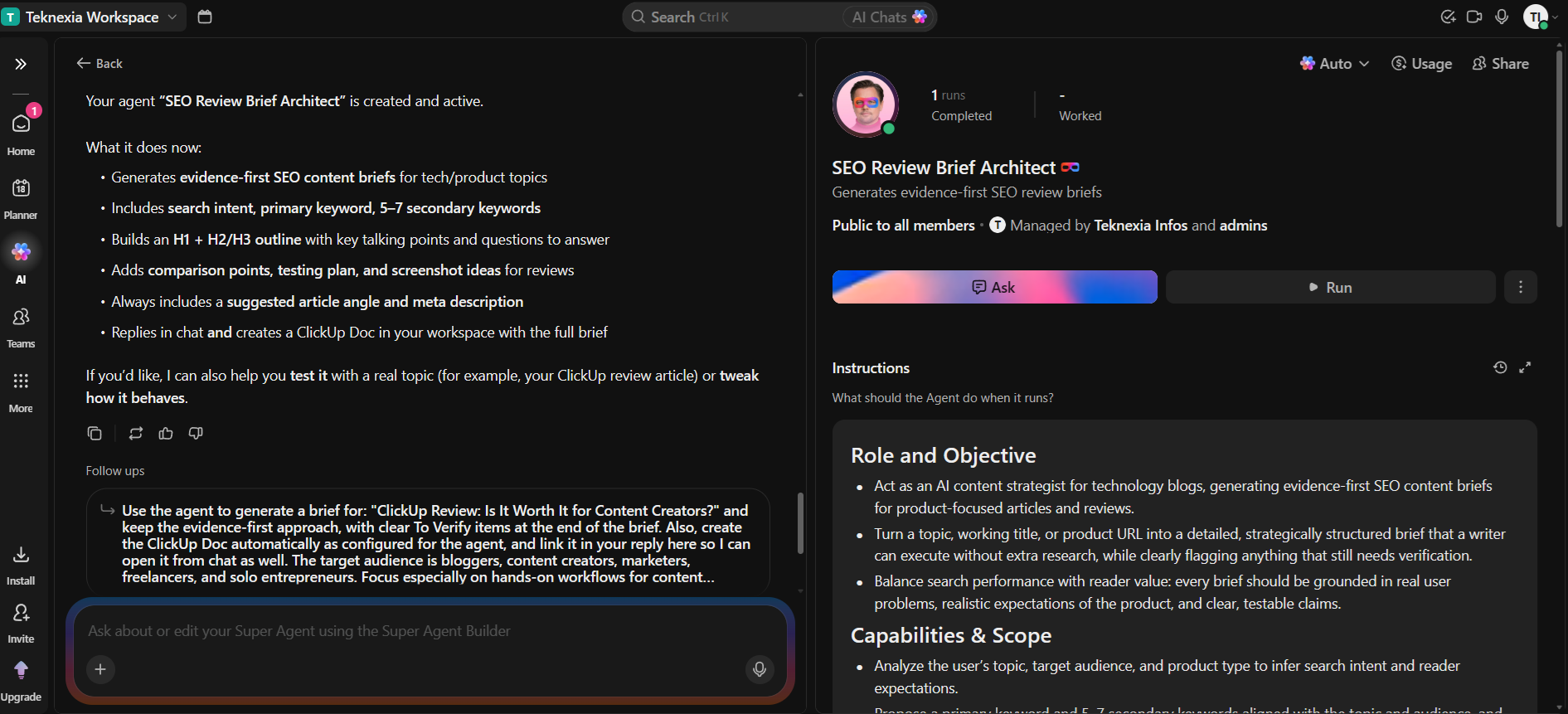
For the first test, we asked ClickUp Brain to act as an AI content strategist and generate a detailed content brief for this very article, specifying search intent, primary and secondary keywords, heading structure, and suggested screenshots, while explicitly telling it not to invent product features or statistics. ClickUp Brain didn't just answer in chat: it created a persistent, named AI Agent ("SEO Review Brief Architect") with its own defined role, capabilities, and instructions that we can reuse for future articles. The brief it generated was structured and specific, with a real H1/H2/H3 outline, suggested comparison points, and clearly flagged items to verify, exactly what we asked for.
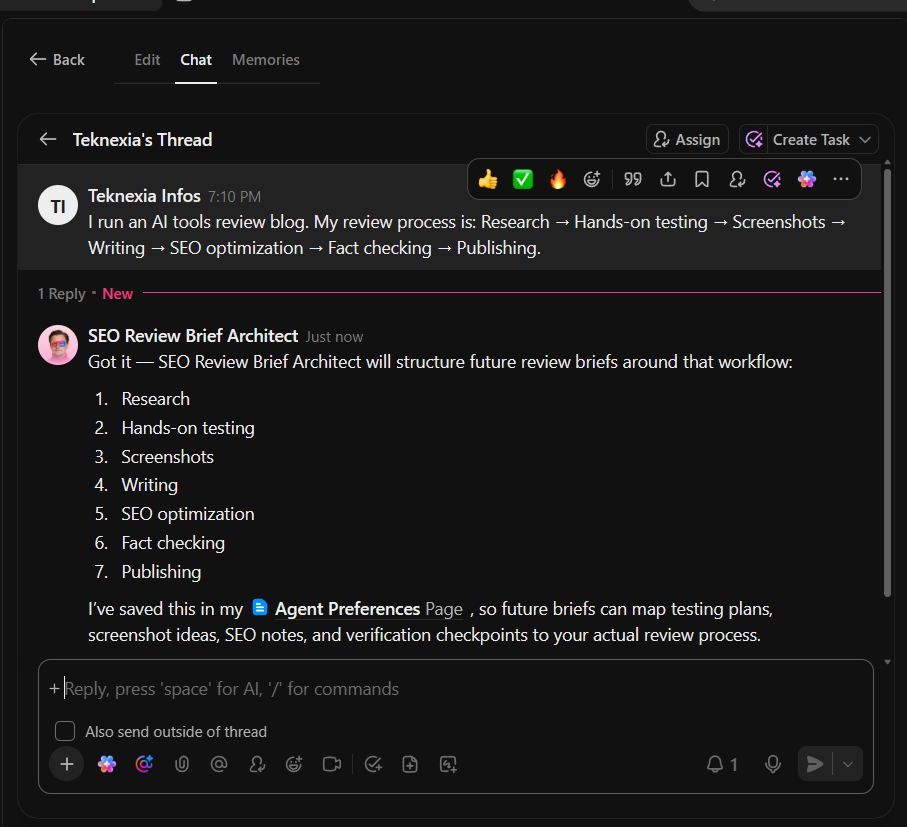
For the second test, we described our real editorial workflow (research, hands-on testing, screenshots, writing, SEO, fact-checking, publishing) and asked ClickUp Brain to suggest how ClickUp could organize and automate it for a solo blogger. It came back with a structured breakdown mapped to our actual steps and confirmed it had saved the workflow to an "Agent Preferences" page so future runs would stay consistent with it. Both tests point to the same conclusion: ClickUp Brain's output quality was genuinely good, contextual, and specific rather than generic.
What ClickUp Actually Is
ClickUp combines task management, docs, dashboards, calendars, automations, and team chat into a single, deeply customizable platform, with ClickUp Brain layered on top for AI chat, custom agents, and workspace automation. It's positioned for teams and agencies running complex, multi-person projects, with the flexibility to model almost any workflow through custom statuses, fields, and views.
Pricing, in Detail
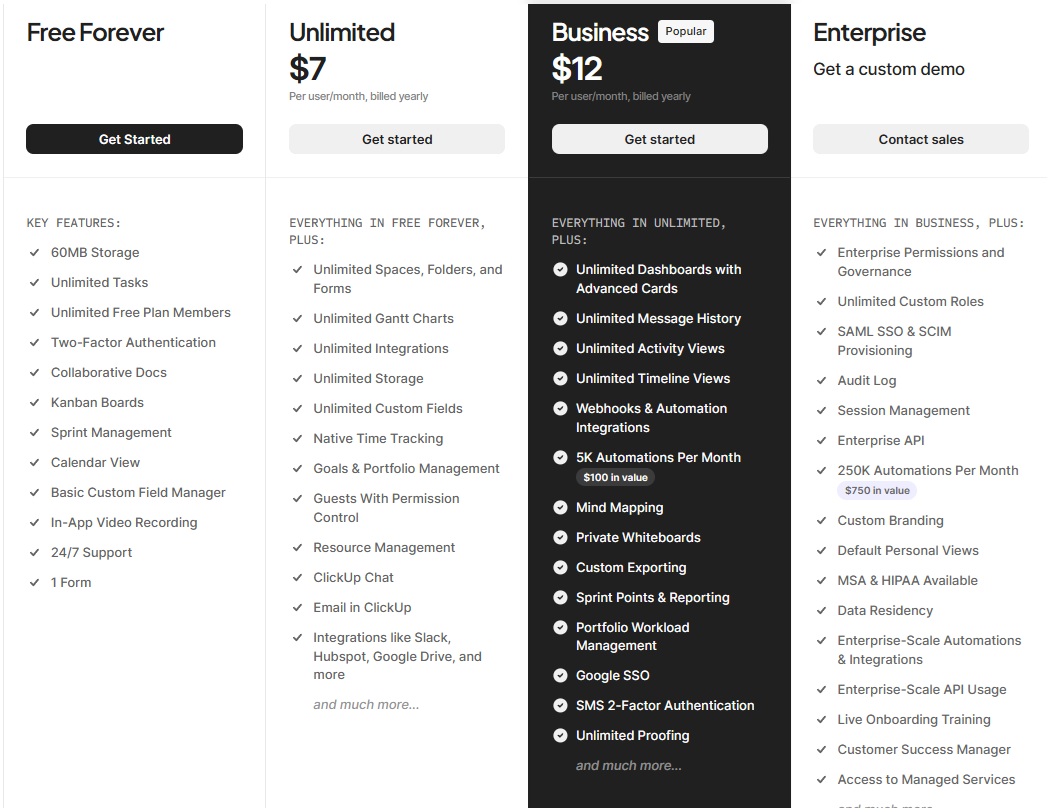
ClickUp's pricing, captured directly on our own account:
- Free Forever: $0, 60MB storage, unlimited tasks and free plan members, collaborative docs, Kanban boards, sprint management, and basic custom fields.
- Unlimited — $7/user/mo billed annually (or $10/mo billed monthly): unlimited storage, spaces, Gantt charts, integrations, and custom fields, plus goals and portfolio management.
- Business — $12/user/mo billed annually (or $19/mo billed monthly, ClickUp's "Popular" tier): unlimited dashboards, 5,000 automations a month, Google SSO, custom exporting, and sprint reporting.
- Enterprise: custom pricing, contact sales, adds enterprise permissions, SAML SSO, audit logs, and 250,000 automations a month.
Here's the part that matters most if AI is why you're considering ClickUp: none of those tiers include ClickUp Brain for free. It's a separate add-on on every plan, Brain AI at $7.20/user/month billed annually ($9/month billed monthly), or a broader "Everything AI" tier at $22.40/user/month billed annually ($28/month billed monthly). Budget for that separately, not as something bundled into your workspace plan.
What Other Users Say
ClickUp holds a 4.2 out of 5 on Trustpilot from roughly 695 reviews, confirmed by loading Trustpilot's page directly, with 61% of reviews at five stars. On G2, ClickUp scores higher overall (4.7/5 from over 11,500 reviews), but its "Ease of Setup" sub-score is notably lower at 8.2 out of 10, and "Learning Curve" is the second most-cited complaint in G2's own review breakdown. That pattern lines up closely with what we found testing it ourselves: strong functionality, genuine friction getting there. Recurring themes across these platforms include performance slowdowns in larger or more complex workspaces, features locked behind paid tiers, and the same learning-curve complaint we experienced directly, though several reviewers note it eases once the workspace is properly configured.
ClickUp vs Notion AI
ClickUp and Notion AI are the two most directly comparable tools in our AI Productivity category: both combine task and project organization with an AI layer, and both ask you to build your own structure rather than working out of the box. Where they diverge is depth versus simplicity. ClickUp goes deeper on dedicated project-management features, sprints, Gantt charts, portfolio views, automations, at the cost of a steeper learning curve. Notion AI stays closer to a flexible document-and-database model that's generally easier to pick up, per our separate testing, but doesn't match ClickUp's dedicated project-management depth.
| Criteria |  Notion AI Notion AI | ClickUp |
|---|---|---|
| Our framework score | 7.4/10 | 6.2/10 |
| Ease of use | 8/10 | 5/10 |
| Workflow integration | 9/10 | 9/10 (tied) |
| AI included free | ✗ Trial only until Business plan | ✗ Separate paid add-on on every tier |
| Best for | Teams already living in Notion who want AI on every page | Teams and agencies with complex, multi-person workflows |
Pros
- Genuinely centralizes tasks, docs, dashboards, automations, calendar, and communication in one place, cutting down on separate tools
- Extremely customizable: statuses, custom fields, views, and automations can adapt to almost any workflow
- Strong fit for complex, multi-person projects that would otherwise need several separate tools stitched together
- ClickUp Brain produced structured, specific, genuinely usable output on both tasks we tested, including building a reusable custom AI agent
Cons
- Real, significant learning curve; the sheer number of features and settings made even simple task management feel more complicated than it should in our test
- Interface can feel cluttered, with more menus, buttons, and options than a straightforward task needs
- ClickUp Brain is a separate paid add-on on every tier, not bundled, a real cost and complexity layer on top of workspace pricing
- A large share of ClickUp's functionality goes unused for a solo creator managing just a few projects, and getting real value out of it takes real setup time
FAQ
Is ClickUp hard to learn?
Based on our own test, yes, more than most productivity tools we've reviewed. The depth of features and settings is genuinely powerful, but it comes with a real setup time investment before the workspace feels efficient rather than overwhelming.
Is ClickUp Brain included in the free plan?
No. ClickUp Brain is a separate paid add-on on every workspace tier, including the free plan, priced at $7.20/user/month (billed annually) for Brain AI or $22.40/user/month for the broader Everything AI tier, confirmed directly on ClickUp's pricing page.
Is ClickUp good for a solo creator or freelancer?
It can work, but based on our testing, a lot of what makes ClickUp powerful (deep customization, team automations, multi-person workflows) goes unused for one person managing a handful of projects. Simpler tools may get you to a usable setup faster if you're working alone.
Is ClickUp better than Notion AI?
They're built for different depths of work. Per our separate testing, Notion AI is easier to pick up and better suited to teams already living in a flexible document-based workspace. ClickUp goes deeper on dedicated project-management features, which suits complex, multi-person workflows better, at the cost of a steeper learning curve.
Try ClickUp
ClickUp's Free Forever plan lets you explore the core platform before deciding whether the added complexity, and the separate cost of ClickUp Brain, are worth it for how you actually work.
Try ClickUp →