
Krea AI Review 2026: Real-Time Generation, Upscaling & Pricing
A Research-based look at Krea, an AI creative suite known for real-time image generation and upscaling. Worth knowing up front: the free plan does not include a commercial license, and upscaling is capped at 2K until you pay.


Quick Verdict
// Research-basedTeknexia AI Tool Evaluation Framework
This is a Research-based review. We did not use Krea ourselves. Every score below is judged on Krea's official pricing page, documentation, and press kit, and on aggregated Trustpilot reviews, not on hands-on use. Where a criterion such as ease of use would normally come from our own testing, it is assessed here from documentation, tutorials, and what user reports describe, and each description says what it rests on.
Overall: 7.0/ 10
Krea is a creative AI platform that brings image, video, 3D, and audio generation together with its own models. It is the eighth review in our AI Image Tools category, after Ideogram, Canva AI, Leonardo AI, Kittl, Midjourney, Adobe Firefly, and Recraft. Two features set it apart in that group: real-time generation and image upscaling. This review is built from named sources only; we have not used Krea ourselves.
Commercial use: Krea's pricing page lists a commercial license, allowing use in marketing, products, and client work, on paid plans; on the free plan, that line is marked as not included. If you plan to sell or deliver images to a client, use a paid plan.
- According to Krea's documentation, Realtime updates the image as you draw or type, with no queue and no render button.
- The free plan includes 100 compute units a day, full access to real-time models, and upscaling up to 2K, but no commercial license.
- Pro costs $35 a month, or $21 billed annually, for 20,000 units, and raises upscaling to 22K.
- Trustpilot shows 3.6/5 from 167 reviews, with 49% five-star and 33% one-star ratings.
What Krea Does, per Its Own Documentation
Krea's press kit describes it as a creative AI platform with more than 150 image, video, audio, and 3D models in one place, including its own foundation models. Its site lists models such as Krea 2, Krea 1, Nano Banana 2, GPT Image, Seedance, Kling, Veo 3.1, and Wan. Krea 2 is described as the company's first foundation image model built from scratch, and Krea Agent, launched on 10 September 2026, plans and produces creative work from a chat brief. Tools include image and video generation, editing, background removal, LoRA training for custom styles or characters, and a node-based workflow editor.
Real-Time Generation
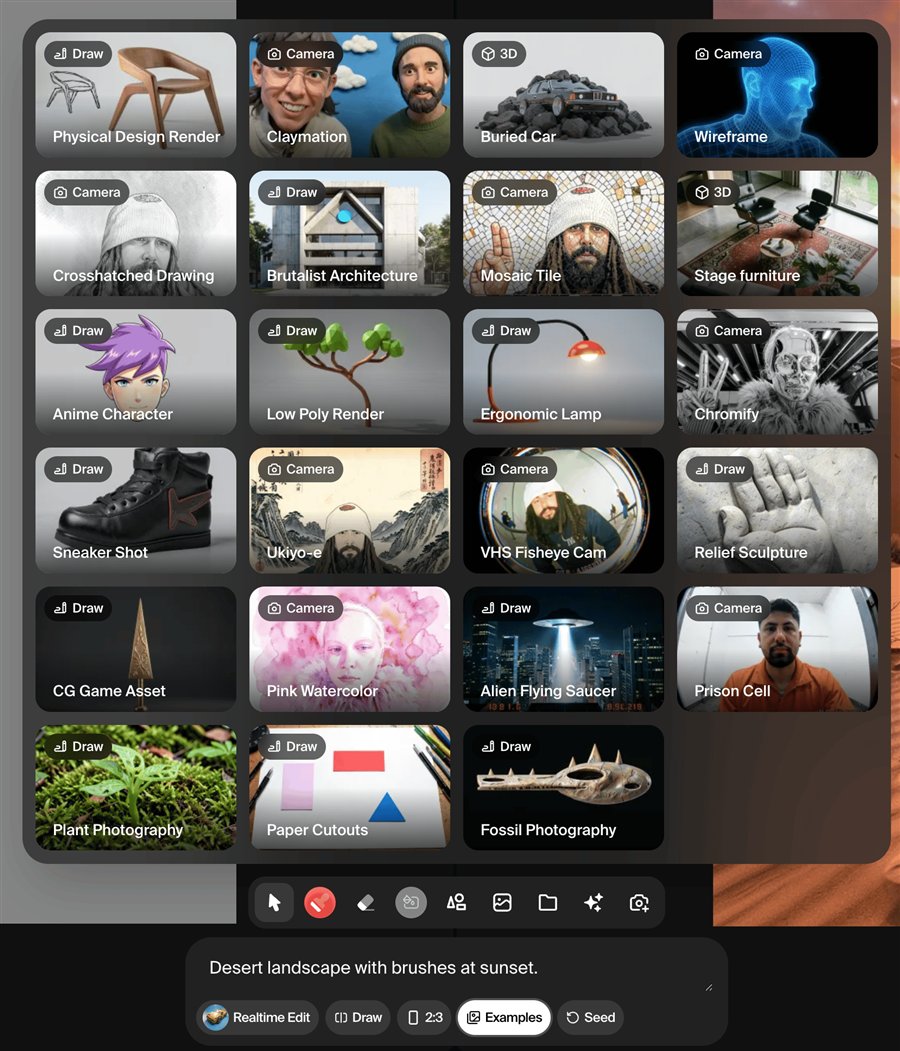
Krea's Realtime documentation describes a split-screen interface: you draw, type, or move elements on a canvas on the left, and the generated image on the right updates immediately, with no queue and no render button. Inputs can be drawing, a webcam feed, a shared browser tab, or text only. Fast models output 512-pixel images and quality models 1,024 pixels, in square or 3:2 and 2:3 formats, and results can then be upscaled. The documentation recommends Realtime for fast ideation and exploring composition, and the standard image generator for more deliberate, prompt-driven work. The image below is an official screenshot from Krea's documentation.
Upscaling and Enhancing Images
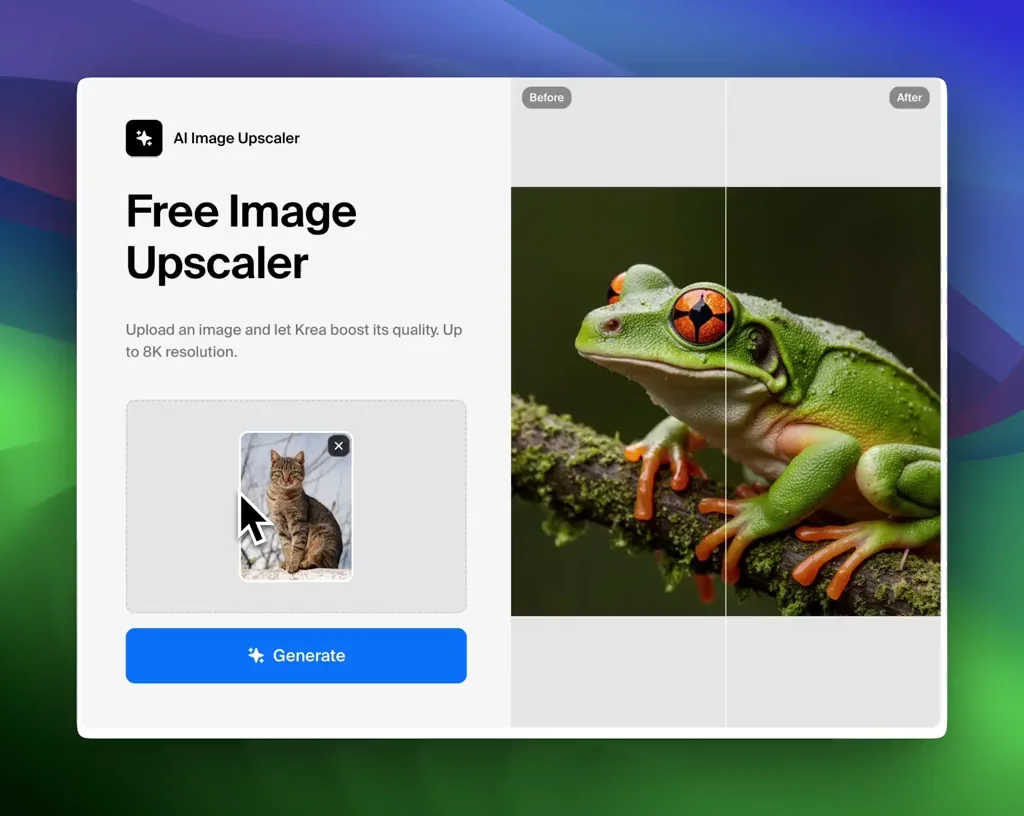
The Enhancer upscales and refines images and videos. Per its documentation, it offers 1x, 2x, 4x, and 8x factors; 1x sharpens an image without enlarging it. Several models are available, including Krea's own and Topaz models, with controls for strength, resemblance, sharpness, denoising, and face enhancement. The docs add a useful caveat: higher upscale factors give the AI more room to interpret and fill in detail, which can introduce subtle changes to textures and edges. On the free plan, the pricing page limits upscaling to 2K with basic models; paid plans add upscalers that output up to 22K.
Pricing, Compute Units, and the Free Plan
We read Krea's pricing page in a browser on 13 October 2026, in both monthly and annual views.
| Plan | Monthly | Billed annually | Units and limits |
|---|---|---|---|
| Free | $0 | $0 | 100 units/day · real-time models · upscaling up to 2K · no commercial license · not all models |
| Pro | $35 | $21/mo | 20,000 units/mo · all models · upscaling up to 22K · commercial license |
| Max | $105 | $63/mo | 60,000 units/mo, higher tiers available · larger LoRA training · more concurrency |
| Business | See pricing page | See pricing page | From 80,000 units/mo · up to 50 seats · business terms |
Krea charges in compute units, and each model costs a different amount, so the same allowance stretches much further on fast image models than on premium video models. Paid plans also include unlimited relaxed generations with supported in-house image models once units run out. Extra unit packs can be bought on top of a plan.
What Other Users Say
What Other Users Say
In a Research-based review, user reports are one of our main sources. According to user reports, Krea's strengths are its variety of models, an intuitive interface, and usefulness for professional work such as photography and interior design. The complaints cluster around money: prices seen as high, compute units used up quickly while experimenting, confusing sign-up offers, and several reviewers who could not find a cancel option or say they were charged after cancelling. Others report distorted results and content filters they find too strict. Trustpilot notes that Krea has not replied to negative reviews.
Sources: Trustpilot (retrieved 13 October 2026). We could not retrieve verified G2 or Capterra figures, so we do not cite them.
Krea vs Midjourney vs Leonardo AI
Midjourney is known for its image style, Leonardo AI for a broad creative toolkit with a free tier, and Krea for real-time generation and upscaling across many models. Leonardo AI was tested hands-on for our earlier review; Midjourney and Krea were assessed from research only.
| Criteria | Krea |
 Midjourney Midjourney |
 Leonardo AI Leonardo AI |
|---|---|---|---|
| Our framework score | 7.0/10 | 6.4/10 | 7.4/10 |
| How we assessed it | Research only | Research only | Hands-on test |
| Real-time generation | Yes, Realtime canvas | Not covered in our review | Not covered in our review |
| Free plan | 100 units/day, no commercial license | None | 150 fast tokens/day |
| Entry paid price | $35/mo ($21 billed annually) | $10/mo | $12/mo |
Pros
- Realtime canvas updates the image as you draw, type, or use a webcam
- Enhancer with 1x to 8x factors and several upscaling models
- More than 150 models plus Krea's own Krea 2, in one subscription
- Free plan with daily units and full access to real-time models
- Official press kit allows editorial use of its assets
Cons
- No commercial license on the free plan
- Free upscaling capped at 2K
- Units run out quickly on premium video models
- Higher upscale factors can alter textures and edges, per Krea's docs
- Billing and cancellation complaints on Trustpilot, with no company replies to negative reviews
FAQ
Can Krea upscale an image without visible loss on the free plan?
Only up to a point. The free plan allows upscaling up to 2K with basic upscalers, per the official pricing page. Krea's documentation also warns that higher upscale factors give the AI more room to fill in detail, which can subtly change textures and edges, so an upscale is never a pixel-perfect enlargement.
Can I use Krea images commercially on the free plan?
No. Krea's pricing page marks the commercial license as not included on the free plan; it is included on paid plans such as Pro and Max.
What is Krea real-time generation?
Per Krea's documentation, Realtime updates the generated image instantly as you draw, type, or move elements on a canvas, with no queue or render button. It can also use a webcam feed or a shared browser tab as input.
How much does Krea cost?
Per the official pricing page read on 13 October 2026, Pro costs $35 a month or $21 a month billed annually for 20,000 compute units, and Max costs $105 a month or $63 billed annually for 60,000 units. The free plan includes 100 units a day.
Is Krea better than Midjourney?
They suit different work. Krea offers real-time generation, upscaling, and many models in one place, while Midjourney focuses on its own image style and has no free plan. In our framework, Krea scored 7.0 and Midjourney 6.4, both from research.
Is this review based on hands-on testing?
No. It is Research-based, built from Krea's official pricing page, documentation, and press kit, plus Trustpilot reviews. We have not used Krea ourselves.
Final Verdict
Krea's distinctive feature is its Realtime canvas: per its documentation, the output updates as you draw, type, or move elements, with no render button, which makes it well suited to exploring compositions quickly. Its Enhancer upscales existing images with several models, and the platform bundles more than 150 image, video, audio, and 3D models with its own Krea 2 model. The free plan is generous for experimentation but carries no commercial license and caps upscaling at 2K, so client work requires a paid plan. Trustpilot reviews are polarized, with billing and cancellation complaints. Try Realtime for free, then pay only once you need commercial rights or larger upscales.
Check Krea's Current Pricing
Try Realtime on the free plan, and upgrade before using any image commercially.
See Krea pricing →