
Leonardo AI Review 2026: We Tested a Real Generation, Model by Model


Quick Verdict
// Hands-on testedTeknexia AI Tool Evaluation Framework
Scored against our site-wide 5-criteria framework, from our own hands-on generation on a real Leonardo AI account combined with Leonardo's public pricing page for the tiers we didn't test directly. This is the canonical score for Leonardo AI — it also appears on the AI Image category page, pulled live from this page.
Overall: 7.4/ 10
Leonardo AI is an AI image and video platform, owned by Canva since 2024, built around one idea: instead of locking users into a single house model, it gives them a large library of models to choose from for each generation. We tested that idea directly — one real prompt, submitted through the live app on an active free account — and checked it against Leonardo's own pricing page for the tiers and tools we didn't use ourselves. This review is labeled Hands-on tested for the parts we verified directly.
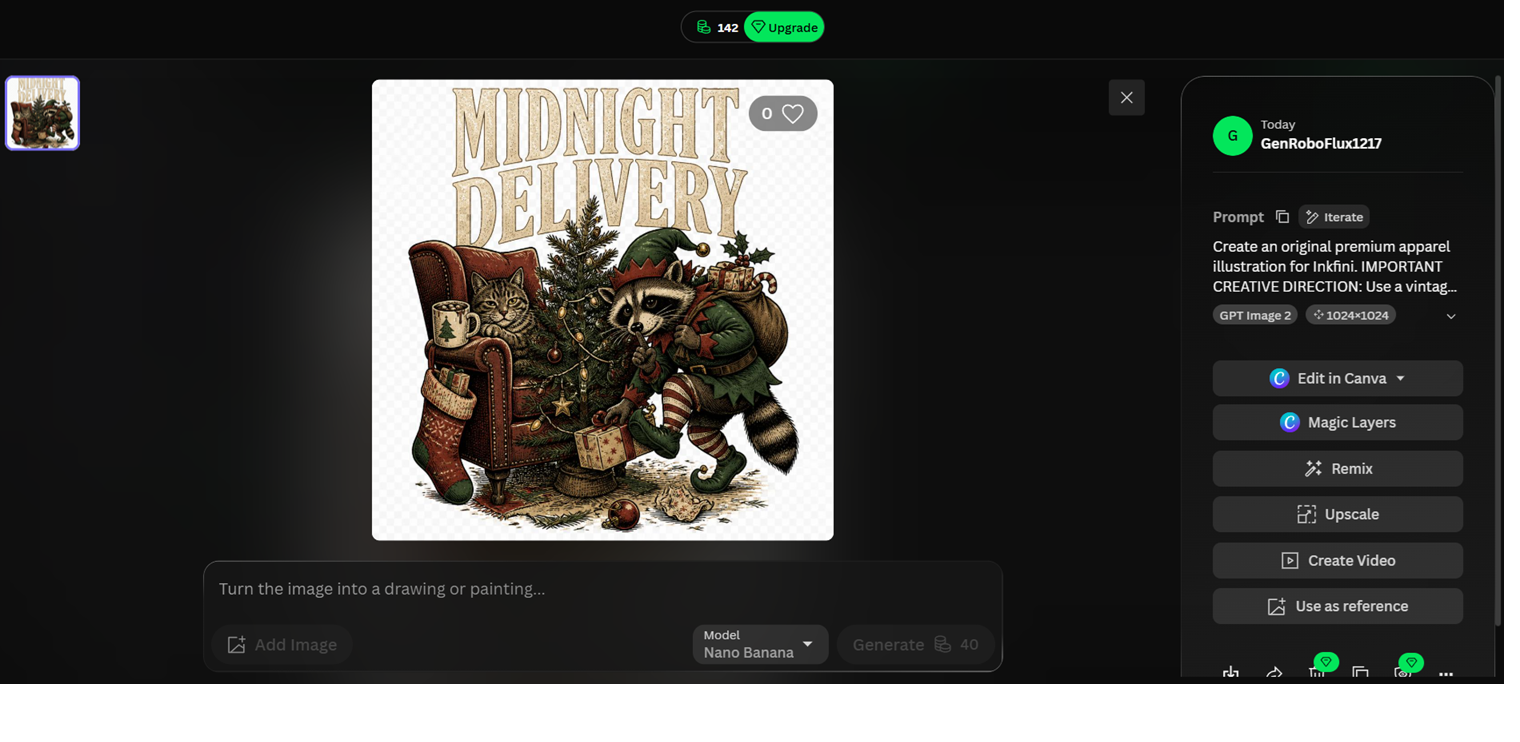
- Our own test generation, a vintage-style apparel illustration built with the GPT Image 2 model, finished in roughly 20 seconds and came back clean and on-brief (Teknexia Hub testing, August 2026).
- The free plan gives 150 fast tokens every day, not a one-time signup bonus — our account still showed 142 of 150 remaining after this generation.
- The post-generation panel (Edit in Canva, Magic Layers, Remix, Upscale, Create Video, Use as reference) was fully present and clickable on our test image, though we've only used the base generation ourselves so far.
- Output quality is real but model-dependent: the model we used suited this brief well, and we can't yet say that holds for every style or use case.
What We Tested, and What Happened
We ran this test on an active, free Leonardo AI account, the same starting point most new users would have. Instead of Leonardo's own Phoenix model, we picked GPT Image 2 from the model list, then wrote a plain-language brief for a premium apparel illustration in a vintage style, for a brand we labeled Inkfini in the prompt. We asked for a 1024×1024 image.
The generation finished in about 20 seconds. The result, which Leonardo's own interface titled "Midnight Delivery," was a clean, on-brief vintage illustration that matched the brief without needing a second attempt. Our account's fast-token balance read 142 out of the daily 150 afterward, confirming the free plan's tokens are real and usable, not just a number on a pricing page. The generation screen also showed a full row of post-generation options: Edit in Canva, Magic Layers, Remix, Upscale, Create Video, and Use as reference, all clickable on our result.

Our Test Protocol
These notes document what we did during testing — they are separate from the 5-criteria Teknexia AI Tool Evaluation Framework score in the Quick Verdict above, not a replacement or duplicate of it.
| Test | Prompt | Result | Note |
|---|---|---|---|
| Model selection & prompt-following | Premium vintage apparel illustration brief for a brand labeled Inkfini, using the GPT Image 2 model, 1024×1024 | Clean, on-brief vintage illustration, titled "Midnight Delivery" by the app, no re-prompt needed | On-brief on the first attempt |
| Generation speed | — (same submission) | Roughly 20 seconds | Fast this run |
| Free-tier token cost | — (same submission) | 142 of 150 daily fast tokens remaining afterward | Confirmed real, usable balance |
| Post-generation options | — (same submission) | Edit in Canva, Magic Layers, Remix, Upscale, Create Video, Use as reference all present and clickable | Present, not individually tested yet |
What we didn't test
One generation tells us Leonardo's core loop works and that its free tokens are real. It doesn't tell us how the platform holds up across a full project. We haven't yet tested Realtime Canvas, Magic Layers as an editing workflow rather than a visible button, the Edit in Canva handoff, video generation, character or style consistency across multiple prompts, or the paid tiers. For those, this review leans on Leonardo's own documentation and pricing page rather than our own use, flagged as such below, and we'll expand this review as we test more of the platform ourselves.
What Leonardo AI Actually Is
Leonardo AI is an AI image and video generation platform built around a large, switchable model library rather than one house model: its own Phoenix model sits alongside third-party and community options, including GPT Image 2, the model we used in testing (Leonardo.Ai, 2026). Past the initial generation, the interface offers a set of post-generation tools we saw directly on our own result — Edit in Canva, Magic Layers, Remix, Upscale, Create Video, and Use as reference — plus a Realtime Canvas feature that converts a live sketch into a rendered image as you draw, and a 3D texture generation tool, neither of which we've tested ourselves yet.
Canva acquired Leonardo AI in 2024, and the integration shows up directly in the product: the Essential plan we found on Leonardo's pricing page is bundled with Canva Business, and "Edit in Canva" sits as a one-click option right on the generation screen, which is exactly what we saw on our own test image. For a site that has also reviewed Canva AI directly, that overlap is worth knowing before assuming the two tools are unrelated.
Leonardo AI Pricing and the Free Plan, in Detail
We verified this pricing directly on Leonardo's own /pricing page, under its "Solo" (individual) tab, on 9 August 2026.
| Plan | Price | Fast tokens | Key limits |
|---|---|---|---|
| Free | $0/mo | 150/day | Public creations only · 1 personal collection · basic quality settings (confirmed hands-on) |
| Essential | $12/mo | 8,500/mo | Private creations · 10 personal AI models · 2 simultaneous generations · included with Canva Business |
| Premium | $30/mo | 25,000/mo | 20 personal AI models · 3 simultaneous generations · unlimited relaxed image generation on select models |
| Ultimate | $60/mo | 60,000/mo | 50 personal AI models · 6 simultaneous generations · unlimited relaxed image and video generation on select models |
The free plan, confirmed hands-on
Leonardo's free plan resets 150 fast tokens every day rather than handing out a single starting balance, and our test generation confirmed that allowance is real: the balance dropped from 150 to 142 after one image. That's a noticeably larger and more frequent free allowance than the other free-tier tool we've reviewed in this category, Ideogram, whose free plan gives roughly 10 to 12 credits per week. The trade-off on Leonardo's free tier, per its own terms rather than something we tested directly, is that free-tier creations default to public access; private generations require a paid plan.
What Users Report
We want to be upfront about a limitation here: Trustpilot's site returned an automated bot-detection challenge both times we tried to pull Leonardo's exact rating and review count directly, the same block we've run into reviewing other tools in this category. Several third-party sources report a rating in the 4.0 to 4.4 out of 5 range on roughly 1,200 reviews, and one site that specifically analyzed 100 of those reviews found close to 90% positive, with an unusually high share naming a specific support agent by name. Since we couldn't confirm those exact figures against Trustpilot's own page, we're reporting them as widely repeated third-party figures, not numbers we verified ourselves.
What we can report, cross-referenced across multiple independent reviews rather than pulled from one source, are recurring patterns:
- Recurring positives: a genuinely large free daily allowance, a wide model selection, and customer support that reviewers describe as fast and responsive — the support point in particular comes up often enough across sources that it looks like a real strength, not noise.
- Recurring complaints: output quality that some reviewers describe as inconsistent across the different models on offer, which lines up with what we found in our own test — the tool's strength is choice, which only pays off if you pick well.
What Other Users Say
Trustpilot blocked our own direct access with a bot-detection challenge, so we can't confirm the exact current figure ourselves. Independent third-party summaries converge on a strongly positive rating, with recurring praise for the free plan's generosity and, especially, customer support — several sources note reviewers naming individual support agents, which is unusual for this category.
Sourced from multiple third-party review aggregations (retrieved 9 August 2026); Trustpilot's own page could not be accessed directly.
Leonardo AI vs Ideogram
Both tools are reviewed here as Hands-on tested, so this comparison rests on two real generations rather than one tested tool against marketing copy. Ideogram's free tier runs on a weekly credit budget with a single default model; Leonardo's runs on a daily token budget across a whole library of switchable models, including the one we used, GPT Image 2.
| Criteria | Leonardo AI | Ideogram |
|---|---|---|
| Free plan | 150 fast tokens/day, confirmed hands-on | ~10-12 credits/week, confirmed hands-on in our Ideogram review |
| Entry paid price | $12/mo (Essential) | $15/mo (Plus, billed annually) |
| Model choice | Large switchable library (Phoenix, GPT Image 2, and others), confirmed hands-on | Single default model per generation |
| Generation speed in our test | ~20 seconds | Under a minute |
| In-image text rendering | Not our test's focus; not independently verified by us on either tool | Widely reported as a core strength |
| Review method here | Hands-on tested | Hands-on tested |
Pros & Cons of Leonardo AI (2026)
Pros
- 150 fast tokens every day on the free plan, confirmed in our own test account, not just a signup bonus
- Wide, switchable model library, including GPT Image 2 alongside Leonardo's own Phoenix model
- Our test generation finished in about 20 seconds and matched the brief without a re-prompt
- A full post-generation toolset (Edit in Canva, Magic Layers, Remix, Upscale, Create Video, Use as reference) was present and clickable on our result
- Direct Canva integration is real, not just marketing — the Essential plan is bundled with Canva Business
Cons
- Output quality is model-dependent, not universal — our test used GPT Image 2, and the right model for a different job (photorealism, text-heavy design, illustration) may be a different pick entirely, which adds a real decision step for new users
- Free-tier creations default to public access; keeping generations private requires a paid plan, per Leonardo's own terms
- We've only tested one generation and the base toolset ourselves — Realtime Canvas, Magic Layers as a workflow, video generation, and the paid tiers are still unverified by us directly
- Pricing has a yearly/monthly toggle we couldn't fully resolve from a single page load; confirm the current monthly rate before subscribing
- We could not independently verify Leonardo's Trustpilot rating; Trustpilot blocked our direct access both times we tried
Frequently Asked Questions
Does Leonardo AI have a free plan?
What model did you test, and how did it perform?
Is Leonardo AI's output quality consistent?
Is Leonardo AI owned by Canva?
Our Leonardo AI Review Verdict
Leonardo AI's pitch is choice, and our test backs that up more than it undercuts it. A single prompt through GPT Image 2, one of several models on offer, produced a clean, on-brief vintage apparel illustration in about 20 seconds, and the free plan behind it is genuinely generous: 150 fast tokens every day, not a one-time trial balance, confirmed by watching our own account drop from 150 to 142 after that generation. The honest catch, which our own test surfaced rather than a spec sheet: a large model library only pays off if you pick the right model for the job, so output quality reads as good but not automatically consistent across every use case. We haven't yet tested Realtime Canvas, Magic Layers as a full workflow, video generation, or any of the paid tiers ourselves, so treat those parts of this review as resting on Leonardo's own documentation until we do. For a creator who wants a large daily free allowance and is willing to spend a little time learning which model fits which brief, our hands-on test points toward Leonardo AI being worth the free tier at minimum. This verdict is Hands-on tested for the parts we verified directly; we'll expand it as we test more of the platform.