
Wordtune Review 2026: Free Rewrites, Pricing & Verdict
A Research-based look at Wordtune, an AI rewriting tool from AI21 Labs. Worth knowing up front: the free plan allows 10 rewrites a day, and AI21 has reportedly stopped developing Wordtune, though it is still on sale.


Quick Verdict
// Research-basedTeknexia AI Tool Evaluation Framework
This is a Research-based review. We did not use Wordtune ourselves. Every score below is judged on Wordtune's official plans page, homepage, and help center, on aggregated Trustpilot reviews, and on business reporting by Calcalist and Globes about its owner, AI21 Labs, not on hands-on use. Where a criterion such as ease of use would normally come from our own testing, it is assessed here from documentation, tutorials, and what user reports describe, and each description says what it rests on.
Overall: 6.6/ 10
Wordtune is an AI writing assistant from AI21 Labs that suggests new ways to phrase the sentences you have already written. It also summarizes documents, checks grammar, and can generate short texts. It is the seventh review in our AI Writing category, after Jasper, Copy.ai, Grammarly, QuillBot, Writesonic, and Rytr. This review is built from named sources only; we have not used Wordtune ourselves.
Development status: On 9 April 2026, Calcalist reported that AI21 Labs had discontinued development of its consumer product, Wordtune, to focus on its Maestro enterprise platform. On 18 May 2026, Globes reported that AI21 was laying off 110 of its 180 employees. Wordtune is still on sale and its plans page shows no notice about its status. We have seen no announcement that the service will close, but new features are unlikely.
- According to the official plans page, the free plan includes 10 rewrites and AI suggestions per day and 3 AI summaries per month.
- Paid plans cost $13.99 or $19.99 a month, or half that billed annually; the plans page says Wordtune does not offer refunds.
- Wordtune writes only in English, but translates into English from 10 languages, per its homepage.
- Trustpilot shows 4.2/5 from 581 reviews; the one-star reviews focus on renewals that users say they could not cancel.
What Wordtune Does, per Its Own Documentation
Per the homepage, Wordtune offers rewriting with context-based alternatives, tone adjustments, a paraphrasing tool, a grammar checker, a summarizer for documents and links, AI writing, and a tool to make AI-generated text sound more natural. The help center notes that summarizing is done in the web editor, while the browser extension focuses on writing. The image below is Wordtune's own promotional visual of rewrite suggestions.

How Many Free Rewrites per Day?
The free Basic plan allows 10 rewrites and AI suggestions per day, according to the official plans page read on 9 October 2026, plus 3 AI summaries per month and unlimited spelling and grammar checks. Ten rewrites go quickly if you rework a whole email sentence by sentence, so the free plan suits occasional use. The Advanced plan raises the limit to 30 rewrites a day and 15 summaries a month; Unlimited removes both caps.
Pricing, Verified on the Official Page
| Plan | Monthly | Billed annually | Limits |
|---|---|---|---|
| Basic | Free | Free | 10 rewrites and AI suggestions per day · 3 summaries per month |
| Advanced | $13.99 | $6.99/mo | 30 rewrites per day · 15 summaries per month |
| Unlimited | $19.99 | $9.99/mo | Unlimited rewrites and summaries · premium support |
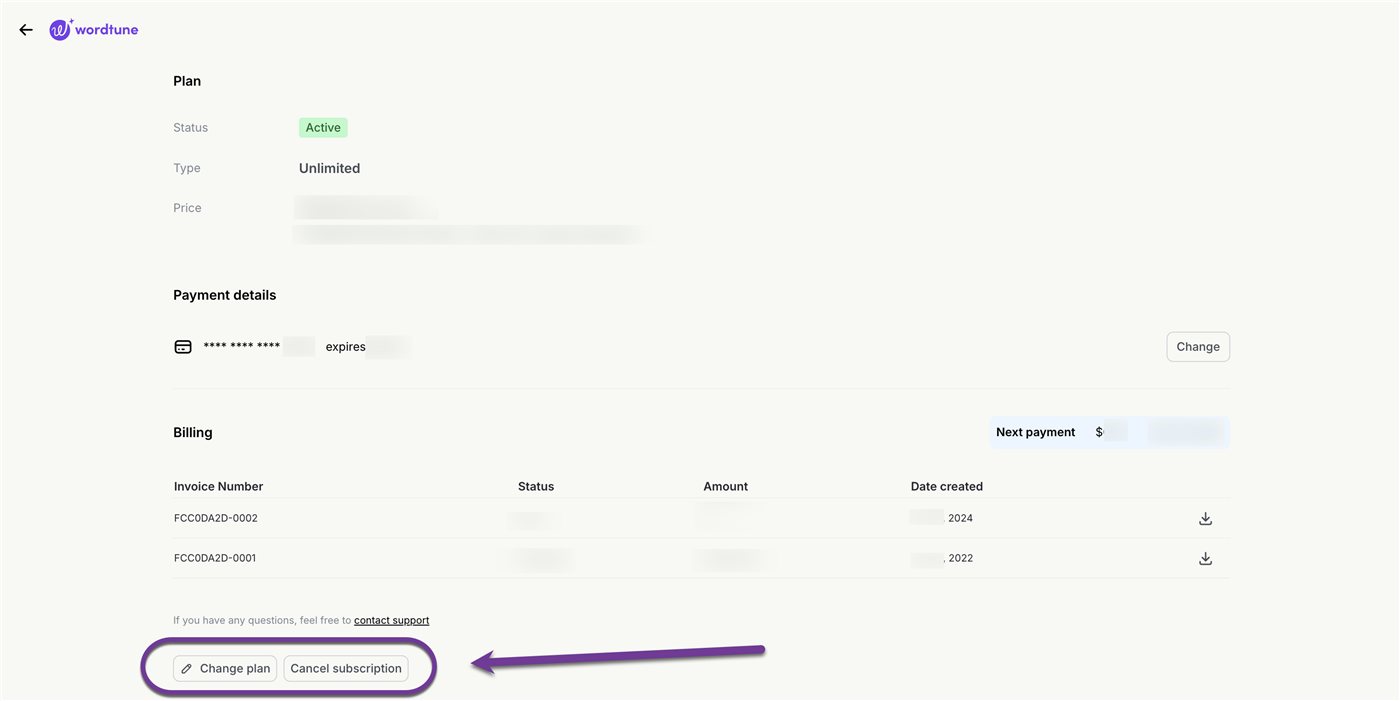
The plans page states plainly that Wordtune does not offer refunds; you must cancel before the next billing cycle or before the trial ends. Per the help center, removing the browser extension does not cancel a subscription: you cancel from the Account page, under Manage plan. At $6.99 a month, the annual Advanced plan is billed as $83.88 a year, the amount several Trustpilot reviewers say they were charged on renewal.
Integrations and Languages
Per the help center, Wordtune is available as a web app, as browser extensions for Chrome, Edge, Firefox, and Arc, and as an iPhone app with a keyboard that works in most writing apps. Android is not supported, there is no Safari extension, and the Mac desktop app beta has been discontinued. In Google Docs, the extension works only when a document uses “Pages” rather than “Pageless” layout.
On languages, the homepage says Wordtune can only write in English. It can translate text into English from Spanish, Mandarin, Arabic, Hindi, Korean, Hebrew, Russian, German, French, and Portuguese. If you write in another language, Wordtune is not the right tool.
What Other Users Say, Including Subscription Complaints
What Other Users Say
In a Research-based review, user reports are one of our main sources. According to user reports, Wordtune is a daily tool for many reviewers, who praise the Rewrite feature for improving phrasing and clarity while keeping their meaning, and some mention helpful support. The one-star reviews from 2025 and 2026 tell a different story: users say they could not find how to cancel, were charged annual renewals of around $83.88 or more, were billed after cancelling, or were refused refunds. A September 2026 reviewer reports that the iPhone app's AI writing feature stopped working on three devices. Trustpilot notes that Wordtune invites its customers to leave reviews, which can raise the share of positive ratings.
Sources: Trustpilot (retrieved 9 October 2026). We could not retrieve verified G2 or Capterra figures, so we do not cite them.
Wordtune vs QuillBot vs Grammarly
All three tools improve text you have already written. QuillBot and Grammarly were tested hands-on for our earlier reviews; Wordtune was assessed from research only.
| Criteria | Wordtune |
 QuillBot QuillBot |
 Grammarly Grammarly |
|---|---|---|---|
| Our framework score | 6.6/10 | 7.2/10 | 6.2/10 |
| How we assessed it | Research only | Hands-on test | Hands-on test |
| Free plan | 10 rewrites per day | Limited modes and a word cap per rephrase | Grammar checks plus 100 AI prompts per month |
| Entry paid price, billed annually | $6.99/mo | $8.33/mo | $12/mo |
| Entry paid price, monthly | $13.99 | $19.95 | $30 |
| Active development | Reported discontinued in April 2026 | Yes | Yes |
Pros
- Free plan with 10 rewrites a day and unlimited grammar checks, no card required
- Low annual pricing: $6.99 a month for Advanced
- Rewrites praised by users for keeping their meaning and tone
- Translates into English from 10 languages
- Works in Chrome, Edge, Firefox, Arc, and on iPhone
Cons
- AI21 reportedly stopped developing Wordtune in 2026
- Writes only in English
- No refunds, and cancellation complaints are frequent on Trustpilot
- No Android app, no Safari extension, no Mac desktop app
- Monthly prices are double the annual rate
FAQ
How many free rewrites does Wordtune give you per day?
According to the official plans page, read on 9 October 2026, the free Basic plan includes 10 rewrites and AI suggestions per day, plus 3 AI summaries per month and unlimited spelling and grammar checks. Advanced raises the limit to 30 rewrites a day, and Unlimited removes it.
Is Wordtune still being developed?
Calcalist reported on 9 April 2026 that AI21 Labs had discontinued development of Wordtune to focus on enterprise products. The service is still on sale, and we have seen no announcement that it will shut down.
How do I cancel a Wordtune subscription?
Per Wordtune's help center, open the Account page from your profile icon, click Manage plan, and use the Cancel subscription button in the Billing section. Removing the browser extension does not cancel the subscription, and the plans page says Wordtune does not offer refunds.
Does Wordtune work in languages other than English?
Only for translation. Per the homepage, Wordtune writes only in English but can translate into English from 10 languages, including Spanish, French, German, and Arabic.
Does Wordtune work with Google Docs?
Yes, through the browser extension, but per the help center only when the document uses Pages layout rather than Pageless.
Is this review based on hands-on testing?
No. It is Research-based, built from Wordtune's official plans page, homepage, and help center, plus Trustpilot reviews and reporting by Calcalist and Globes. We have not used Wordtune ourselves.
Check Wordtune's Current Plans
Start with the free 10 daily rewrites, and if you take a trial, note the date so you can cancel before you are billed.
See Wordtune plans →