
Riverside Review 2026: Is It Worth It for Podcasters?
A Research-based look at Riverside's recording studio, AI editing, and pricing. Worth knowing up front: there is no free plan, and the 14-day free trial requires a credit card.


Quick Verdict
// Research-basedTeknexia AI Tool Evaluation Framework
This is a Research-based review. We did not use Riverside ourselves. We chose not to start the trial because Riverside's own help center says a credit card is required, and we did not want to enter payment details just to produce a review. Every score below is judged on Riverside's official pricing page, help center and blog, and on aggregated Trustpilot reviews, not on hands-on use. Where a criterion such as ease of use would normally come from our own testing, it is assessed from documentation and reviewer reports, and the descriptions say so.
Overall: 7.0/ 10
Riverside is a browser-based studio for recording podcasts and video interviews with remote guests, with AI editing, clipping, and publishing built on top. It is the sixth review in our AI Video category, after Descript, Opus Clip, Higgsfield, Runway, and HeyGen. Riverside's own site describes the company as formerly Riverside.fm, and it now lives at riverside.com. This review is built from named sources only, and we have not recorded or edited anything with it.
Read this before you start a trial: Riverside has no free plan. Its help center says the 14-day Pro trial requires a credit card to begin: you are not charged until the trial ends, but your card is on file from day one. That card requirement is the reason this review is Research-based instead of hands-on, and it is worth knowing about if you plan to test Riverside yourself.
- According to Riverside's help center, the free trial requires a credit card. You are not charged until the 14 days end, and you can cancel anytime.
- Riverside's own blog says it no longer offers a free plan, only the 14-day trial (page updated 10 September 2026).
- Paid plans start at $29 a month, or $24 a month billed annually, per the official pricing page.
- Trustpilot shows 3.7/5 from 503 reviews: reviewers praise the platform and recording quality, while some report failed recordings and trouble cancelling.
The Free Trial and the Credit Card
Riverside's help center article "Can I try Riverside Pro for free?" states that you can start a free 14-day trial of Pro, that you need a credit card to begin, that you will not be charged until the trial ends, and that you can cancel anytime. Its signup steps are: create an account, choose a monthly or yearly plan type, enter card details, and the Pro account is free for 14 days. A second help article says the same about card details being required to start the trial.
Riverside's own blog post on the topic, updated 10 September 2026, adds that the company no longer offers a free plan and that you can trial Pro, Grow, or Webinar, after which the account converts to a paid subscription unless cancelled. That matters for one practical reason: the trial converts on its own. If you try it, set a reminder to cancel before day 14.
Some Trustpilot reviewers describe unexpected charges and difficulty cancelling. Those are individual reports that we cannot verify, and the help center says cancellation is possible at any time, so read the refund and cancellation policy before you enter a card.
What Riverside Is, per Its Own Documentation
Riverside's About page says it makes it easy to record remote podcasts and video interviews that look and sound studio-grade, and that it was founded in 2020. According to Riverside's blog, it records each participant locally on their own device and uploads the tracks automatically to the cloud during the session, so a weak connection should not degrade the recording itself. That is Riverside's own description, and we have not tested it. The two images below are Riverside's own product visuals, not our captures.
On the editing side, the official pricing page lists unlimited text-based editing, an AI editing and repurposing agent, AI B-roll, eye contact correction, silence and filler-word removal, unlimited transcriptions, Magic Clips and show notes, and audio enhancement. Riverside's FAQ says core AI features such as Magic Clips, Magic Audio, and the Co-Creator do not require AI credits, while features such as AI translation, AI B-roll, and animated clips do. Pro users start with 2,000 free credits, and more can be purchased.
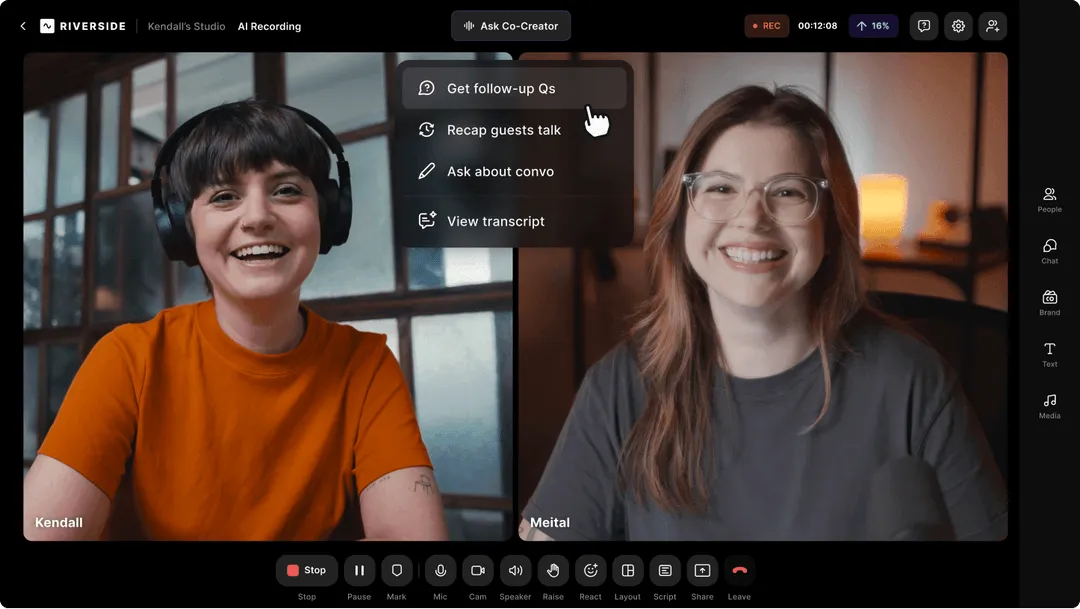
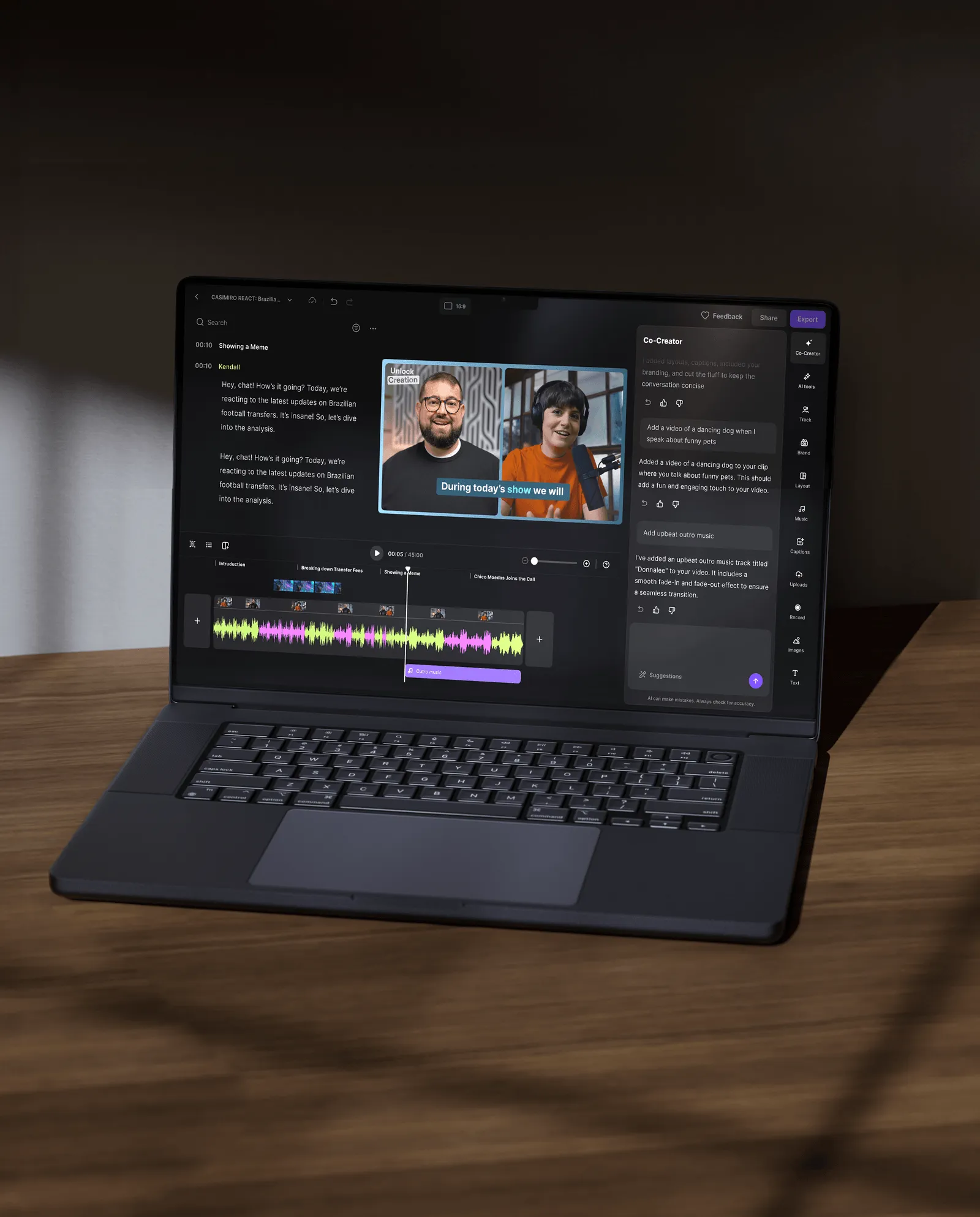
Beyond recording and editing, Riverside lists podcast hosting, publishing to YouTube, Spotify, Apple, Instagram, and LinkedIn, and, on Grow and above, live streaming, a creator website, newsletters, and an MCP connection to AI assistants such as Claude and ChatGPT.
Pricing, Verified on the Official Page
We read Riverside's official pricing page in a browser on 21 September 2026. It headlines a free trial and lists four plans, with up to 20% off for yearly billing.
| Plan | Monthly | Yearly | Highlights |
|---|---|---|---|
| Pro | $29/mo | $24/mo | Up to 4K video, 48kHz audio, no watermark, text-based editing, AI editing agent, Magic Clips, podcast hosting, 1 studio, 15 hours of separate-track downloads |
| Grow | $39/mo | $34/mo | Everything in Pro, plus live streaming (1080p), multistreaming, social scheduling, newsletter, creator website, MCP, 2 studios, 20 hours of downloads |
| Webinar | $99/mo | $79/mo | Everything in Grow, plus webinars with up to 100 registrants, lead capture, HubSpot sync, 3 studios, 25 hours of downloads |
| Business | Contact sales | Contact sales | Unlimited studios and downloads, collaborative editing, API access, SSO, SOC2 and ISO27001 compliance |
What Other Users Say
What Other Users Say
In a Research-based review this section carries extra weight, because reviewer experience is one of our main sources. Trustpilot's summary of recent reviews describes the platform as intuitive and the recording features as high quality, and reviewers also praise the automated transcripts and AI tools. The mixed side is customer service and reliability: some reviewers describe recordings that did not save as expected, and others report unexpected charges or trouble cancelling and getting refunds. Trustpilot notes the company has not replied to negative reviews, and it does not fact-check the reviews it shows, so treat individual complaints as reports, not established facts.
Source: Trustpilot (retrieved 21 September 2026). We could not verify current G2 or Capterra figures, so we do not cite them.
Riverside vs Descript
Both tools let you edit podcast and video content from a transcript, but they start from different places. Riverside's core is recording remote guests, with editing built in. Descript, which we tested hands-on in July 2026, is centered on editing. The Descript column below uses our published review, and the Riverside column uses the sources above, so the methods differ.
| Criteria |  Descript Descript |
Riverside |
|---|---|---|
| Our framework score | 7.6/10 | 7.0/10 |
| How we assessed it | Hands-on test | Research only: official pages and Trustpilot |
| Free plan | Yes, including 1 hour of transcription per month | No. 14-day trial, credit card required |
| Entry paid price | $12/mo (Hobbyist) | $29/mo, or $24/mo billed annually (Pro) |
| Core focus | Script-first editing of audio and video | Recording remote guests locally, plus editing and publishing |
| Live streaming and webinars | Not covered in our review | Yes, on Grow and Webinar plans |
| Trustpilot | 2.9/5 from 271 reviews (as published in our review) | 3.7/5 from 503 reviews (retrieved 21 September 2026) |
| Best for | Script-first solo creators | Creators who record remote interviews and want one platform |
Pros
- Recording, text-based editing, AI editing, clips, and publishing in one platform, per the official plan page
- Up to 4K video and 48kHz audio with no watermark on paid plans, per Riverside
- Local per-participant recording is described by Riverside as protecting quality from connection problems
- Trustpilot reviewers praise ease of use and recording quality
- Core AI features like Magic Clips do not require AI credits, per Riverside's FAQ
Cons
- No free plan, and the 14-day trial requires a credit card up front
- Some Trustpilot reviewers report failed recordings, unexpected charges, or trouble cancelling
- Separate-track downloads are capped per plan (15, 20, or 25 hours), per the pricing FAQ
- Some AI features (translation, B-roll, animated clips) draw on AI credits
- Higher entry price than Descript's paid tier ($24 to $29 vs $12 a month)
FAQ
Does Riverside require a credit card for the free trial?
Yes, according to Riverside's help center: you need a credit card to begin the 14-day trial, but you are not charged until the trial ends, and you can cancel anytime.
Does Riverside have a free plan?
According to Riverside's own blog (updated 10 September 2026), no. It offers a 14-day free trial of Pro, Grow, or Webinar instead. Its pricing page lists paid plans only.
How much does Riverside cost?
Per the official pricing page read on 21 September 2026: Pro $29/mo ($24/mo billed annually), Grow $39/mo ($34), Webinar $99/mo ($79), and Business through sales.
Is this review based on hands-on testing?
No. It is Research-based: built from Riverside's official pricing page, help center, and blog, plus Trustpilot's aggregated reviews. We did not start a trial because a credit card is required, and we have not recorded or edited with Riverside.
Is Riverside better than Descript?
They overlap in transcript-based editing but start from different places: Riverside from recording remote guests, Descript from editing. Descript scores slightly higher in our reviews (7.6 vs 7.0), but the two scores rest on different methods.
Check Riverside's Current Pricing
If you decide to try it, note the card requirement and the day-14 conversion, and read the cancellation policy first.
See Riverside pricing →