
Pictory Review 2026: Blog to Video, Pricing & Limits
A Research-based look at Pictory, which turns articles, scripts, and long videos into short videos. Worth knowing up front: free-trial downloads carry a Pictory watermark, and paid plans are non-refundable.


Quick Verdict
// Research-basedTeknexia AI Tool Evaluation Framework
This is a Research-based review. We did not use Pictory ourselves. Every score below is judged on Pictory's official pricing page, help center, and terms of service, and on aggregated Trustpilot reviews, not on hands-on use. Where a criterion such as ease of use would normally come from our own testing, it is assessed here from documentation, tutorials, and what user reports describe, and each description says what it rests on.
Overall: 7.0/ 10
Pictory is an AI video tool that turns written content and long recordings into short videos with stock footage, captions, and voice-over. It is the ninth review in our AI Video Tools category, after Descript, Opus Clip, Higgsfield AI, Runway, HeyGen, Riverside, InVideo AI, and Synthesia. Its focus is repurposing content you already have, which makes it particularly relevant for bloggers. This review is built from named sources only; we have not used Pictory ourselves.
Stock footage rights: Pictory's terms let you use its licensed stock footage only inside the videos you create with the service. You may not use those clips on their own, in print, or in templates. Pictory's terms also state that all fees are non-refundable. This is a summary, not legal advice.
- According to Pictory's help center, you can paste a blog or web page URL and have Pictory generate a video script, then a video, from it.
- The free trial needs no credit card, but its downloads carry a Pictory watermark, and videos are limited to 5 minutes at 720p.
- Starter costs $29 a month or $25 billed annually for 200 video minutes a month; Professional costs $59, or $35 billed annually as a special offer.
- Trustpilot shows 4.2/5 from 665 reviews, with Pictory replying to every negative review.
What Pictory Does, per Its Own Documentation
Pictory's homepage lists its inputs: text, scripts, blog articles and URLs, PowerPoint files, images, audio, screen recordings, and existing videos. From these it builds videos with automatic scene creation, captions, AI voices, and templates. For long recordings such as webinars, its feature list includes editing video by text and generating highlights. Every plan supports landscape, portrait, and square formats, so one piece of content can be resized for different platforms.
Turning a Blog Article Into a Video
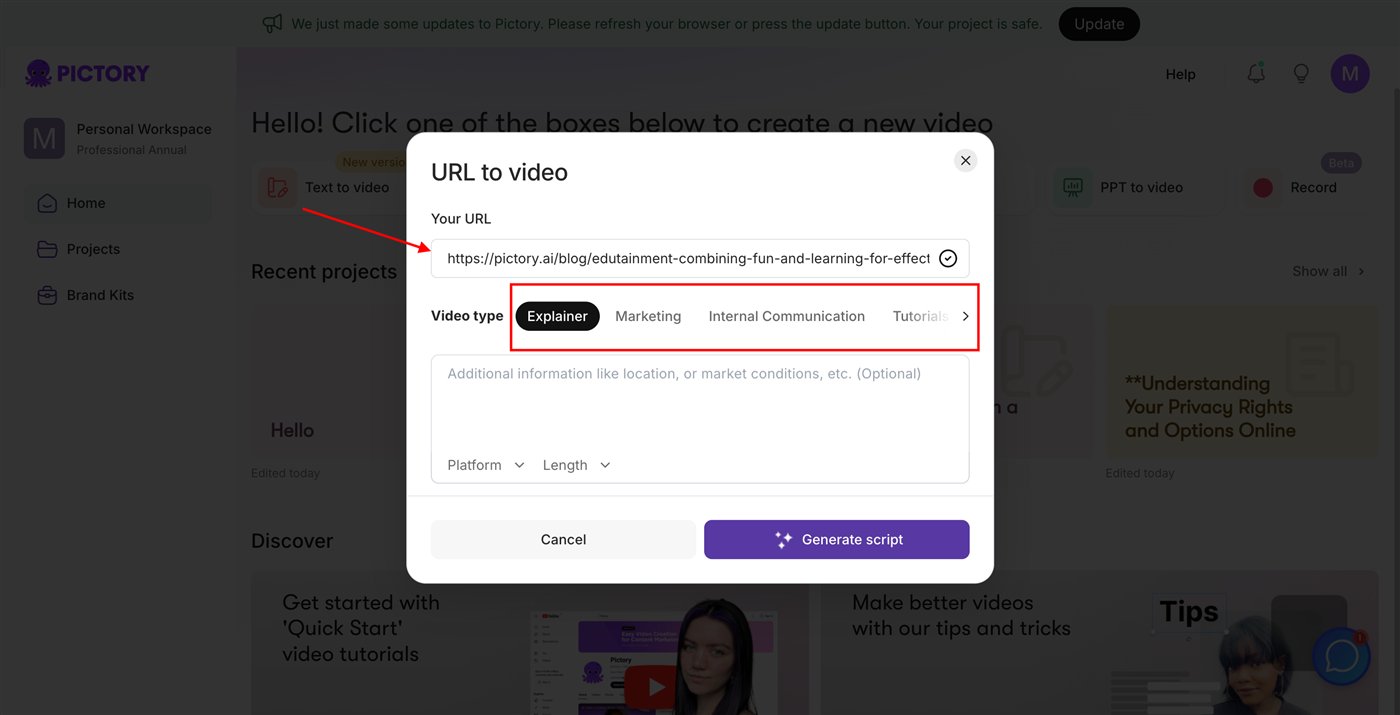
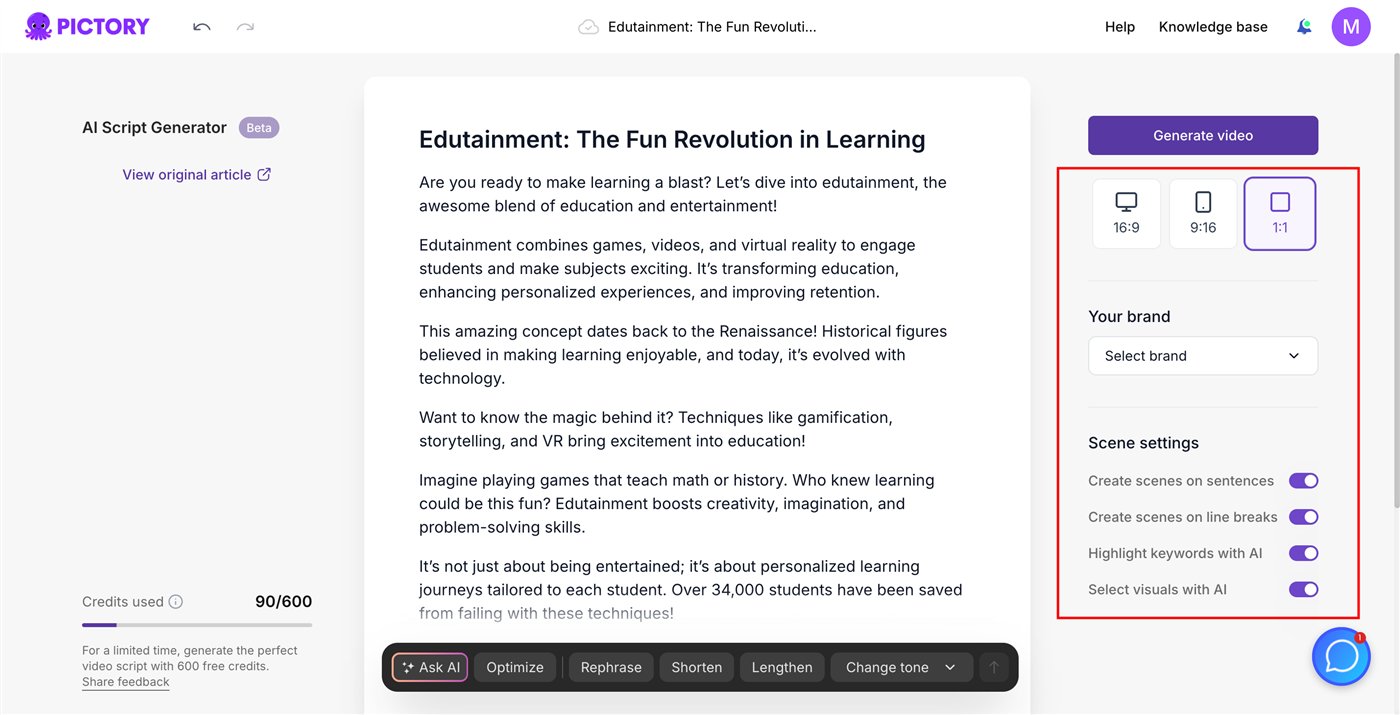
Pictory's help center describes the URL to Video flow step by step. You click URL to video, paste the page address, choose a video type such as explainer or marketing, and optionally add instructions, a platform, and a target length. Pictory then summarizes the page into a script that you can refine with an AI bar offering options to rephrase, shorten, lengthen, or change the tone. Finally, you choose the aspect ratio, brand kit, and scene settings, and generate the video as an editable storyboard. The two images below are official screenshots from that help article.
Pricing, Minutes, and the Free Trial
We read Pictory's pricing page in a browser on 14 October 2026, in both annual and monthly views.
| Plan | Monthly | Billed annually | Video and limits |
|---|---|---|---|
| Free trial | $0 | $0 | 15 video minutes · videos up to 5 min · 720p · watermarked downloads |
| Starter | $29 | $25/mo | 200 video min/mo · 1080p · 1 brand kit · no watermark |
| Professional | $59 | $35/mo (special offer) | 600 video min/mo · 5 brand kits · voice cloning · custom avatars |
| Team | $199 | $119/mo | 1,800 video min/mo · 3+ users · shared workspace |
On the free trial, Pictory's help center is explicit: videos downloaded during the trial carry the Pictory watermark, and subscribing does not remove it from files already downloaded; you need to download them again on a paid plan. Pictory's terms state that all fees are non-refundable, including for partial periods or unused services; cancelling stops the next renewal.
Stock Footage and Voices
The pricing page lists stock videos from Getty Images and Storyblocks, with the larger library on Professional and above, plus premium music tracks. Pictory's terms limit how that material can be used: only together with your own content and the service's features, never on its own, in print, or in electronic templates.
For voice-over, the pricing page lists ElevenLabs AI voices in 29 languages, with a monthly allowance by plan, plus voice cloning from Professional. We could not find enough verified user reports specifically about voice quality to summarize them fairly, so test a short script during the trial before relying on it.
What Other Users Say
What Other Users Say
In a Research-based review, user reports are one of our main sources. According to user reports, Pictory is easy to use, including for beginners turning scripts and blog posts into videos, and many reviewers praise its onboarding sessions and support staff. Complaints in 2026 include a cancellation request that did not register and left auto-billing on, and an unexplained account cancellation. Trustpilot notes that Pictory invites its customers to review, which can raise the share of positive ratings.
Sources: Trustpilot (retrieved 14 October 2026). We could not retrieve verified G2 or Capterra figures, so we do not cite them.
Pictory vs Opus Clip vs Descript
All three help repurpose content, in different ways. Pictory turns text and URLs into new videos and can pull highlights from long recordings; Opus Clip specializes in cutting long videos into short clips; Descript is a full editor built around a transcript. Opus Clip and Descript were tested hands-on for our earlier reviews; Pictory was assessed from research only.
| Criteria | Pictory |
 Opus Clip Opus Clip |
 Descript Descript |
|---|---|---|---|
| Our framework score | 7.0/10 | 8.2/10 | 7.6/10 |
| How we assessed it | Research only | Hands-on test | Hands-on test |
| Best at | Articles and scripts into new videos | Long videos into short clips | Editing audio and video by transcript |
| Free option | Trial: 15 min, watermarked | 60 credits/mo, watermarked | Free plan |
| Entry paid price | $29/mo ($25 billed annually) | $15/mo | From $12/mo |
Pros
- Turns a blog URL directly into a script and then a video
- Many inputs: text, URLs, PowerPoint, images, audio, and recordings
- Getty Images and Storyblocks footage and ElevenLabs voices included
- Free trial without a credit card
- 4.2/5 on Trustpilot, with replies to every negative review
Cons
- Free-trial downloads are watermarked and limited to 5-minute, 720p videos
- All fees are non-refundable, per the terms
- Stock footage can only be used inside your Pictory videos
- The annual Professional price is a special offer that may end
- Reports of cancellation requests that did not register
FAQ
Can Pictory create a video directly from a blog article URL?
Yes. Pictory's help center describes a URL to Video option: you paste the page address, choose a video type, and Pictory generates a script from the page, which you can refine before generating the video.
Does the Pictory free trial add a watermark?
Yes. Pictory's help center says videos downloaded during the free trial carry the Pictory watermark. After subscribing, you need to download them again to get a version without it.
How many video minutes do you get with Pictory?
Per the official pricing page read on 14 October 2026, Starter includes 200 video minutes a month, Professional 600, and Team 1,800. The free trial includes 15 minutes, with videos up to 5 minutes long.
Can I use Pictory stock footage outside my videos?
No. Pictory's terms only allow its licensed stock material to be used together with your own content inside the service, not on its own, in print, or in templates.
Can I get a refund from Pictory?
Generally not. Pictory's terms state that all fees are non-refundable, including for partial billing periods or unused services. Cancelling stops the next renewal.
Is this review based on hands-on testing?
No. It is Research-based, built from Pictory's official pricing page, help center, and terms, plus Trustpilot reviews. We have not used Pictory ourselves.
Final Verdict
Pictory is built for repurposing: paste a blog URL, script, or presentation, and it drafts a video with stock footage, captions, and AI voices, or pulls highlights from a long recording. For a blogger who wants video versions of existing articles, that workflow is a direct fit. The trade-offs are clear in its own documentation: free-trial downloads are watermarked, the trial caps video length at 5 minutes and 720p, stock footage can only be used inside your Pictory videos, and fees are non-refundable. Trustpilot reviewers are mostly positive, with complaints centered on cancellation. Try it on one of your own articles first, and compare it with Opus Clip if your main need is clipping long videos.
Check Pictory's Current Pricing
Run one of your own articles through the free trial, and remember that trial downloads are watermarked.
See Pictory pricing →