
InVideo AI Review 2026: Free Plan, Credits & Watermark
A Research-based look at InVideo AI, a prompt-to-video tool. Worth knowing up front: plans now run on credits rather than video minutes, unused credits expire monthly, and running out of credits is the most common complaint in user reviews.


Quick Verdict
// Research-basedTeknexia AI Tool Evaluation Framework
This is a Research-based review. We did not use InVideo AI ourselves. Every score below is judged on invideo's official pricing page, help center, and terms and conditions, and on aggregated Trustpilot reviews, not on hands-on use. Where a criterion such as ease of use would normally come from our own testing, it is assessed here from documentation, tutorials, and what user reports describe, and each description says what it rests on.
Overall: 6.0/ 10
InVideo AI, from the company invideo, turns a text prompt into a finished video: it writes a script, picks or generates footage, adds a voice-over and captions, and lets you refine the result with further prompts or on a timeline. It is the seventh review in our AI Video Tools category, after Descript, Opus Clip, Higgsfield AI, Runway, HeyGen, and Riverside. This review is built from named sources only; we have not used InVideo AI ourselves.
Credits, not minutes: invideo's current plans are priced in credits, which every AI action consumes at a rate that depends on the model used. The pricing page no longer lists AI video minutes per plan, so older reviews quoting “minutes per month” are out of date. Per the pricing FAQ, invideo can change credit costs at any time without notice.
- According to invideo's help center, the free plan needs no card and gives limited credits that reset every Monday at 00:00 UTC.
- Paid videos download without a watermark; per the help center, free-plan users need a paid plan to download edited videos without one.
- Paid plans start at $9 a seat a month for 190 credits, and unused credits do not roll over.
- Trustpilot shows 2.9/5 from 897 reviews for invideo AI, with credits running out quickly as the main complaint.
What InVideo AI Does, per Its Own Documentation
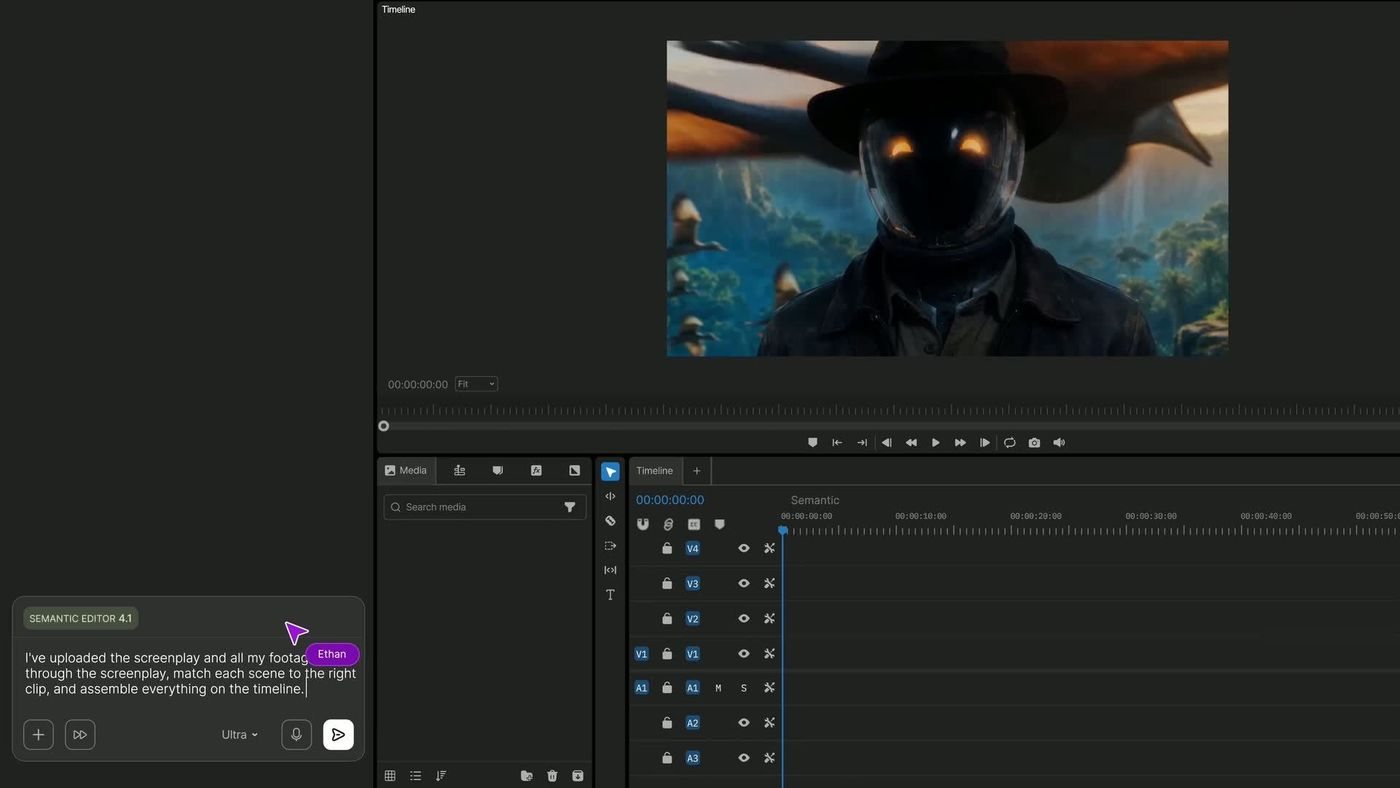
invideo's pricing page describes an AI agent, called Agent Two, that works in three tiers (Lite, Pro, and Ultra) depending on the plan. The site lists third-party video models including Google Veo 3.1, Kling, and Seedance, image models such as Nano Banana Pro, and audio models from ElevenLabs and MiniMax. Per the help center, manual editing on the timeline is free and does not consume credits; only AI work and media generation do. The two images below are official visuals from invideo.
Free Plan, Watermark, and Exports
Per invideo's help article on the free plan, you can sign up without card details and receive limited credits that reset weekly, on Monday at 00:00 UTC. The article does not state how many credits that is. Free users can try the AI models, generate images, and use and share videos on social media.
On watermarks, the help center says videos downloaded on a paid plan are watermark-free, and that once an account drops back to the free plan, any edited video needs a paid plan to download without a watermark. Projects exported before subscribing keep their watermark until you re-export them on a paid plan. The model guides for Kling, Veo 3.1, and Seedance all say downloads are watermark-free “on all paid plans”. We could not find an official statement of the free plan's export resolution, so we do not give one. Exporting or downloading itself does not use credits.
Pricing and Credits
We read invideo's pricing page in a browser on 9 October 2026, in both monthly and annual views.
| Plan | Monthly | Billed annually | Credits and limits |
|---|---|---|---|
| Free | $0 | $0 | Limited credits, reset weekly |
| Basic | $9/seat | $4/seat/mo (50% off) | 190 credits/mo · 45 premium stock clips · Agent Lite only · no Seedance |
| Pro | $30/seat | $15/seat/mo (50% off) | 1,000 credits/mo · 150 premium stock clips · all agent tiers |
| Ultra | $80/seat | $40/seat/mo (50% off) | 3,000 credits/mo · 180 premium stock clips · lowest cost per credit |
Credits are spent on AI work, at rates set by each model. The pricing page gives examples: about 2.5 credits per Nano Banana Pro image and about 56 credits per 5 seconds of Seedance 2.5 video at 720p. On that basis, Basic's 190 credits cover roughly 76 images or a handful of short generated clips. Per the FAQ, credits reset monthly on your subscription date, including on annual plans, and unused credits do not roll over; extra credit packs are valid for up to 12 months. If you cancel, the plan runs to the end of the billing cycle, then unused paid credits expire.
Stock Footage and Commercial Rights
invideo's terms, updated 8 July 2026, say you own your outputs subject to the terms and third-party rights, and grant you a perpetual, royalty-free licence to use and commercialise them, which survives cancellation. Two caveats matter. Stock media remains subject to its own third-party licence terms, and outputs are not exclusive: another user can generate similar results. The terms also make you responsible for disclosing AI-generated content where the law or industry standards require it.
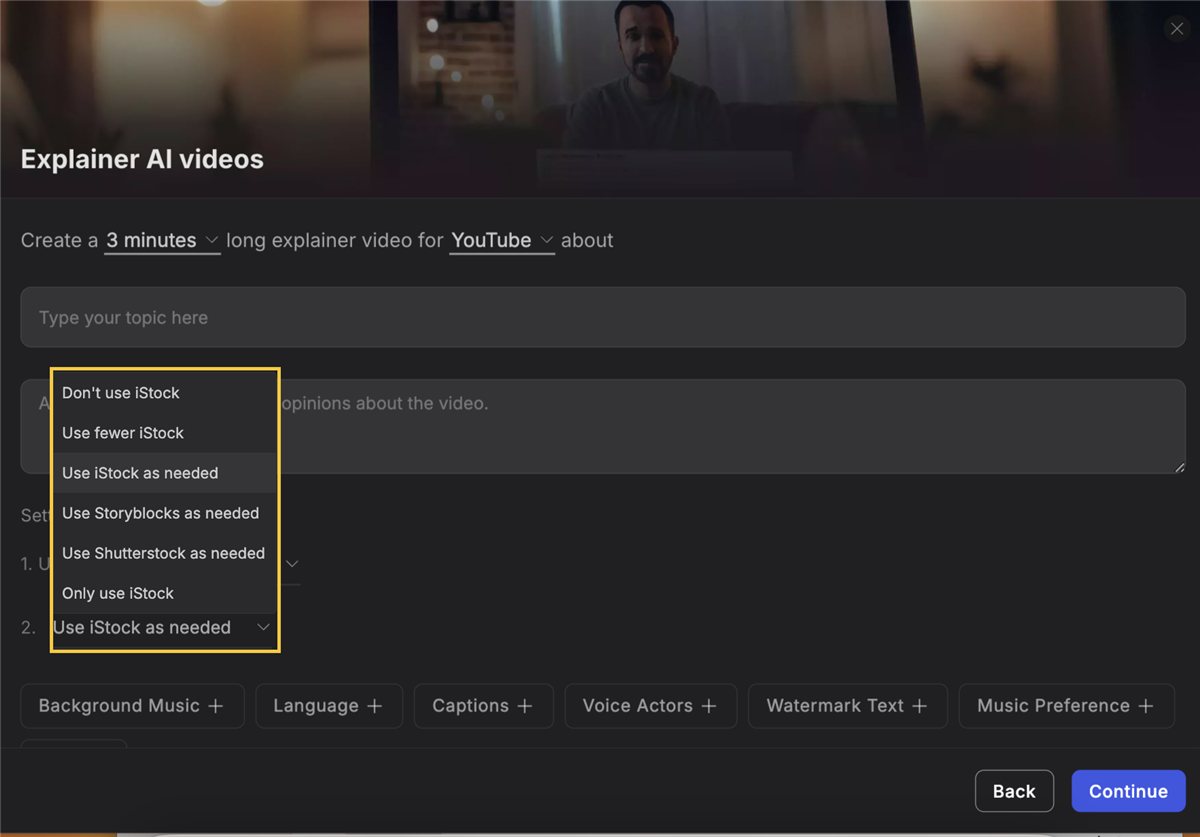
Per the help center, the AI draws stock media from Storyblocks, Shutterstock, and iStock. iStock clips count against your plan's monthly quota when you download a video; Storyblocks and Shutterstock media are unlimited, and you can tell the AI to use fewer or no iStock clips.
Voice-Over Quality
invideo lists ElevenLabs and MiniMax among its audio models, along with voice cloning and text-to-speech tools. We have not listened to its output, and we know of no independent, published comparison of its voices. User reports are mixed: some Trustpilot reviewers are satisfied with the results, while one describes a word pronounced correctly the first time and differently the second. If voice-over matters for your channel, test a short script on the free credits before paying.
What Other Users Say, Including Billing Complaints
What Other Users Say
In a Research-based review, user reports are one of our main sources. According to recent reviews from September and October 2026, the dominant complaint is credits: several users say a monthly allowance ran out after one or two short videos, or during retries after crashes, and that it was hard to see what a video would cost. Others report unfinished projects and support tickets without replies. On the positive side, reviewers praise quick, helpful support agents and call the tool easy to use. A separate Trustpilot profile for invideo's older template editor, Invideo Studio, scores 1.8/5 from 1,021 reviews, and one reviewer notes the two products carry separate subscriptions.
Sources: Trustpilot, invideo AI and Trustpilot, Invideo Studio (both retrieved 9 October 2026). We could not retrieve verified G2 or Capterra figures, so we do not cite them.
invideo's refund policy, per its help center and terms, explains part of the friction: refunds are possible within 7 days of a purchase or renewal only if nothing was generated or downloaded in that period, there are no partial refunds, and credits are non-refundable. App Store purchases are refunded through Apple.
InVideo AI vs HeyGen vs Runway
The three tools solve different problems: InVideo AI assembles videos from a prompt with stock footage, HeyGen builds avatar presenter videos, and Runway focuses on generating footage with its own models. HeyGen was tested hands-on for our earlier review; Runway and InVideo AI were assessed from research.
| Criteria | InVideo AI |
 HeyGen HeyGen |
 Runway Runway |
|---|---|---|---|
| Our framework score | 6.0/10 | 6.6/10 | 5.4/10 |
| How we assessed it | Research only | Hands-on test | Research only |
| Main job | Prompt-to-video with stock footage | AI avatar presenter videos | Generative video models |
| Free option | Credits reset weekly | 3 videos/mo, up to 1 minute | 125 one-time credits |
| Entry paid price | $9/mo ($4/mo billed annually) | $29/mo ($24/mo billed annually) | $15/mo ($12/mo billed annually) |
Pros
- Free plan with weekly credits and no card required
- Low entry price: $9 a month, or about half on annual billing
- Commercial-use licence for outputs that survives cancellation, per the terms
- Unlimited Storyblocks and Shutterstock media alongside a monthly iStock quota
- Manual timeline editing and exports do not use credits
Cons
- Credits drain quickly according to many user reports, and do not roll over
- Credit costs vary by model and can change without notice
- Refunds only if nothing was generated, and credits are non-refundable
- Watermark-free downloads require a paid plan
- 2.9/5 on Trustpilot, with stalled projects and unanswered tickets among complaints
FAQ
Can I monetize InVideo AI videos on YouTube?
invideo's terms grant you a perpetual, royalty-free licence to commercialise your outputs, and its help center says you have complete rights to use the videos you make for any purpose. Stock media stays subject to its own licence terms, and you must disclose AI-generated content where rules require it; YouTube asks creators to disclose realistic altered or synthetic content. Monetization itself depends on YouTube's Partner Program policies, which apply whatever tool made the video. invideoinvideo's help center had no article dedicated to YouTube monetization when we checked on 9 October 2026.
Does the InVideo AI free plan add a watermark?
invideo's help center says downloads are watermark-free on paid plans, and that free-plan users need a paid plan to download edited videos without a watermark. Videos exported before subscribing must be re-exported after upgrading to remove it.
How many credits does the InVideo AI free plan include?
invideo's help center says the free plan gives limited credits that reset every Monday at 00:00 UTC, but it does not state the number. Paid plans include 190, 1,000, or 3,000 credits a month.
Do InVideo AI credits roll over?
No. Per the official pricing FAQ, credits reset monthly on your subscription date and unused credits do not roll over. Separately purchased credit packs are valid for up to 12 months while your subscription is active.
Can I get a refund from InVideo AI?
Only in limited cases. Per invideo's refund policy, you can request a refund within 7 days of purchase or renewal if nothing was generated or downloaded in that period. There are no partial refunds, and credits are non-refundable.
Is this review based on hands-on testing?
No. It is Research-based, built from invideo's official pricing page, help center, and terms, plus Trustpilot reviews. We have not used InVideo AI ourselves.
Check InVideo AI's Current Pricing
Start on the free weekly credits, check each model's credit cost before generating, and test the voice-over on a short script.
See InVideo AI pricing →