
Canva AI Review 2026: We Tested Magic Studio Firsthand


Quick Verdict
// Hands-on testedTeknexia AI Tool Evaluation Framework
Scored against our site-wide 5-criteria framework. This is the canonical score for Canva AI — it also appears on the AI Image category page, pulled live from this page.
Overall: 7.6/ 10
Canva has folded a growing suite of AI tools — Magic Design, Magic Write, Magic Media, Magic Eraser, and more, grouped under "Magic Studio" — directly into its design platform, rather than shipping them as a separate product. We ran two of those tools hands-on with specific briefs to see whether the bundled approach actually holds up, not just what the marketing pages promise.
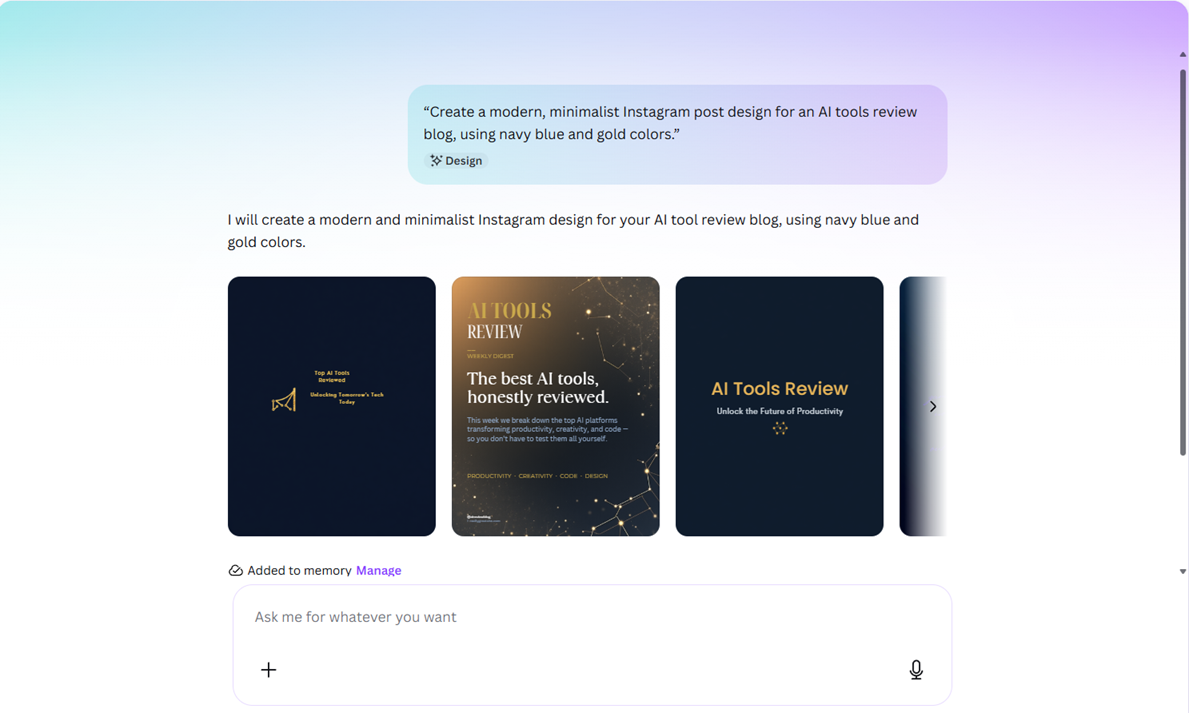
- A single prompt to Magic Design ("create a modern, minimalist Instagram post design for an AI tools review blog, using navy blue and gold colors") returned four on-brief, navy-and-gold Instagram post layouts, ready to use with no follow-up prompt (our own test, 2026).
- A near-identical request to Canva's AI writing assistant ("write a short, engaging Instagram caption...") missed the brief entirely — it generated a long-form document about how to write captions instead of an actual caption.
- Canva's Free plan includes a real, non-time-limited AI quota shared across its Standard and Premium AI tools — not a trial, though it's capped and separate from the general Free-plan design limits (Canva, 2026).
- Beyond this specific test, our broader day-to-day use of Canva backs up the same pattern: the AI tools are genuinely useful time-savers for simple creative tasks, but inconsistent enough that they're accelerators, not a replacement for real design judgment.
What Is Canva AI Used For?
"Canva AI" isn't one tool — it's a set of generative and editing features bundled inside Canva under the "Magic Studio" umbrella: Magic Design (auto-generates full layouts from a prompt or image), Magic Write (AI copywriting and document generation inside the editor), Magic Media (AI image and video generation), Magic Eraser and Magic Expand (object removal and canvas extension), and several smaller tools like Magic Charts and background remover (Canva, 2026).
The pitch is integration: instead of generating an image in one tool, writing copy in another, and assembling the layout in a third, Canva keeps all of it inside the same canvas you're already designing in.
What We Actually Tested
We ran two specific, plain-English prompts through two different Magic Studio tools to see whether Canva's AI actually follows a brief, not just whether it produces something.
Our Test Protocol
These notes document what we did during testing — they are separate from the 5-criteria Teknexia AI Tool Evaluation Framework score in the Quick Verdict above, not a replacement or duplicate of it.
| Test | Prompt | Result | Note |
|---|---|---|---|
| Magic Design (image/layout generation) | "Create a modern, minimalist Instagram post design for an AI tools review blog, using navy blue and gold colors." | Generated 4 distinct, on-brief Instagram post layouts in navy and gold, legible text, usable as-is | On-brief on the first attempt |
| AI writing assistant (Magic Write-style) | "Write a short, engaging Instagram caption promoting a new AI tool review, in a professional but approachable tone." | Produced a long-form document explaining how to write a caption, not an actual caption | Misread the brief — genuine inconsistency, not cherry-picked |
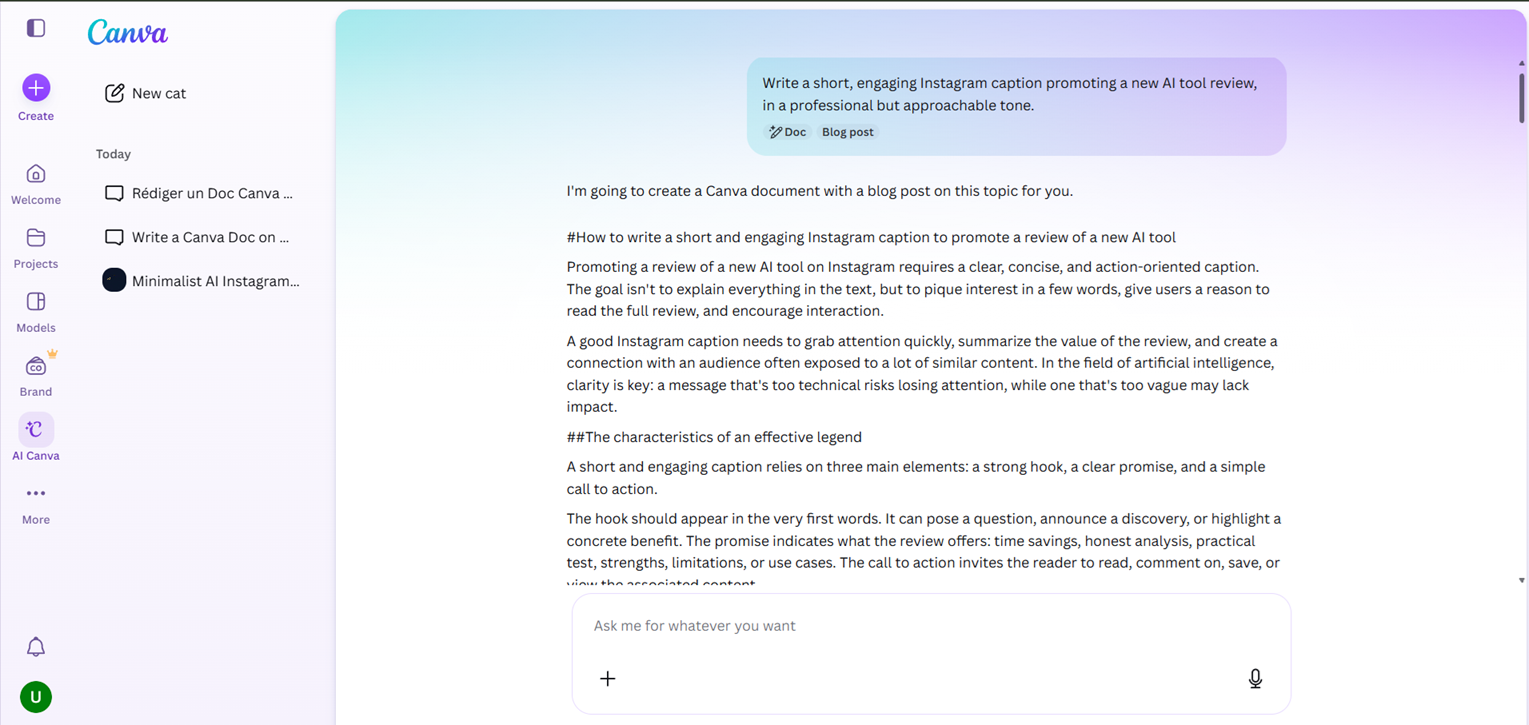
The gap between these two results is the whole story: Canva's visual AI tools followed a specific creative brief well, while its writing assistant defaulted to a generic, longer response instead of the short deliverable actually requested. Neither result was cherry-picked — both were first attempts, no re-prompting.
Beyond This Test: Our Broader Experience With Canva
This review is also informed by using Canva in real, ongoing work outside of this specific test, which we're keeping distinct from the two prompts above. On the whole-platform side: the interface stays intuitive even for non-designers, the template and element library is large, and Canva Pro's price feels like real value given how much of the platform — presentations, social posts, video, documents, even basic websites — it covers in one subscription.
On the AI tools specifically, that broader experience lines up with what the two tests above show: Magic Studio's AI genuinely speeds up simple creative tasks — image generation, background removal, quick copy, translation — but the quality is inconsistent, sometimes misreading instructions or defaulting to generic output. Several of the more advanced features (and some AI capacity) are reserved for Pro, and we've also run into occasional friction with billing, support responsiveness, and limits on specific tools like PDF translation and free-domain website publishing.
Pricing in 2026: What's Actually Free vs. Gated
Canva's AI features run on a shared usage quota rather than a separate credit purchase. The Free plan is $0/month and includes a real (not time-limited) AI quota shared across Canva's Standard and Premium AI tools — capped, but usable without paying anything (Canva, 2026).
Pro is $15/month billed monthly (roughly $10/month if billed annually) for one person, and expands the AI quota to also cover Ultra-tier AI tools. Canva has also introduced Pro+, a newer tier above Pro aimed at individuals and small teams, which adds a larger AI quota plus access to Leonardo.Ai and Flourish tools bundled in — we confirmed Pro+ exists directly on Canva's own pricing page, though we'd recommend checking Canva's live pricing page for the exact current rate in your currency, since Canva prices regionally. On top of any paid plan, Canva also sells an "AI Pass" add-on that multiplies your AI quota — roughly 40x more usage than Pro, or 20x more than Pro+ — usable across Standard, Premium, and Ultra AI tools.
The practical read: light AI use (a handful of Magic Design layouts or Magic Media images a month) is genuinely free. Heavier day-to-day use of AI features is where the quota runs out fastest, and that's where Pro, Pro+, or the AI Pass add-on come in.
What Other Users Say
Canva's Trustpilot base skews positive overall but is genuinely polarized — alongside a large majority of 5-star reviews sits a sizeable minority of 1-star ratings, not a smooth bell curve. Reviewers who like it repeatedly praise how approachable the platform is for beginners and professionals alike, plus fast, helpful support when something goes wrong. The recurring complaints are templates and features locked behind the paid plan, AI tools that don't always work as expected, and billing or refund processes some reviewers found unnecessarily difficult.
Source: Trustpilot (retrieved 2 August 2026).
Canva AI vs Ideogram: Which One Should You Actually Pick?
These solve different problems. Ideogram is a dedicated image generator built to do one thing well — text-in-image generation — and nothing else. Canva AI is a set of AI tools bundled into a full design platform, where image generation is one feature among many. In our test, Canva's visual AI (Magic Design) handled a specific creative brief cleanly, but we haven't run Canva's Magic Media image generator against Ideogram head-to-head on identical prompts, so we can't yet call a winner on raw image quality specifically.
What we can say from testing both tools separately: if the job is "generate one good image," a dedicated tool avoids the inconsistency we saw from Canva's non-image AI tools. If the job is "take an idea to a finished, publishable design" — layout, copy, and image together — Canva's integration is the real advantage, and nothing in Ideogram replaces that.
| Criteria | Canva AI | Ideogram |
|---|---|---|
| Genuinely usable free plan (no card) | ✓ Yes | ✓ Yes |
| Cheapest full-access entry point | $15/mo (Pro) | $15/mo (Plus, billed annually) |
| Full design suite (layouts, docs, video) built in | ✓ Yes | ✗ Image generation only |
| Follows a specific creative brief consistently | Mixed in our test — strong on layout, weak on copy | Purpose-built for one task, consistent by design |
| Best for | Creators who want AI generation bundled into a full design workflow | Creators who want dedicated, high-quality text-in-image generation |
If you're producing everyday content — social posts, presentations, marketing visuals — and want AI to speed up the simple parts without leaving your design tool, Canva AI earns its place, and the free plan is real enough to try it properly before paying. It's a harder sell if you need consistent, precise AI output for demanding creative work; our own test, and our broader use of the platform, both show the same inconsistency that pushes experienced designers back toward dedicated tools for anything that has to be right the first time.
Does Canva AI Struggle With Anything?
Yes, and our test caught a clear example: asked for a short Instagram caption, the AI writing assistant produced a long-form explainer document instead. That's not an isolated glitch either — it matches a pattern we've seen using Canva more broadly, where AI output quality varies by tool and can miss the brief or default to generic results. Canva's visual AI tools (Magic Design in particular) fared much better in our test than its writing tools did.
Pros & Cons of Canva AI
Pros
- Magic Design followed a specific creative brief cleanly in our test, producing usable, on-brand results on the first attempt
- Every AI tool we used stayed inside the same canvas — no exporting between separate apps
- Free plan includes a real, non-time-limited shared AI quota, not a crippled trial
- Intuitive interface and a large template/element library, approachable even without design experience
Cons
- The AI writing assistant misread a simple, specific brief in our test and produced the wrong kind of output entirely
- AI output quality is inconsistent tool-to-tool — strong on layout generation, weaker on following written instructions precisely
- Many of the more advanced features, and extra AI capacity, are reserved for Pro or the AI Pass add-on
- AI quota is shared across every AI tool in the account, so heavy use of one feature eats into what's available for the others
Frequently Asked Questions
Is Canva AI actually free?
Is Canva AI worth it over Ideogram?
How much does Canva AI cost in 2026?
Is Canva's AI reliable?
Our Canva AI Verdict
Canva AI is one of the best options for content creators, marketers, and small businesses who want to produce professional-looking visuals quickly — in our test, Magic Design delivered an on-brief result on the first try, and the free plan is generous enough to prove that to yourself before paying. But its AI features are productivity accelerators, not a replacement for real design or writing judgment: our own test caught the AI writing assistant missing a simple brief entirely, and that inconsistency matches what we've seen using the platform more broadly. Experienced designers with demanding, precise needs will likely still reach for dedicated tools.