
n8n Review 2026: We Tested Real Workflow Automation Firsthand


Quick Verdict
// Hands-on testedTeknexia AI Tool Evaluation Framework
Scored against our site-wide 5-criteria framework. This is the canonical score for n8n — it also appears on the AI Automation category page, pulled live from this page.
Overall: 7.2/ 10
n8n is a workflow automation platform built around a visual canvas of connected nodes — think Zapier's simplicity crossed with the flexibility of writing your own code. We built and ran a real workflow on an active n8n Cloud trial account to see how the editor, execution, and pricing model actually hold up.
- We built a two-node workflow (Manual Trigger → HTTP Request) on a live n8n Cloud account and ran it repeatedly — every execution succeeded, typically in under 1.3 seconds (n8n Cloud, our own test, 2026).
- n8n's Community Edition is genuinely free to self-host under its Sustainable Use License — not OSI-approved open source, but unrestricted for internal use (n8n, 2026).
- Cloud pricing starts at $20/mo for 2,500 executions, rising to $50/mo for 10,000 and $800/mo for 40,000 — a steeper curve than flat-rate competitors once you're running production workloads (n8n, 2026).
- The HTTP Request node worked as a reliable fallback for any service without a native connector, which matters more than the raw "400+ integrations" number once you're building something specific.
What Is n8n Used For?
n8n is a node-based automation tool for teams who outgrow simple "if this, then that" services but don't want to write a backend from scratch. Every workflow is a canvas of connected nodes — triggers, actions, logic — that you build visually and can drop into code (JavaScript or Python) wherever the visual layer isn't enough (n8n, 2026).
That combination is the pitch: teams get the speed of a visual builder for the easy 80% of a workflow, and the escape hatch of real code for the hard 20%. It's aimed at technical teams — ops, growth, engineering — more than the fully no-code audience Zapier built its name on.
What We Actually Built and Ran
We opened a new workflow on a live n8n Cloud trial account (14 days, no card required) and added a Manual Trigger node through the "What triggers this workflow?" picker — a simple search box that found the node in one keystroke. Running it produced a clean, logged execution in 4ms.
We then added an HTTP Request node, pointed it at a real public endpoint (https://api.github.com/repos/n8n-io/n8n), and executed it. It returned real JSON — repository ID, name, description, avatar URL, and dozens more fields — rendered live in n8n's Schema/Table/JSON output viewer. Across several re-runs, the HTTP Request step alone completed in 250–560ms, and the full two-node workflow finished in 1.2 seconds or less every time.
Our Test Protocol
These notes document what we did during testing — they are separate from the 5-criteria Teknexia AI Tool Evaluation Framework score in the Quick Verdict above, not a replacement or duplicate of it.
| Test | Prompt | Result | Note |
|---|---|---|---|
| Manual Trigger node, first run | — (node execution, no input) | Success in 4ms | Instant |
| HTTP Request to a public API | GET https://api.github.com/repos/n8n-io/n8n | Success in 250–560ms across repeated runs; real repo JSON returned each time | Consistent |
| Full workflow execution (both nodes) | — (Execute workflow) | Completed end to end in 1.2 seconds or less, every run | No failed executions |
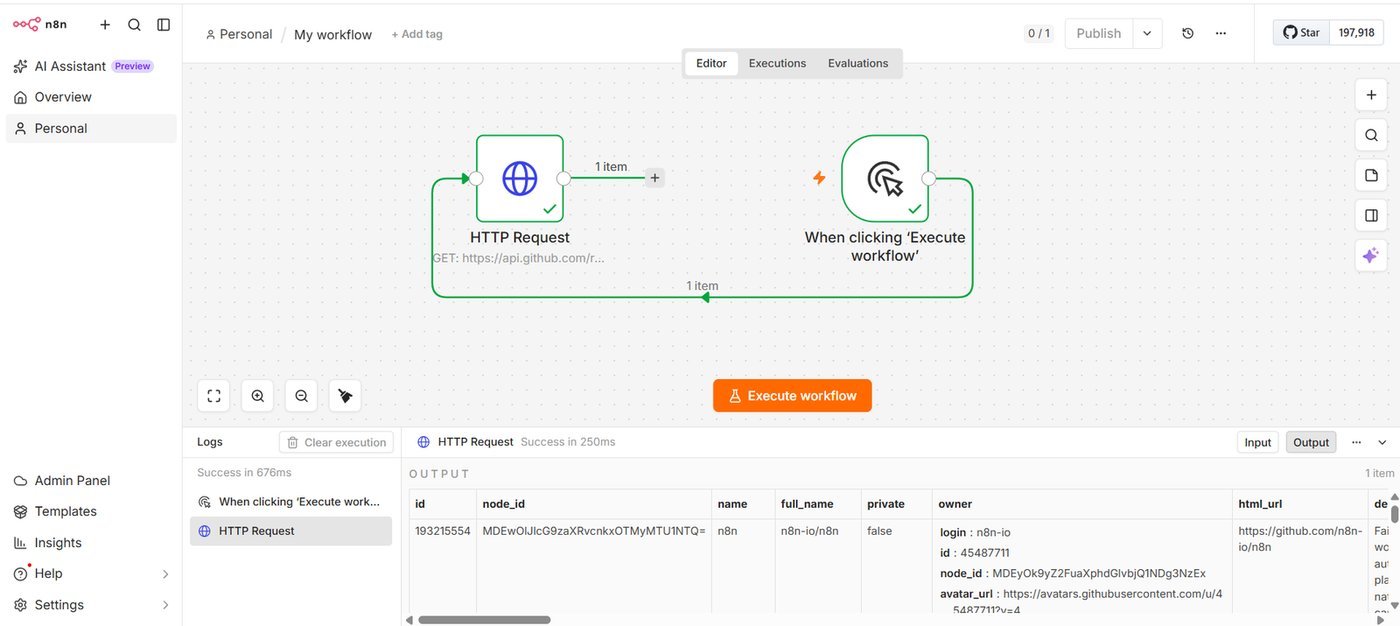
What stood out wasn't any single feature — it was that nothing broke. Every execution we triggered, across two different node types and multiple re-runs, returned a clean success with real data. For a tool with this much surface area (400+ integrations, native AI/LangChain nodes, custom code steps), that reliability on the basics is the thing that actually matters day to day.
Pricing in 2026: Free Self-Hosted vs. Paid Cloud
n8n runs two genuinely different pricing tracks, and conflating them is the most common mistake in reviews of this tool. The Community Edition is free, self-hosted, and unrestricted for internal use under n8n's Sustainable Use License — a fair-code license, not an OSI-approved open-source one, but with no execution cap or feature gate for running it yourself (n8n, 2026).
n8n Cloud, the hosted option we tested on, is priced by monthly workflow executions rather than by user or by integration: Starter is $20/mo billed annually for 2,500 executions and 5 concurrent runs; Pro is $50/mo for 10,000 executions and 20 concurrent runs; Business is $800/mo for 40,000 executions, with a self-hosted variant also available at that tier (n8n, 2026). Enterprise pricing is custom.
The practical read: if you're comfortable maintaining your own server, self-hosting is free indefinitely. If you want n8n to host it, the $20/mo Starter tier is a real starting point, but 2,500 executions a month is easy to burn through once a workflow runs on every new record or every incoming webhook.
n8n vs Zapier: Which One Should You Actually Pick?
Zapier wins on raw simplicity and app coverage for non-technical users; n8n wins on cost control and depth once a workflow gets complex. In 2026, Zapier still prices per task with per-zap complexity limits, while n8n prices by execution and lets a single workflow contain unlimited steps (n8n, 2026).
What Other Users Say
n8n's Trustpilot base is small but split: reviewers who like it tend to point to the self-hosted, fair-code model as a real cost saver, even for automation beginners. The negative cluster is more operational than a complaint about the automation engine itself — workflow crashes, account-access problems with no support response, and being asked to pay before a workflow was fully set up.
Source: Trustpilot (retrieved 28 July 2026).
| Criteria | n8n | Zapier |
|---|---|---|
| Free self-hosted option | ✓ Yes | ✗ No |
| Cheapest paid entry point | $20/mo (2,500 executions) | $19.99/mo (750 tasks) |
| Custom code in workflows | Native JS/Python steps | Limited code steps |
| Steps per workflow | Unlimited, one price | Priced by complexity |
| Best for | Technical teams, cost-sensitive scale | Non-technical users, fastest setup |
If your team already writes code and wants full control over cost as usage scales, n8n's execution-based pricing and self-hosting option make it the cheaper long-term bet. If you need the absolute fastest setup with zero technical involvement, Zapier's app coverage and polish are still hard to beat.
Does n8n Struggle With Anything?
The canvas has a learning curve past two or three nodes — branching logic, error workflows, and the AI Agent nodes all take real time to learn well. And while we didn't hit any execution failures in our own testing, we also only tested a small slice of n8n's 400+ integrations; broader integration reliability is still something we'd want to verify further before making a blanket claim.
Pros & Cons of n8n
Pros
- Free, unrestricted self-hosting under the Sustainable Use License — no execution cap if you run it yourself
- Every execution in our test completed successfully, consistently under 1.3 seconds end to end
- Native code steps (JS/Python) mean you're never blocked by a missing integration
- Execution-based pricing, not per-user or per-zap-complexity
Cons
- Cloud's cheapest tier (2,500 executions/mo) is a low ceiling for an active workflow
- Self-hosting is free, but you're on the hook for maintaining and securing your own instance
- The visual canvas gets harder to read once a workflow branches heavily
- We tested one integration path (HTTP Request) directly, not the full 400+ connector library
Frequently Asked Questions
Is n8n actually free?
Do I need to know how to code to use n8n?
How does n8n's pricing actually work?
Is n8n reliable for production workflows?
Our n8n Review Verdict
n8n earns its place if you have technical resources and want to control cost as you scale — self-hosting is genuinely free, and every execution we ran in testing completed cleanly and fast. If you need the absolute fastest setup with no technical involvement at all, Zapier's polish still has an edge. For anyone in between, the 14-day Cloud trial we used is a real, no-card-required way to build one workflow yourself before deciding.