
Synthesia Review 2026: AI Avatar Videos, Pricing & Limits
A Research-based look at Synthesia, the AI avatar video platform aimed at training and corporate teams. Worth knowing up front: free videos carry a watermark and cannot be downloaded, and paid plans now run on credits.


Quick Verdict
// Research-basedTeknexia AI Tool Evaluation Framework
This is a Research-based review. We did not use Synthesia ourselves. Every score below is judged on Synthesia's official pricing page, help center, and announcements, and on aggregated Trustpilot reviews, not on hands-on use. Where a criterion such as ease of use would normally come from our own testing, it is assessed here from documentation, tutorials, and what user reports describe, and each description says what it rests on.
Overall: 7.0/ 10
Synthesia is a London-based platform for making videos with AI avatars: you write or import a script, choose an avatar and voice, and Synthesia generates a presenter-led video, with no camera involved. It is the eighth review in our AI Video Tools category, after Descript, Opus Clip, Higgsfield AI, Runway, HeyGen, Riverside, and InVideo AI. In January 2026, Synthesia announced a $200 million Series E at a $4 billion valuation. This review is built from named sources only; we have not used Synthesia ourselves.
Credits, not just minutes: Synthesia's plans now include a monthly free allowance of 10 video minutes plus a pool of credits. Per its pricing FAQ, a typical finished minute of video uses about 100 credits, and dubbing, surveys, and generated B-roll draw on the same pool, so the number of minutes you get depends on what your videos contain.
- According to the official pricing page, the free Basic plan includes 10 minutes of video a month and 9 avatars, with a Synthesia watermark; downloads start on Starter.
- Starter costs $29 a month or $18 billed annually, and includes 3 personal avatars; Pro costs $89 or $64 and includes 5.
- Synthesia's help center says no avatar is created without the person's informed consent, including a biometric consent process.
- Trustpilot shows 3.8/5 from 1,828 reviews, and notes the company has not replied to negative reviews.
What Synthesia Does, per Its Own Documentation
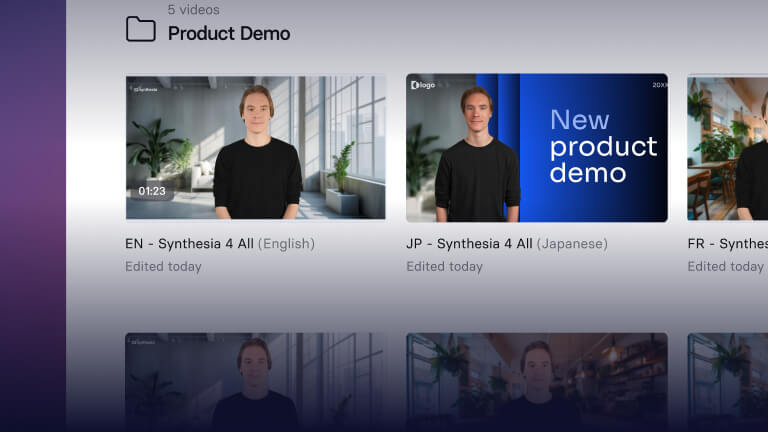
Synthesia offers stock avatars, custom avatars of real people, and an AI Video Assistant, plus newer products such as Sessions for roleplay training. Its comparison table lists templates, PowerPoint import, auto-generated captions, interactive quizzes and branching, brand kits, and a media library with stock content. Videos can be shared through a link or embedded, and paid plans can download MP4 files. The two images below are official visuals from Synthesia's website.
Pricing, Minutes, and the Free Plan
We read Synthesia's pricing page in a browser on 12 October 2026, in both monthly and annual views.
| Plan | Monthly | Billed annually | Video and avatars |
|---|---|---|---|
| Basic | $0 | $0 | 10 min/mo · 9 AI avatars · Synthesia watermark · share by link only |
| Starter | $29 (1,250 credits/mo) | $18/mo (15,000 credits/yr) | About 12 extra min/mo · downloads · no watermark · 125+ avatars · 3 personal avatars |
| Pro | $89 (6,000 credits/mo) | $64/mo (72,000 credits/yr) | About 60 extra min/mo · 180+ avatars · 5 personal avatars · branded pages · interactive videos |
| Enterprise | Custom | Custom | Unlimited video minutes · 240+ avatars · unlimited personal avatars · SSO · SCORM export |
Per the pricing FAQ, every plan includes 10 minutes of video each month, and Starter's 1,250 credits add roughly 12 more, for about 22 minutes a month in total. Credits are only used when something is generated, not while editing or previewing; dubbing costs 80 credits a minute with lip-sync or 40 without. Your monthly allowance and plan credits reset each billing period, while separately purchased credits last 12 months. If you hit your limit, video creation pauses until renewal unless you buy more credits or upgrade.
Languages and Translation
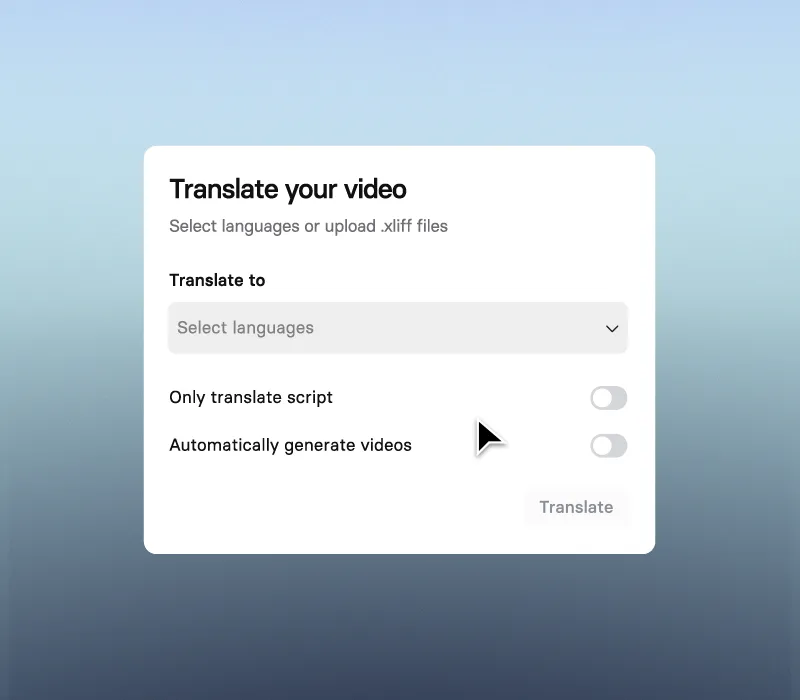
The pricing page lists 140+ languages and voices on every plan. One-click translation of a whole video is listed for Enterprise, and a multilingual video player lets viewers switch languages. Separate AI dubbing for uploaded videos covers 70+ languages on self-serve plans, according to the plan table. One Trustpilot reviewer in September 2026 noted that Italian was not available for what they needed, so check your language before committing.
Custom Avatars and Safeguards
Synthesia offers two kinds of custom avatar. Its help center describes Personal avatars and Studio avatars, the latter filmed in a professional studio or submitted from a high-quality home setup, and says both are available on Starter plans and above, counting against your avatar allowance. Studio avatars are a $1,000-a-year add-on, per the pricing page.
On consent, Synthesia's avatar policy guide states that explicit consent is required: no avatar is created without the individual's informed consent, including a biometric consent process to confirm authenticity, and the person can review and revoke permissions at any time. Only the avatar owner can revoke access or delete it. Content is moderated with automated tools backed by human review, according to the help center.
What Other Users Say
What Other Users Say
In a Research-based review, user reports are one of our main sources. According to user reports, Synthesia is good enough for training videos, and some reviewers praise its onboarding sessions and the range of languages. Recent negative reviews from September and October 2026 describe features that stop working after updates, voices whose emotion and emphasis cannot be corrected, an interface some find unintuitive, and a free trial that only works in Chrome and Edge. Trustpilot notes that Synthesia has not replied to negative reviews and has not invited customers to review recently.
Sources: Trustpilot (retrieved 12 October 2026). We could not retrieve verified G2 or Capterra figures, so we do not cite them.
Synthesia vs HeyGen
HeyGen is Synthesia's closest competitor for AI avatar videos. HeyGen was tested hands-on for our September 2026 review; Synthesia was assessed from research only, so the scores below rest on different kinds of evidence.
| Criteria | Synthesia |
 HeyGen HeyGen |
|---|---|---|
| Our framework score | 7.0/10 | 6.6/10 |
| How we assessed it | Research only | Hands-on test |
| Positioning | Training and corporate video | Avatar videos for creators and marketing |
| Free plan | 10 min/mo, watermark, no downloads | 3 videos/mo, up to 1 minute each |
| Entry paid price, billed annually | $18/mo | $24/mo (Creator) |
| Entry paid price, monthly | $29/mo | $29/mo (Creator) |
Pros
- Built for training: templates, PowerPoint import, quizzes, and branching
- 140+ languages and voices on every plan
- Personal avatars from the Starter plan, with explicit and revocable consent
- Moderation with automated tools and human review
- Low annual entry price: $18 a month
Cons
- The free plan is watermarked and cannot download videos
- Starter adds only about 12 minutes a month on top of the free 10
- Studio avatars cost an extra $1,000 a year, and SCORM export is Enterprise only
- Credits do not roll over
- Trustpilot reviewers report features breaking after updates and limited voice control
FAQ
Can you create your own Synthesia avatar on the entry-level plan?
Yes. The official pricing page lists 3 personal avatars on Starter, and Synthesia's help center says custom avatars are available on Starter and above. Studio-quality avatars are a separate add-on at $1,000 a year.
Does Synthesia have a free plan?
Yes. The Basic plan is free and includes 10 minutes of video a month and 9 AI avatars, but videos carry a Synthesia watermark and can only be shared by link; downloads start on Starter.
How many minutes of video do you get on Synthesia Starter?
Per the pricing FAQ, about 22 minutes a month: the 10 free minutes every plan includes, plus roughly 12 more from Starter's 1,250 credits. Dubbing or other features reduce that.
Can Synthesia create an avatar of someone without their consent?
Not according to its policies. Synthesia's help center says no avatar is created without the person's informed consent, including a biometric consent process, and that the person can revoke permissions at any time.
Is Synthesia better than HeyGen?
They target different users. Synthesia focuses on training and corporate video, while HeyGen is aimed more at creators and marketing. In our framework, Synthesia scored 7.0 from research and HeyGen 6.6 from a hands-on test, so the two scores are not directly comparable.
Is this review based on hands-on testing?
No. It is Research-based, built from Synthesia's official pricing page, help center, and announcements, plus Trustpilot reviews. We have not used Synthesia ourselves.
Final Verdict
Synthesia is built for organizations that turn documents and slides into presenter-led videos and need them in many languages. Its documented strengths are governance: explicit consent for custom avatars, moderation before content is used, and translation tools that keep versions in sync. For individual creators, the limits matter more. The free plan cannot download videos, the Starter plan adds only about 12 minutes a month on top of the free 10, and Trustpilot reviewers mention voices that cannot be fine-tuned and features that break after updates. If you mainly make marketing or social videos, compare it with HeyGen; if you build training content, Synthesia is the more natural fit.
Check Synthesia's Current Pricing
Try a short video on the free plan to judge the avatars and voices, and check that your language is supported.
See Synthesia pricing →