HeyGen Review 2026: Impressive Avatars, but the Credits Go Fast


Quick Verdict
// Hands-on testedTeknexia AI Tool Evaluation Framework
Scored against our site-wide 5-criteria framework, from our own hands-on test on a real HeyGen account (one avatar video generated from a written script), combined with our tester's wider notes on using the tool, HeyGen's own pricing and help-center pages, and aggregated third-party reviews for the parts we didn't test directly. This is the fifth entry in our AI Video category, alongside Descript, Opus Clip, Higgsfield, and Runway.
Overall: 6.6/ 10
HeyGen is an AI video platform built around talking avatars: you write or upload a script, choose an avatar and a voice, and it generates a video of a presenter speaking it, with lip-sync, optional voice cloning, and translation into other languages. We tested it on a real account, generating an avatar video from a script we wrote ourselves. This is the fifth review in our AI Video category, and it sits differently from the others: where Runway and Higgsfield generate creative footage from prompts, HeyGen makes presenter-style videos, which is why we compare it to Higgsfield below on the one thing they share, a credit-based pricing model.
Before you sign up, know this about credits: HeyGen is impressive in a demo and easy to use, but our tester found the credits go quickly, particularly with advanced models, and a generation that comes out wrong has to be redone, which can cost more credits. The free plan is limited to three videos a month of up to one minute each, and extra credits can't be bought on the Creator plan. If you plan to make videos regularly, do the credit math against your real usage before subscribing.
- Setup was fast and simple: we generated a 20-second avatar video from a written script in a few clicks, and lip-sync and facial expressions looked convincing.
- The credit system is the real cost: our tester found credits go quickly, especially on advanced models, and failed generations mean paying to retry.
- Results aren't always consistent from one generation to the next, with occasional glitches on hands and, with Avatar V, exaggerated head and mouth movement.
- HeyGen requires a recorded consent video before you can create a digital twin, and its moderation policy bans avatars of real people without their consent.
What We Tested, and What Happened
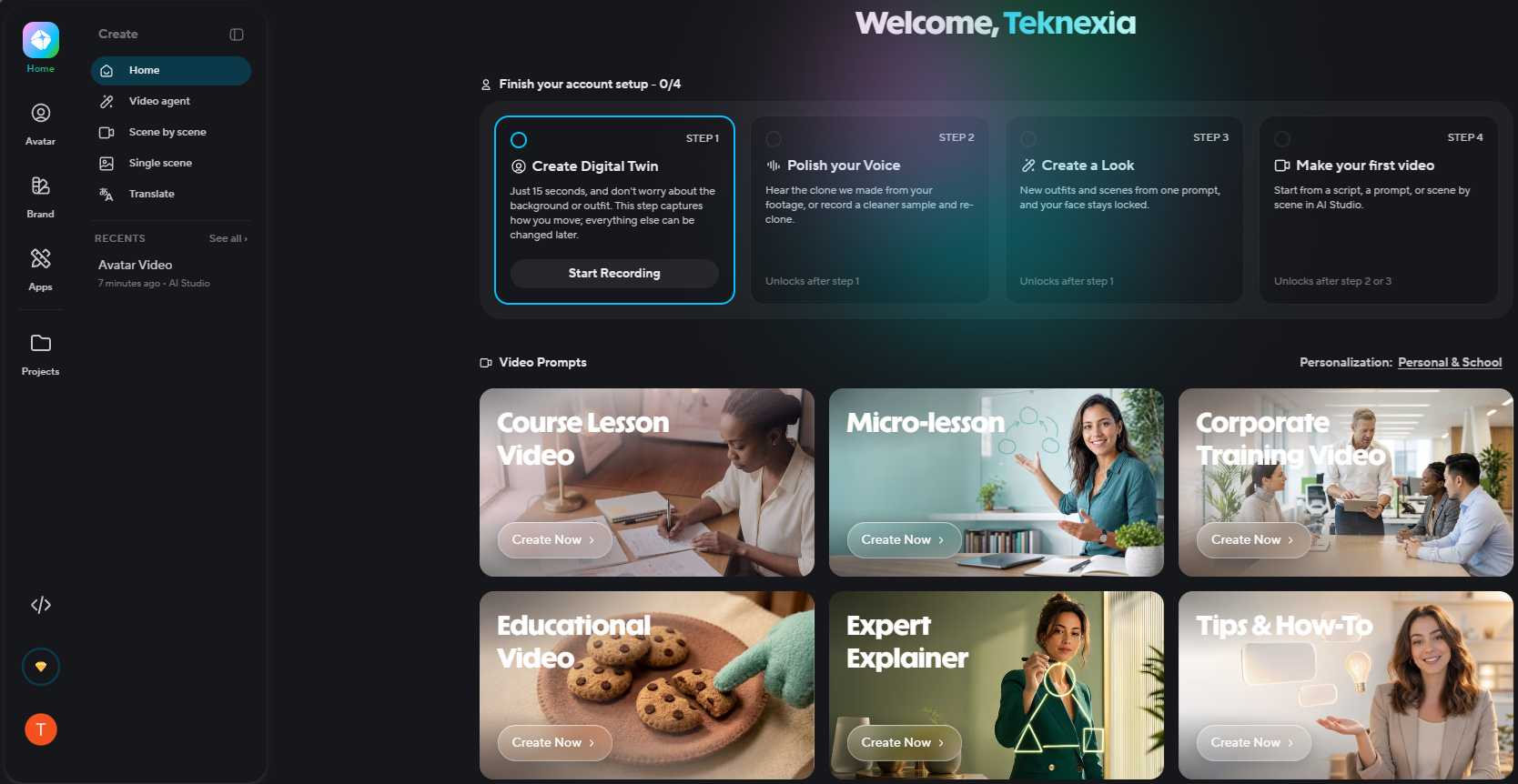
We used a real, active HeyGen account. The account's setup checklist was still at 0 of 4 steps when we started, which means we did not record our own digital twin or clone our own voice for this test. Instead we used one of HeyGen's stock avatars with a stock voice.
We pasted in a short script about Teknexia Hub, roughly 60 words, selected the Avatar IV model with the stock voice "Daisy," set the output to 720p in a vertical format, and clicked Generate. The result was a 20-second avatar video, shown at the bottom of the screen below.
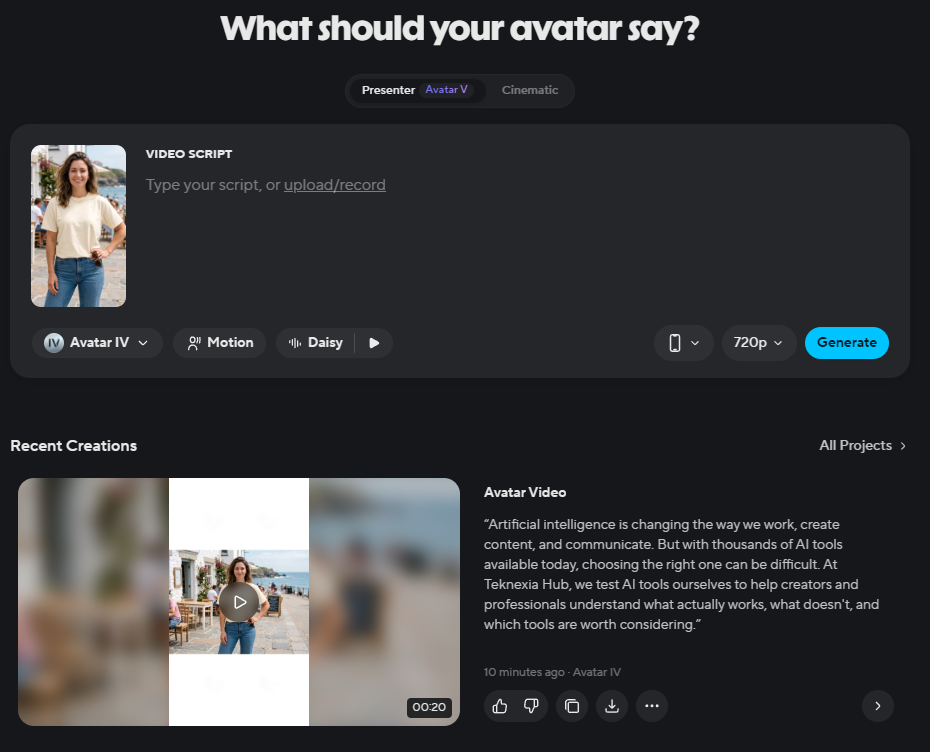
Three things stood out. First, speed and simplicity: from a blank screen to a finished video took a few clicks and no video-editing knowledge. Second, the lip-sync and expressions: the avatar's mouth movement followed the script convincingly and its facial expressions looked natural, which our tester rates as one of HeyGen's clear strengths. Third, the time saved: producing a presenter video this way needs no camera, studio, actor, or traditional editing.
We want to be precise about what this documented test does and doesn't cover. It was one short Avatar IV generation on a stock avatar. The negatives below, inconsistent results between generations, glitches on hands, exaggerated head and mouth movement with Avatar V, and slower renders during heavy demand, come from our tester's wider notes on using HeyGen and from user reports, not from that single clip, and we're flagging them for that reason rather than folding them into the demo.
What HeyGen Actually Is
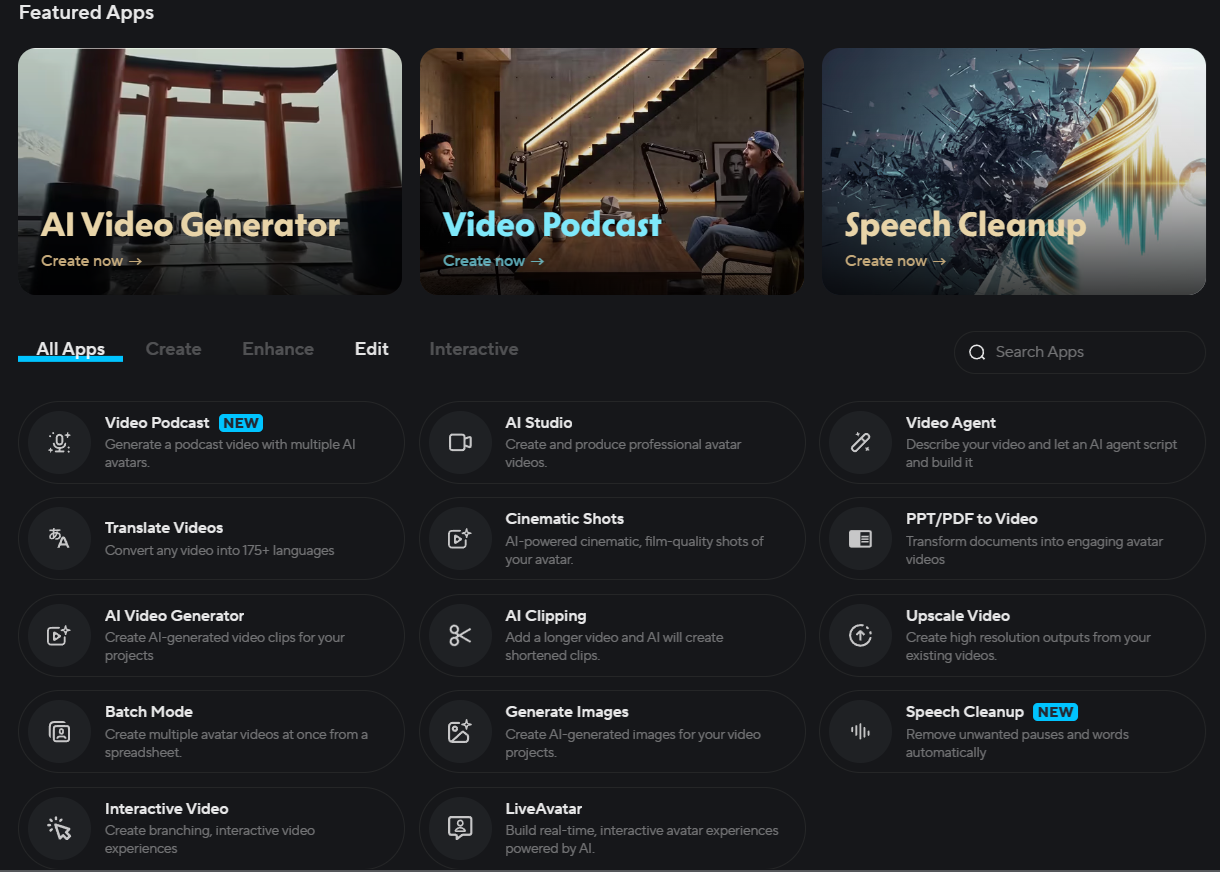
HeyGen turns scripts into videos presented by AI avatars, with lip-synced speech, voice cloning on paid plans, and video translation. Beyond the core avatar tool, its own app directory lists a video podcast generator, cinematic shots, an AI video generator, PPT and PDF to video, batch mode from a spreadsheet, AI clipping, video upscaling, speech cleanup, interactive video, and a real-time LiveAvatar option.
Pricing and the Credit System, in Detail
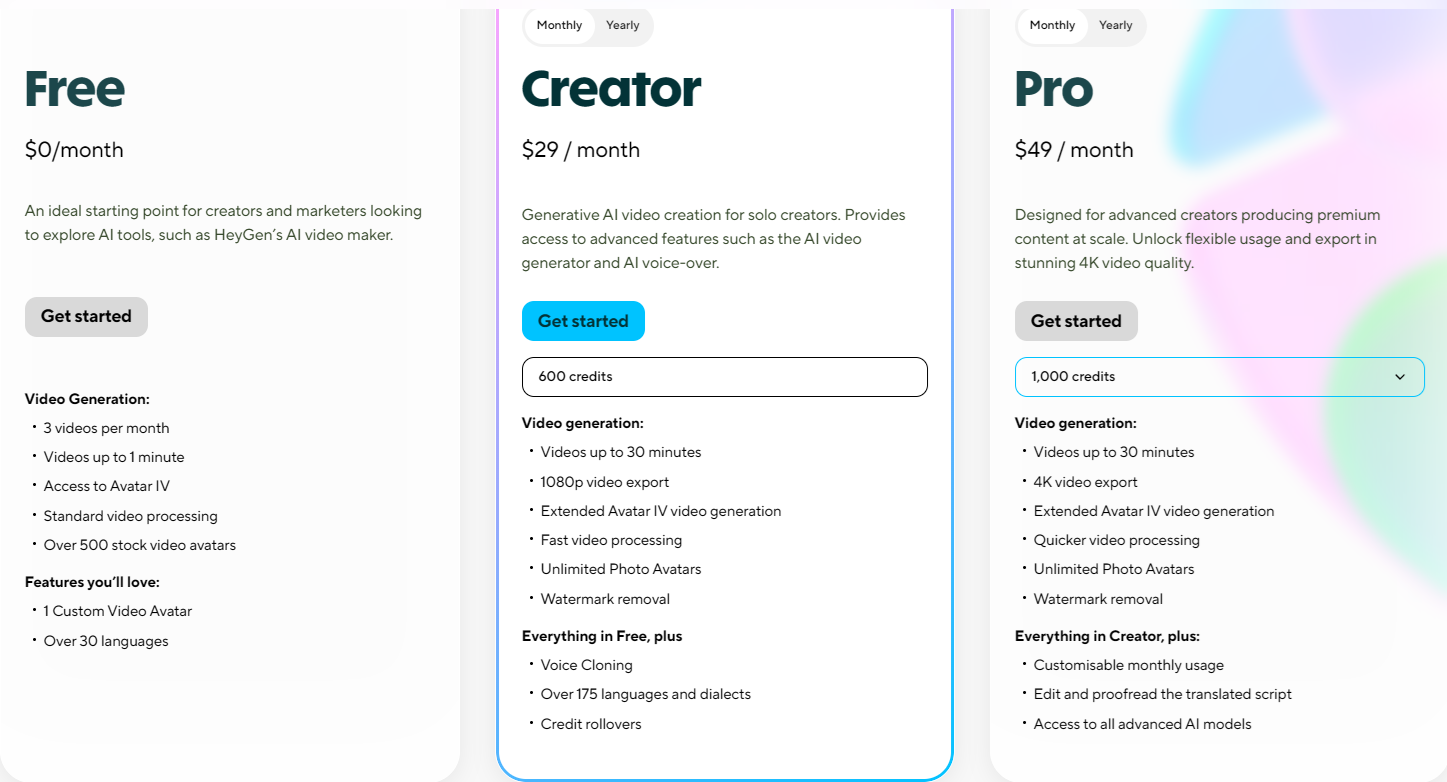
HeyGen's pricing, as captured on our own account:
- Free: $0/month, 3 videos per month, up to 1 minute each, access to Avatar IV, standard processing, 500+ stock avatars, 1 custom video avatar, and 30+ languages.
- Creator — $29/month (HeyGen's help center lists $24/month billed annually): 600 credits, videos up to 30 minutes, 1080p export, extended Avatar IV generation, faster processing, unlimited photo avatars, watermark removal, voice cloning, 175+ languages and dialects, and credit rollover.
- Pro — from $49/month: flexible credit tiers starting at 1,000, 4K export, quicker processing, editing and proofreading of translated scripts, and access to all advanced AI models.
- Business and Enterprise: per HeyGen's help center, Business is $149/month plus $20 per seat with 1,500 credits and SSO, and Enterprise is custom.
The free plan doesn't list watermark removal, while Creator and Pro do, which suggests free videos carry a watermark, though we haven't confirmed that ourselves. On credits, third-party summaries put Avatar IV or V video at roughly 20 credits per minute, which would make 600 credits about 30 minutes of premium avatar video. We couldn't confirm that rate on a HeyGen page, and it doesn't capture what our tester actually experienced: credits leaving quickly on advanced models and again on every regeneration. Treat any per-minute figure as a starting point for your own math, not a guarantee.
We did not test video translation. The pricing page lists 30+ languages on the free plan and 175+ on paid plans, but sources conflict on whether lip-synced translation is available on the free plan, so check that directly before relying on it.
Deepfake Concerns and HeyGen's Safeguards
Realistic avatars and cloned voices raise obvious misuse concerns, so it's worth knowing what HeyGen says it does about them. Per HeyGen's own help center, creating a video-based digital twin requires a recorded consent video, and if you're making an avatar of someone else, that person records their own consent, which they can do by scanning a QR code on their phone. HeyGen's moderation policy bans avatars of real people without consent, as well as content involving minors and sexual, violent, hateful, or deceptive material, and describes automated detection followed by human review. Its trust page lists SOC 2 Type II, GDPR, and CCPA compliance and an appeals process for enforcement decisions.
Two limits to be honest about. We did not go through the consent flow ourselves, since we didn't create a digital twin. And we didn't find documentation of a provenance or watermarking standard for generated videos beyond the free-plan watermark, nor confirmation of specific consent rules for voice cloning, so those questions remain open on our side.
What Other Users Say
What Other Users Say
This comes from other users' reviews, not our own test. Reviewers praise ease of use and realistic avatars. The recurring complaints line up closely with our own concerns: credits being consumed fast (one reviewer summed it up as easy to use but expensive in credits), inconsistent or unresponsive support, lip-sync problems, and glitches or account restrictions. On G2, HeyGen scores higher, 4.8/5 from about 1,924 reviews, a smaller gap between platforms than we've seen with some other tools in this category, though still worth weighing when you decide which rating to trust.
Sources: Trustpilot, G2 (retrieved 19 September 2026).
HeyGen vs Higgsfield
HeyGen and Higgsfield are built for different jobs but share the same pricing pain. Higgsfield generates creative video clips from prompts using models like Seedance and Kling. HeyGen produces presenter-style videos from a script with a talking avatar. What they have in common is a credit model where heavier or higher-end use burns through your allowance faster than the sticker price suggests, and both scored low on pricing value in our reviews. Pick by the output you need, and budget credits carefully either way.
| Criteria |  Higgsfield Higgsfield |
HeyGen |
|---|---|---|
| Our framework score | 7.0/10 | 6.6/10 |
| What it makes | Creative video clips generated from prompts | Presenter videos with a talking avatar, from a script |
| Pricing value | 4/10 | 3/10 |
| Cheapest paid plan | $9/mo billed annually (120 credits) | $29/mo billed monthly (600 credits) |
| Best for | Creators who want fast, professional-looking AI video and can budget for Pro or Max | Creators and teams who want camera-free talking-avatar videos, with credits budgeted carefully |
Pros
- Quick and simple to use: a finished avatar video in a few clicks, with no editing skills
- Convincing lip-sync and natural facial expressions, one of HeyGen's clearest strengths
- Camera-free production: no studio, actor, or traditional editing needed
- A broad workspace beyond avatars: translation into 175+ languages, PPT/PDF to video, batch mode, and more
- Documented consent and moderation safeguards for digital twins
Cons
- Credits go quickly, especially with advanced models, and a failed generation means paying again to retry
- Results can be inconsistent between generations, with glitches on hands and details
- Head and mouth movement can look exaggerated with Avatar V
- Renders can be slower during periods of heavy demand
- The free plan is very limited: three videos a month, up to one minute each
FAQ
Is HeyGen free to use?
There's a free plan, but it's limited to 3 videos a month of up to 1 minute each, with a smaller feature set than the paid plans. Paid plans start at $29/month for Creator (600 credits).
Do HeyGen credits run out quickly?
According to our tester, yes, especially with the more advanced models, and a failed generation has to be redone, which can cost more credits. Our tester rates credit consumption as the single most important thing to watch on this tool.
Is HeyGen safe to use for making avatars of real people?
HeyGen says it requires a recorded consent video to create a digital twin, and its moderation policy bans avatars of real people without their consent. We didn't go through the consent flow ourselves, so we can only report what HeyGen documents.
Is HeyGen better than Higgsfield?
They do different jobs: HeyGen makes talking-avatar presenter videos from a script, while Higgsfield generates creative video clips from prompts. Higgsfield scored slightly higher overall in our reviews (7.0 vs 6.6), but both scored low on pricing value because of credit-based costs.
Try HeyGen
HeyGen's free plan lets you generate a few short avatar videos and judge the lip-sync and quality yourself, though you'll want to do the credit math before committing to a paid plan.
Try HeyGen →