Udio Review 2026: Great Music, but You Can't Download It Right Now


Quick Verdict
// Hands-on testedTeknexia AI Tool Evaluation Framework
Scored against our site-wide 5-criteria framework, from our own hands-on test on a real Udio account, combined with Udio's own Help Center and pricing page for the parts that don't come from direct use. This is the fourth and final entry in our AI Audio category, alongside Suno, ElevenLabs, and Murf.
Overall: 6.0/ 10
Udio is an AI music generation tool that turns a text description, a style reference, or your own lyrics into a finished track, with real instrumentation and vocals. We tested it on a real, active account: generating tracks from both the Describe and Use a Style workflows, comparing output quality, and checking pricing and account limits directly. This is the fourth and final review in our AI Audio category, and it's the tool closest in positioning to Suno, which we compare directly below.
Before you subscribe, know this: since October 2025, Udio has disabled downloads of audio, video, and stems for every account, free and paid, as part of an ongoing licensing transition following its settlement with Universal Music Group (with additional deals since signed with Warner Music Group, Merlin, and Kobalt). A brief 48-hour window let users pull existing songs in early November 2025, but as of this review in September 2026, downloads remain disabled, per Udio's own Help Center, with no firm restoration date, only that Udio hopes to re-enable them once a fully licensed version of the platform launches "later in 2026." If you're paying specifically to own and export your creations, that isn't currently possible, and there's no confirmed date for when it will be again.
- Udio's music and vocal quality genuinely impressed us in testing: clean, wide-stereo mixes and convincing vocal detail (vibrato, pitch glides, breath), especially on female vocals, with the v4 model holding together on tracks up to 10 minutes.
- Downloads have been disabled for all users, free and paid, since October 2025, during Udio's licensing transition with major labels, and remain disabled as of this review with no confirmed restoration date.
- Control is limited to roughly 30-second segments, and results aren't always predictable or reproducible, a real workflow constraint compared to more steerable tools.
- Udio confirms on its own Help Center that it doesn't currently run an affiliate program.
What We Tested, and What Happened
We ran this test on a real, active Udio account, using both the "Describe Your Song" and "Use a Style" tabs.
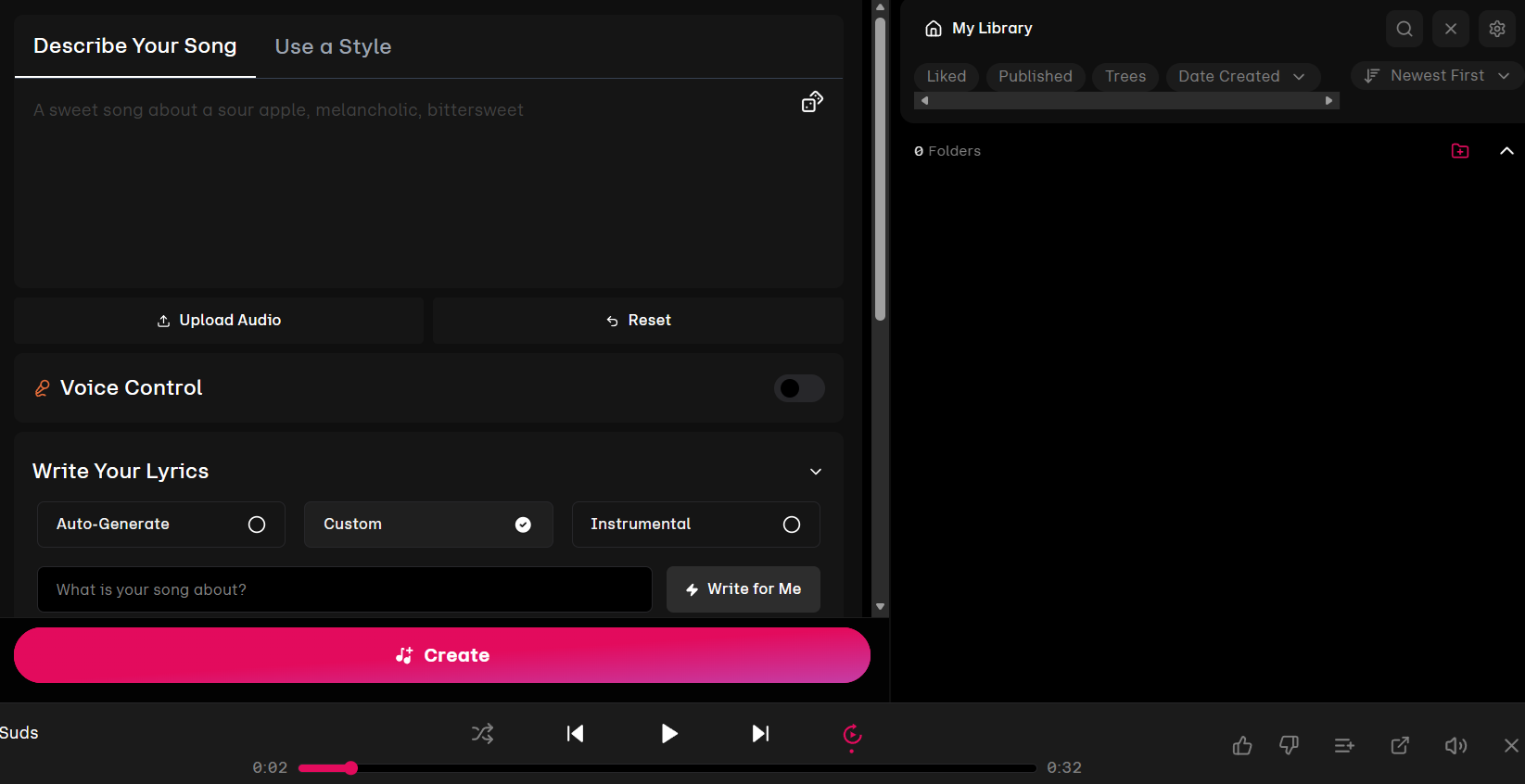
Describing a song and generating it was, in our own experience testing it, perfect and quick, a finished track came back fast with no real learning curve. The audio itself was clean and well-mixed, with a noticeably wide stereo image and detailed bass and treble. Vocal rendering stood out specifically: vibrato, pitch glides, and audible breath all came through convincingly, and this was especially strong on the female vocal takes we generated. On a longer generation using the v4 model, the track held together for close to 10 minutes without the arrangement drifting or losing coherence.
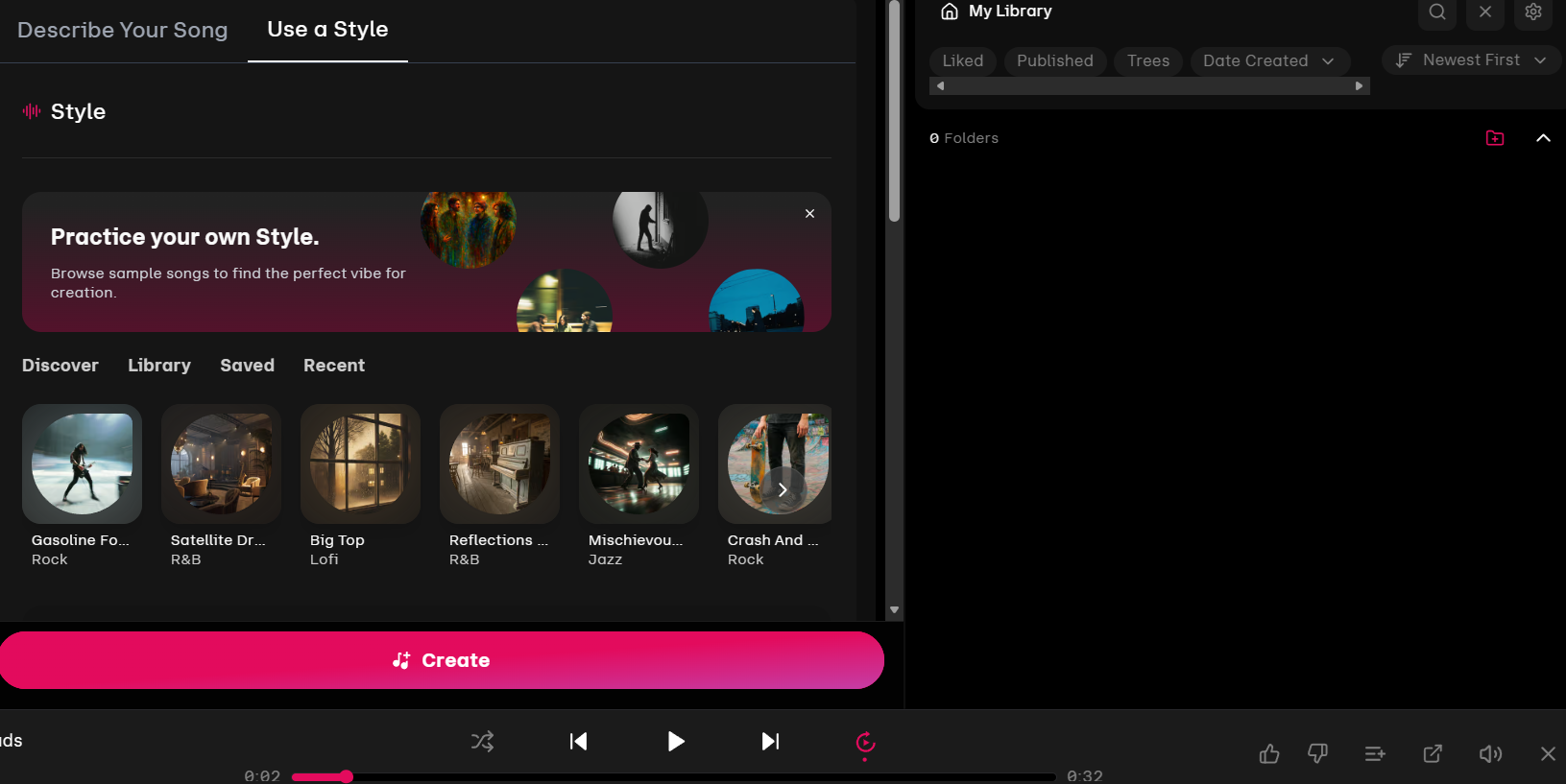
The Use a Style tab worked as a genre-first alternative to writing a prompt from scratch, useful for finding a vibe quickly rather than describing one in words. Where we ran into real friction was control: Udio generates in roughly 30-second segments, and asking for the same kind of result twice didn't reliably produce something close to the first attempt. That unpredictability is a real workflow cost if you need a specific, reproducible outcome rather than a good surprise.
What Udio Actually Is
Udio generates full songs, instrumentals, and vocals from a text description, a style reference, or your own lyrics, competing most directly with Suno in the AI music generation space. Paid tiers add Voice Control, the ability to upload your own audio as a style reference, lyric editing, and higher generation limits, per Udio's own product pages.
Pricing, in Detail
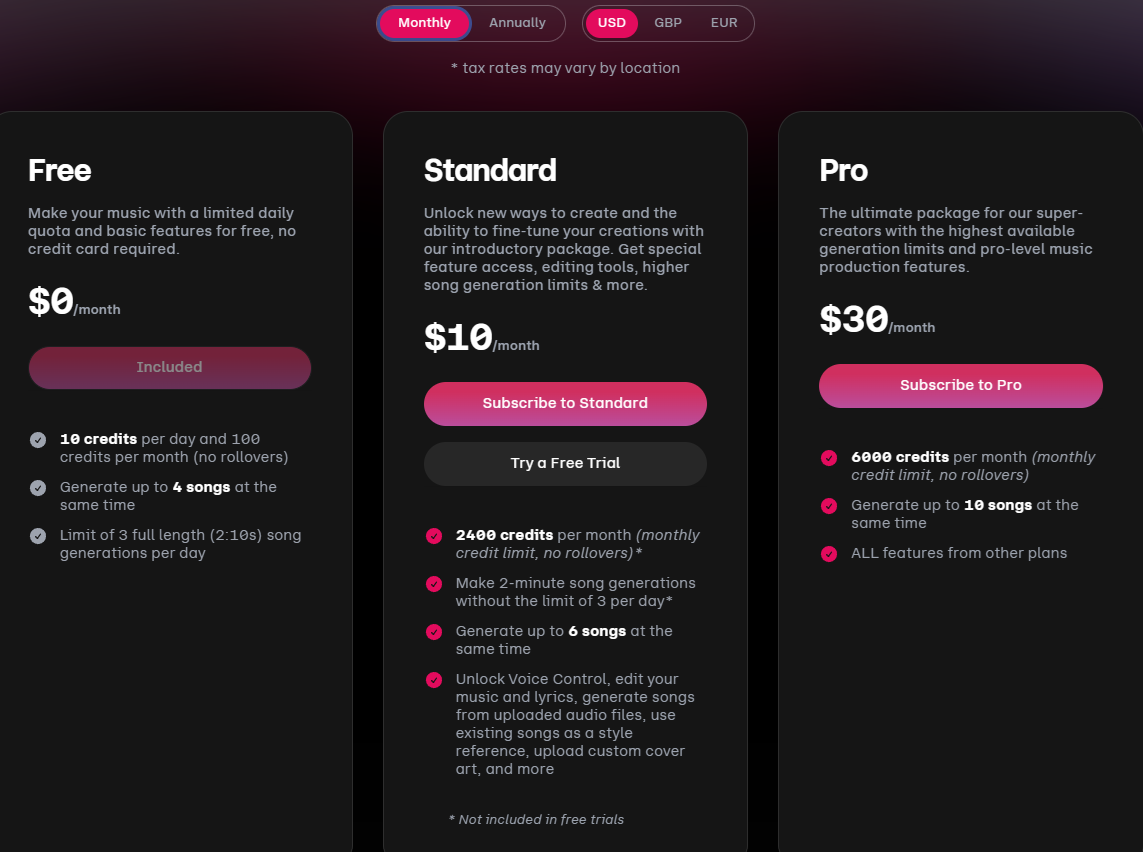
Udio's pricing, confirmed directly on our own account:
- Free: $0/mo, 10 credits per day and 100 credits per month with no rollover, up to 4 songs generated at the same time, and a limit of 3 full-length (2:10) song generations per day.
- Standard — $10/mo: 2,400 credits per month, 2-minute song generations (up to 3 per day), up to 6 songs at once, and access to Voice Control, lyric editing, audio uploads as a style reference, and custom cover art.
- Pro — $30/mo: 6,000 credits per month, up to 10 songs at once, and every feature from the plans below it.
We tested with monthly billing selected; Udio's account settings didn't surface annual pricing at the time of our test, so if you're specifically looking for an annual discount, confirm that directly on Udio's own pricing page before subscribing.
What Other Users Say
Udio holds a 1.5 out of 5 on Trustpilot, from 58 reviews, with 76% of those at one star, confirmed by loading Trustpilot's page directly. The download restriction we documented above is, by a wide margin, the most cited complaint in these reviews, followed by unclear licensing and ownership terms even for paying subscribers, inconsistent prompt adherence, and billing or refund complaints. That pattern lines up exactly with what we found testing the product ourselves: strong output, undermined by a real, current limitation on what you can actually do with what you generate.
Udio vs Suno
Udio and Suno are the two most directly comparable tools in our AI Audio category: both generate full songs from a text prompt, and both are positioned for creative prototyping rather than professional mixing and mastering. Where they diverge sharply right now is downloads: Suno's paid and free tiers both let you export what you generate, while Udio has had all downloads disabled since October 2025 during its licensing transition. For anyone who needs to actually own and use their output today, that's a meaningful difference, not a minor one.
| Criteria |  Suno Suno | Udio |
|---|---|---|
| Our framework score | 7.0/10 | 6.0/10 |
| Can you download what you make? | ✓ Yes | ✗ No, disabled since October 2025 |
| Vocal realism | Leaned robotic in places in our test | Convincing vibrato, pitch glides, and breath in our test |
| Free plan | 50 credits/day, no commercial rights | 10 credits/day, 100/mo, no rollover |
| Best for | Fast musical ideation you can actually keep and use | Vocal-focused prototyping, if you can accept not downloading it yet |
Pros
- Generation felt perfect and quick in our test, with no learning curve to a usable first result
- Clean, well-mixed audio with a wide stereo image and detailed bass and treble
- Genuinely impressive vocal rendering, vibrato, pitch glides, and breath, especially on female vocals
- The v4 model held together on tracks up to 10 minutes without the arrangement drifting
Cons
- All downloads (audio, video, stems) have been disabled for every account, free and paid, since October 2025, with no confirmed restoration date
- Paying a subscription without being able to download your creations is a structural problem right now, not a minor inconvenience
- Control is limited to roughly 30-second segments, and results weren't always predictable or reproducible in our test
- Trustpilot rating (1.5/5, 58 reviews) is dominated by complaints about the same download restriction we documented directly
FAQ
Can I download the songs I make on Udio?
Not currently. Udio disabled downloads of audio, video, and stems for all accounts, free and paid, in October 2025 during its licensing transition with major labels, and downloads remain disabled as of this review, per Udio's own Help Center, with no confirmed restoration date.
Why did Udio disable downloads?
Per Udio's own Help Center, it's tied to licensing changes following Udio's settlement with Universal Music Group, with additional deals since signed with Warner Music Group, Merlin, and Kobalt. Udio has said it hopes to re-enable downloads once a fully licensed version of the platform launches later in 2026, without a firm date.
Is Udio better than Suno?
Based on our testing of both, Udio's vocal realism was more convincing, but Suno lets you actually download and keep what you generate, which Udio currently does not. If exporting your output matters to you today, that's the deciding factor.
Does Udio have a free plan?
Yes. The free plan gives 10 credits per day and 100 per month with no rollover, enough for up to 3 full-length songs a day, confirmed directly on our own account.
Try Udio
Udio's free plan lets you judge the output quality yourself, but go in aware that downloading what you generate isn't currently possible on any plan, free or paid.
Try Udio →