Murf AI Review 2026: We Tested a Real Voiceover, Start to Finish


Quick Verdict
// Hands-on testedTeknexia AI Tool Evaluation Framework
Scored against our site-wide 5-criteria framework, from our own hands-on voiceover test on a real Murf AI account, combined with Murf's public pricing page for the tiers we didn't test directly. This is the canonical score for Murf AI, the third entry in our AI Audio category.
Overall: 7.4/ 10
Murf AI is a text-to-speech and voiceover platform built around a block-based script editor, a library of 200+ voices across 20+ languages, and per-line controls for pitch, speed, emphasis, and pronunciation. We tested it directly: a real script, generated and refined through the live app on an active account, checked against Murf's own pricing and documentation for the tiers and tools we didn't use ourselves. This is the third review in our AI Audio category, and it's labeled Hands-on tested for the parts we verified directly.
- Voice quality was genuinely realistic in our own test, and Murf's library spans 20+ languages, not just English (Teknexia Hub testing, August 2026).
- Not every line sounded natural on the first generation — we used the pitch, emphasis, and pronunciation tools ourselves to fix specific words and phrases, and that fixed them.
- Our overall conclusion after testing: Murf AI is a reliable tool for voiceover projects, particularly for users who want good audio quality and don't mind a short refinement pass.
- The free plan gives 10 real minutes of generation with no commercial rights — enough to genuinely evaluate voice quality before paying anything.
What We Tested, and What Happened
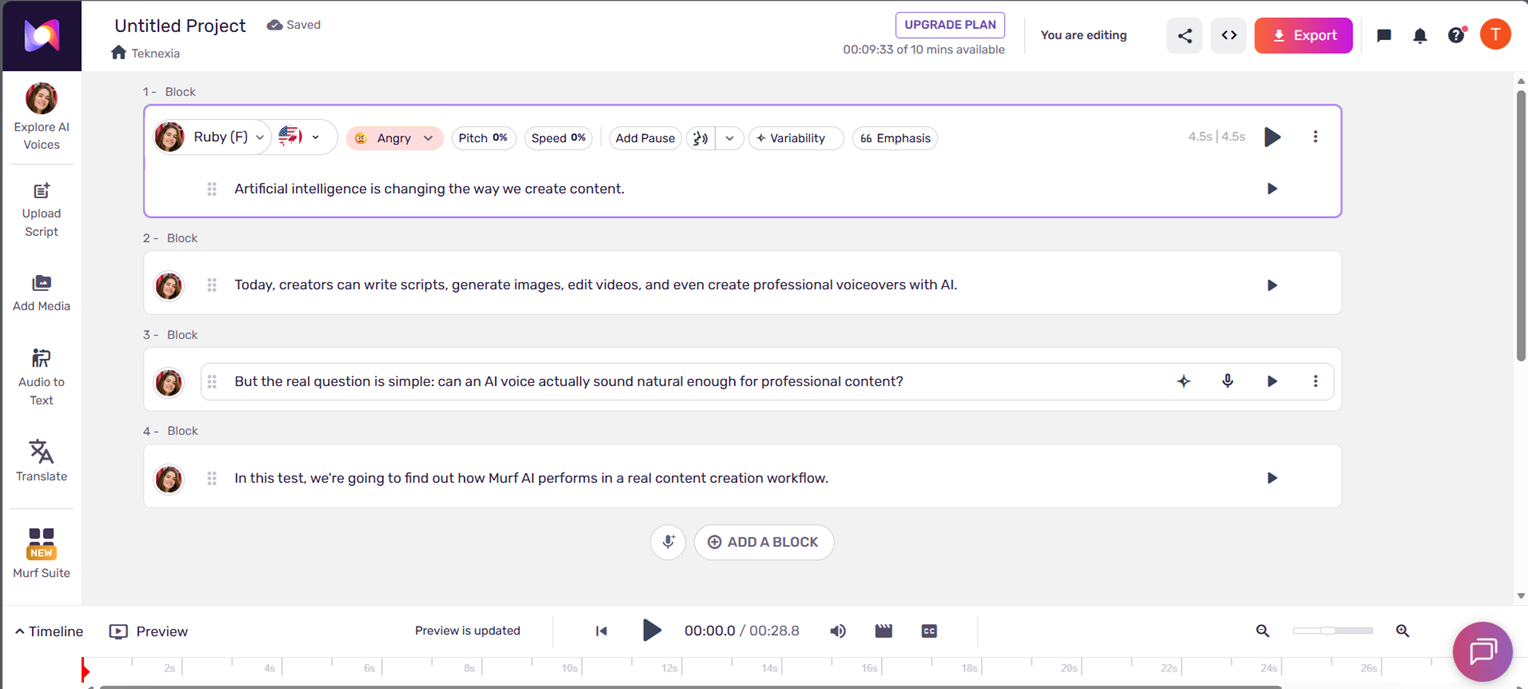
We ran this test on an active Murf AI account, the free plan's 10-minute budget. We wrote a short script directly in Murf's block-based editor, one block per sentence: “Artificial intelligence is changing the way we create content. Today, creators can write scripts, generate images, edit videos, and even create professional voiceovers with AI. But the real question is simple: can an AI voice actually sound natural enough for professional content? In this test, we're going to find out how Murf AI performs in a real content creation workflow.”
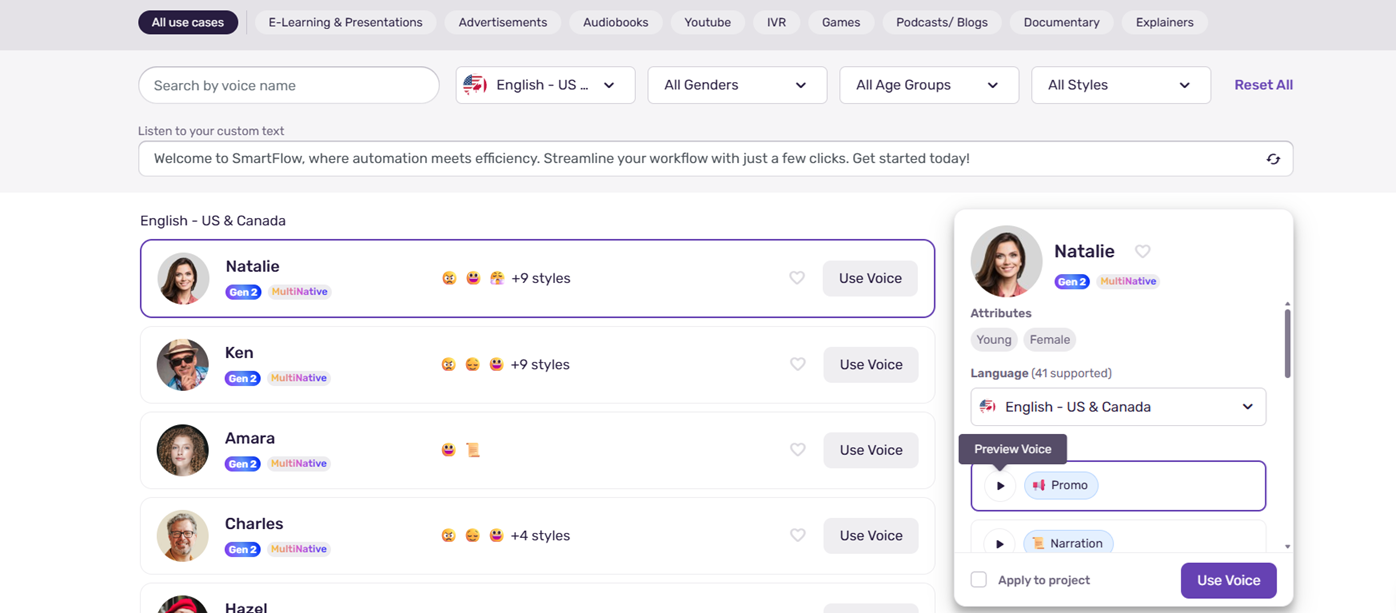
We picked a voice from the library, generated the full script, and listened critically rather than accepting the first pass. The overall quality was genuinely good: clear, well-paced, and realistic enough to pass for professional narration on most lines. A few specific words came out with slightly off emphasis or pronunciation on the first try — not a dealbreaker, but a real, honest observation, not every line was perfect out of the gate. We used Murf's own tools to fix that directly rather than accepting a flawed take.
Our Test Protocol
These notes document what we did during testing — they are separate from the 5-criteria Teknexia AI Tool Evaluation Framework score in the Quick Verdict above, not a replacement or duplicate of it.
| Test | Prompt | Result | Note |
|---|---|---|---|
| Script-to-voiceover generation | “Artificial intelligence is changing the way we create content… In this test, we're going to find out how Murf AI performs in a real content creation workflow.” (full script above), 4 blocks | Clear, realistic narration overall; a few words needed pronunciation or emphasis fixes | Good, not flawless on the first pass |
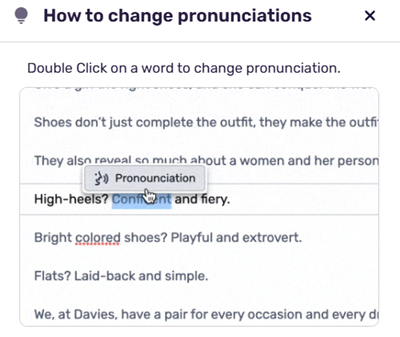
| Pronunciation correction | — (per-word fix on flagged terms) | Double-click a word, choose the corrected pronunciation, regenerate that block only | Fixed the issue directly |
| Free-plan budget | — (account check) | 10 minutes total on the free plan, confirmed in our account's usage counter | Enough to genuinely test quality |
What we didn't test
One short script tells us Murf's core voice quality and correction tools are real, but it doesn't cover the rest of the platform. We haven't tested dubbing, the API, voice cloning (Enterprise-only), or the Canva and Google Slides integrations ourselves, and we haven't tested the Creator or Business tiers directly — our account ran on the free plan for this test. For those, this review leans on Murf's own documentation rather than our own use, and we'll expand it as we test more of the platform.
What Murf AI Actually Is
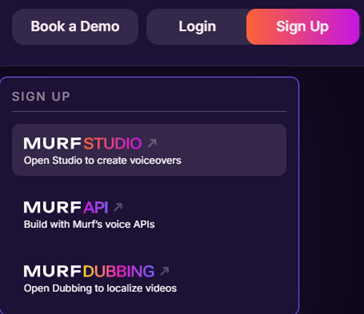
Murf AI is a text-to-speech and voiceover platform built around a library of 200+ voices across 20+ languages, a block-based script editor, and per-line controls for pitch, speed, pauses, emphasis, and pronunciation (Murf AI, 2026). Past the core editor, the product menu we saw in our own account lists Murf Studio (the main voiceover editor), Murf API, and Murf Dubbing for localizing video, alongside integrations with tools like Canva and Google Slides that we haven't tested ourselves yet.
Murf AI Pricing and the Free Plan, in Detail
Murf's pricing page is a JavaScript-rendered app that doesn't expose plan details to a simple page fetch, so we cross-referenced multiple independent sources against our own account's free-plan usage counter (10 minutes, confirmed hands-on) rather than relying on a single source.
| Plan | Monthly | Billed annually | Key limits |
|---|---|---|---|
| Free | $0 | — | 10 minutes total · no commercial use (confirmed hands-on) |
| Creator | $29/mo | $19/mo | 24 hours/year · 200+ voices · commercial rights |
| Business | $99/mo | $66/mo | 96 hours/year (annual) or 20 hours/month (monthly) |
| Enterprise | Custom | Custom | Adds voice cloning and enhanced security |
What Users Report
Trustpilot's own site returned an automated bot-detection challenge when we tried to verify Murf's exact rating directly, the same block we've run into reviewing other tools in this category. Third-party sources report a strong rating, around 4.7 out of 5 on roughly 185 reviews; since we couldn't confirm that figure against Trustpilot's own page, we're reporting it as a third-party figure, not a number we verified ourselves.
What we can report, cross-referenced across multiple independent sources, are recurring patterns:
- Recurring positives: ease of use and realistic voice quality are praised consistently, which matches what we found in our own test, along with responsive customer support in a number of reports.
- Recurring complaints: a strict refund policy (a request window measured in minutes of usage), premium voices gated behind higher tiers, and non-English voices, particularly Spanish and Hindi, described as less natural than the English output — we tested in English ourselves, so we can't independently confirm that gap.
What Other Users Say
We could not access Trustpilot directly to confirm this figure. Recurring themes across the sources we found: strong praise for ease of use and voice realism, alongside a frequently-cited strict refund window and criticism of some non-English voice quality.
Sourced from multiple third-party review aggregations (retrieved 12 August 2026); Trustpilot's own page could not be accessed directly.
Murf AI vs ElevenLabs
Both tools are reviewed here as Hands-on tested, so this comparison rests on two real tests rather than one tested tool against marketing copy. They overlap more directly than Murf does with Suno: both are text-to-speech and voice platforms, positioned closer to each other than either is to Suno's music generation.
| Criteria | Murf AI | ElevenLabs |
|---|---|---|
| Core use case | Scripted voiceovers from a voice library, confirmed hands-on | Voice cloning from a real sample, confirmed hands-on in our ElevenLabs review |
| Free plan | 10 minutes total, confirmed hands-on | 10,000 credits, confirmed hands-on in our ElevenLabs review |
| Entry paid price | $19/mo (Creator, billed annually) | $6/mo (Starter) |
| Output in our test | Good overall, some lines needed manual pronunciation/emphasis fixes | Close, convincing match to the cloned source voice |
| Language coverage | 200+ voices across 20+ languages, per Murf's own site | 70+ languages, per ElevenLabs' own site (not independently tested by us on either) |
| Review method here | Hands-on tested | Hands-on tested |
Pros & Cons of Murf AI (2026)
Pros
- Genuinely realistic voice quality in our own test, across a library that spans 20+ languages
- Per-word pronunciation correction and per-line pitch/speed/emphasis controls worked as expected and fixed the specific issues we found
- Block-based script editor was easy to pick up with no prior audio experience
- Free plan gives 10 real minutes, enough to genuinely judge voice quality before paying
- Our overall conclusion after testing: a reliable tool for voiceover work, especially for users prioritizing audio quality
Cons
- Not every line sounded natural on the first generation in our test — some needed manual pitch, emphasis, or pronunciation adjustment, an honest limitation, not a one-off
- Paid plans meter usage in hours per year rather than offering unlimited generation
- Free plan has no commercial usage rights, per Murf's own terms
- We haven't tested dubbing, the API, voice cloning, or the Canva/Slides integrations ourselves yet
- Third-party reports describe non-English voices, particularly Spanish and Hindi, as less natural than English — we tested in English, so we can't confirm this ourselves
Frequently Asked Questions
Does Murf AI have a free plan?
Is Murf AI's voice quality actually good?
Can you fix mispronounced words on Murf AI?
How does Murf AI compare to ElevenLabs?
Our Murf AI Review Verdict
Murf AI does what it promises for the case we tested: a script, turned into a genuinely realistic voiceover, in a language library that goes well past English. Our honest read after testing it ourselves lines up with the plain conclusion we set out to check: Murf AI is a reliable tool for voiceover projects, particularly for users who want good audio quality and are willing to spend a few minutes fixing the odd line rather than expecting every word to land perfectly on the first try. The pronunciation and emphasis tools we used to fix our own script's rough spots worked exactly as intended, which matters more than a perfect first pass would — the correction path is real and it works. We haven't yet tested dubbing, the API, voice cloning, or Murf's paid tiers ourselves, so treat those parts of this review as resting on Murf's own documentation until we do. This verdict is Hands-on tested for the parts we verified directly: good, realistic voice quality that sometimes needs a manual touch-up, a real correction workflow that works, and a free plan generous enough to judge it yourself before paying.