
Higgsfield AI Review 2026: We Tested It and Ran the Real Credit Math


Quick Verdict
// Hands-on testedTeknexia AI Tool Evaluation Framework
Scored against our site-wide 5-criteria framework. This is the canonical score for Higgsfield AI — it also appears on the AI Video Tools category page, pulled live from this page.
Overall: 7.0/ 10
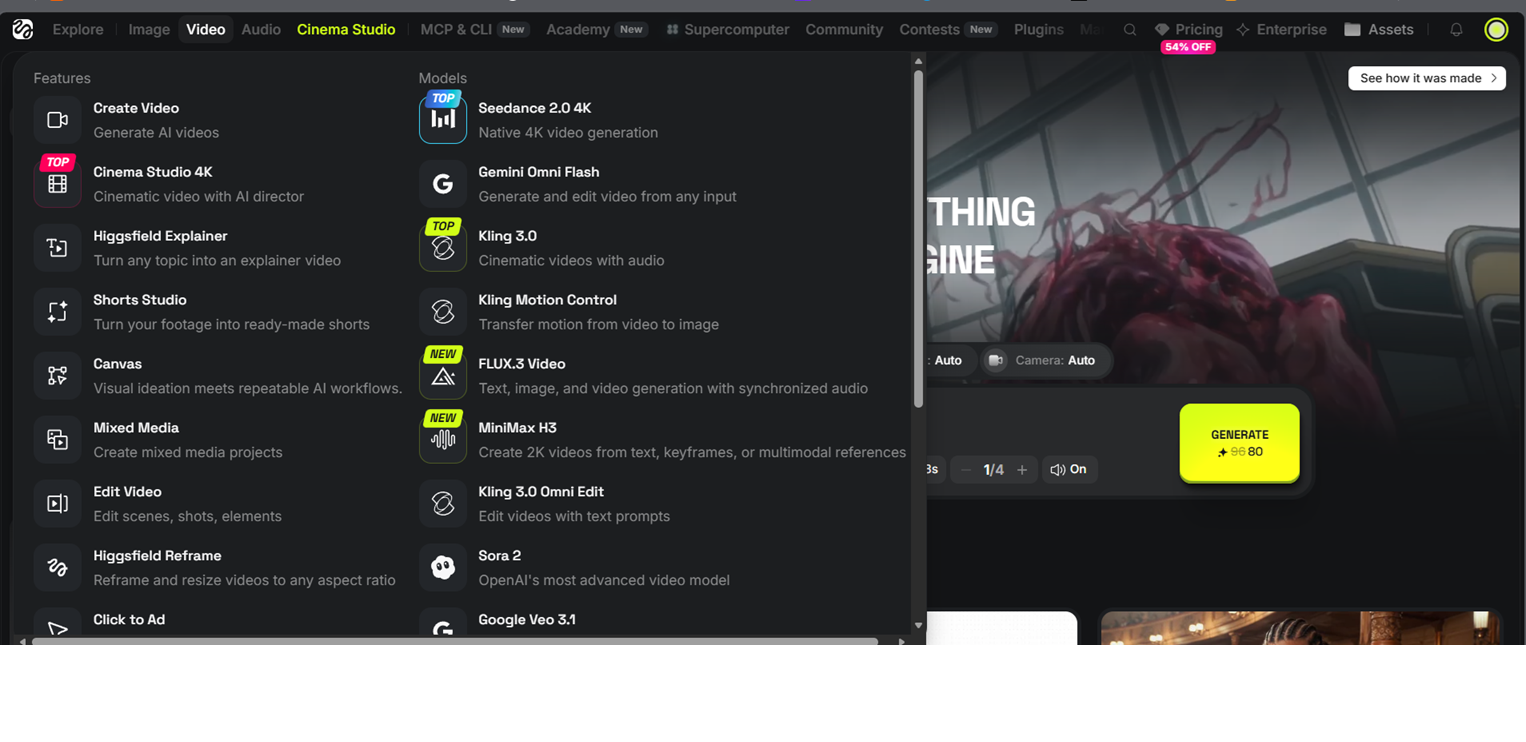
Higgsfield AI turns a text prompt into video across a catalog of top-tier models — Seedance 2.0, Kling 3.0, Nano Banana Pro, and others — inside one workspace. We tested it hands-on to see whether the output quality holds up and, just as importantly, what it actually costs to use it regularly rather than just try it once.
- The interface was intuitive and pleasant to use even without prior AI video experience — picking a model, writing a prompt, and generating didn't require a learning curve (our own test, 2026).
- Generating an 8-second, 1080p, 9:16 talking-creator video with Seedance 2.0 took about 1 minute and cost 72 credits at a discounted rate (down from a standard 96) — our test.
- Higgsfield's real constraint isn't quality, it's credits: even the $59–$79/mo Max plan tops out around 80 Seedance 2.0 videos a month before you need extra credit purchases or a Team plan (Higgsfield, 2026).
- Higgsfield holds a 4.0/5 rating on Trustpilot across 3,653 reviews, with free-tier credit confusion as the most common complaint (Trustpilot, retrieved 2026).
What Is Higgsfield AI Used For?
Higgsfield AI is a prompt-to-video generation platform built around access to multiple top-tier AI models — Seedance 2.0 and 2.5, Kling 3.0, Nano Banana Pro and Nano Banana 2, plus audio via ElevenLabs — all inside one project-based workspace instead of separate subscriptions to each model provider (Higgsfield, 2026). Beyond straight text-to-video, it packages purpose-built tools on top of those models: Cinema Studio for cinematic sequences, Shorts Studio, Higgsfield Explainer, Canvas for mixed image/video work, and Supercomputer for higher-throughput generation.
Everything runs on a credit system: each generation consumes credits at a rate that depends on the model, resolution, and clip length you choose, which is the mechanic behind both its flexibility and its main cost complaint (see the pricing section below).
What We Actually Tested
We generated an 8-second, 1080p, vertical (9:16) video using the Seedance 2.0 model, with High quality and audio on, from a prompt describing a content creator talking to camera at a desk.
Our Test Protocol
These notes document what we did during testing — they are separate from the 5-criteria Teknexia AI Tool Evaluation Framework score in the Quick Verdict above, not a replacement or duplicate of it.
| Test | Prompt & settings | Result | Note |
|---|---|---|---|
| 9:16 talking-creator video (Seedance 2.0) | "A confident content creator sitting at a modern desk, talking directly to camera, natural hand gestures, soft studio lighting, smooth camera push-in, 9:16 vertical format for social media." · 1080p, 8s, High quality, audio on | Generated in about 1 minute; cost 72 credits at a discounted rate (down from 96) | Output quality was decent and usable, not flawless — a solid first take rather than an exceptional one |
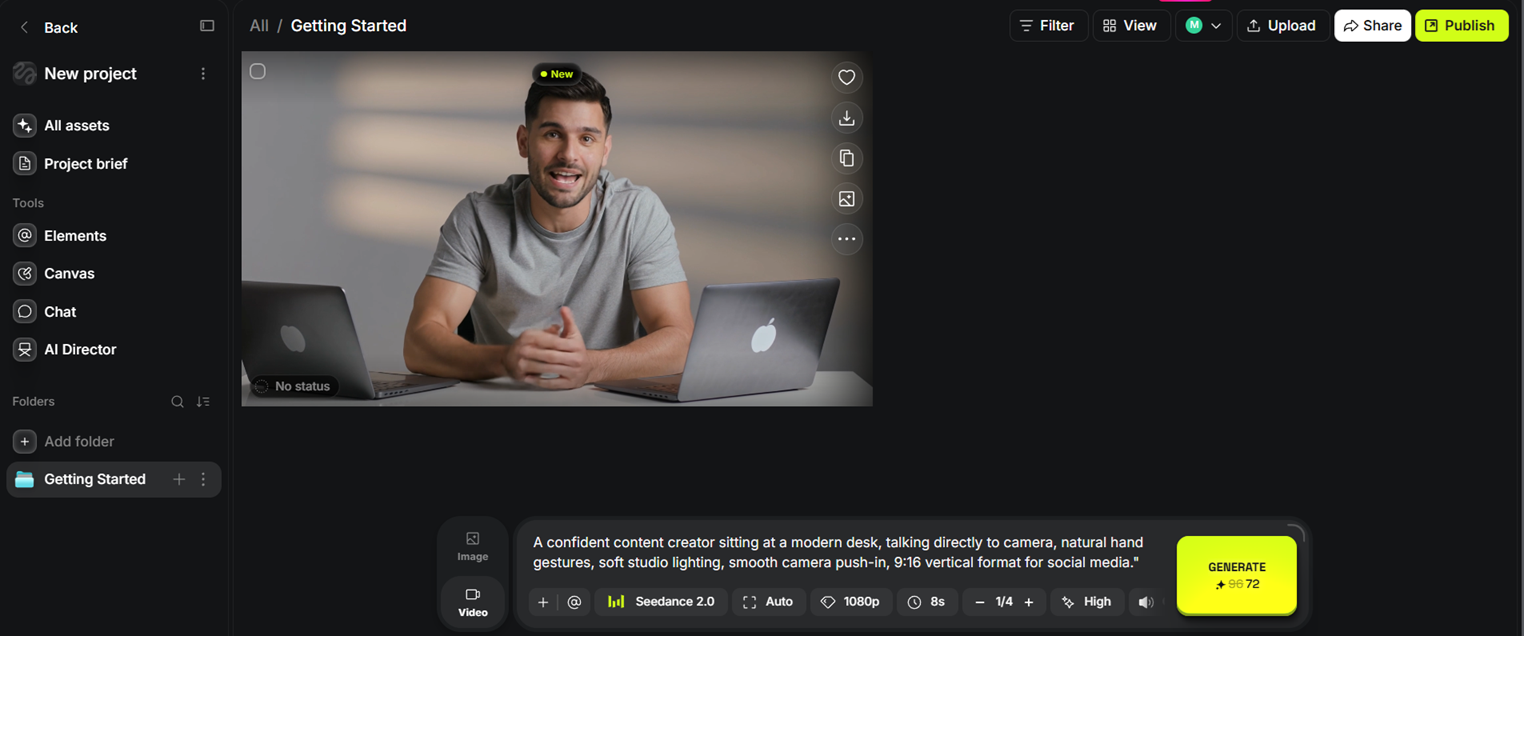
The generation itself matched what varied models and quickly professional results promise: no manual keyframing, no technical setup, a usable clip from a single plain-language prompt in about a minute. What it doesn't remove is the credit meter running in the background — a single 8-second clip at these settings used more than half the entire monthly allowance on the $9 Basic plan.
Pricing in 2026: The Real Cost of Regular Use
Higgsfield bills in credits, and the credit-to-dollar rate actually improves on higher tiers — $1 buys roughly 14 credits on Basic, 27 on Pro, and 31 on Max (Higgsfield, 2026). That structure rewards committing to a bigger plan, which is exactly where the cost friction shows up for anyone using it casually.
Basic is $9/month billed annually for a fixed 120 credits/month — enough for roughly 7 Seedance 2.0 Fast videos, with no access to unlimited or free-generation models and no Seedance 2.5. Pro runs $23–$29/month billed annually depending on the credit tier you pick (600–900 credits/month), covering roughly 27 Seedance 2.0 videos a month at the top tier and adding 7-day unlimited windows on Nano Banana 2 and Kling 3.0. Max runs $59–$79/month billed annually for 1,800–5,400 credits/month, roughly 80 Seedance 2.0 videos a month at the top tier, with the lowest per-credit cost and 7-day unlimited access to Nano Banana Pro (Higgsfield, 2026).
Those "unlimited" windows matter, because standard credit-metered generation adds up fast otherwise. Higher-fidelity choices — 4K output, Seedance 2.5, Kling 3.0 Omni Edit — draw down credits noticeably faster than the Fast/Mini tiers we tested with. For anyone generating video regularly rather than occasionally, that's the gap between the advertised entry price and what a real workflow costs: matching our own reviewer's experience that avoiding a mid-month credit shortfall on a genuinely active workflow takes a Pro or Max plan, and can still run into the hundreds of dollars a month once 4K or premium models are part of the routine.
What Other Users Say
Higgsfield's Trustpilot reviews skew positive, with reviewers repeatedly praising the smooth, high-quality video and image generation, cinematic output, and support that's described as responsive and helpful. The recurring negative thread lines up closely with what we found in testing: several reviewers say the free-tier credits feel unusable in practice, since a number of models require a paid upgrade regardless of remaining credit balance, which some call misleading about what "free" actually gets you. Higgsfield's team appears to actively respond to negative reviews explaining plan limitations, which suggests the complaint is common enough to warrant a standing response process.
Source: Trustpilot (retrieved 5 August 2026).
Where Higgsfield Fits Among Our AI Video Tools
Higgsfield, Descript, and Opus Clip all sit in our AI Video Tools category, but they solve different problems and aren't really substitutes for each other — the table below is about fit, not a head-to-head score.
| Tool | What it does | Best for | Starting price |
|---|---|---|---|
| Higgsfield | Generates video from text prompts across multiple AI models | Creating new video content from scratch, no filming required | $9/mo (real regular use from ~$23–$29/mo) |
| Descript | Edits and cleans up existing video/podcast footage by editing a text transcript | Polishing footage you already recorded, not generating new footage | Free plan, paid from $12/mo · see review |
| Opus Clip | Repurposes long-form video into short social clips automatically | Turning an existing podcast or long video into multiple short clips | Free plan, paid from $15/mo · see review |
If you need footage from nothing — no camera, no talent, no shoot — Higgsfield is the tool of the three built for that job. If you already have raw footage and want to clean it up, Descript is the closer fit; if you have a long recording and want short clips out of it, that's Opus Clip's job. None of the three compete directly on the same task.
Is Higgsfield Worth the Cost for an Individual Creator?
Honestly, only conditionally. The generation quality and ease of use are genuinely there — our test produced a usable, professional-looking clip in about a minute with no learning curve. But the credit economics work against light, individual use: the $9 Basic plan's 120 fixed credits get consumed fast at anything beyond Fast/Mini model tiers, and getting real headroom means committing to Pro or Max, both billed annually. For a solo creator publishing occasionally, that's a real cost to weigh against the quality gain; for a brand or small team producing video regularly, the math looks a lot more reasonable.
Pros & Cons of Higgsfield AI
Pros
- Intuitive, pleasant interface even for someone new to AI video generation — no steep learning curve
- Wide catalog of top-tier models (Seedance, Kling, Nano Banana, Sora 2, Veo 3.1) inside one workspace
- Generated a usable, professional-looking 9:16 clip from a single prompt in about a minute in our test
- Credit-to-dollar rate improves on higher tiers, and 7-day unlimited windows on some models genuinely offset heavy use
Cons
- Real, regular use requires several hundred dollars a month to avoid running short on credits, per our own use and echoed in user reviews
- The $9 Basic plan's 120 fixed credits are consumed quickly — a single 8-second Seedance 2.0 clip in our test used more than half of it
- Higher-fidelity models (4K, Seedance 2.5, Kling 3.0 Omni) draw down credits noticeably faster than Fast/Mini tiers
- Free-tier credit confusion is the most common complaint in Higgsfield's own Trustpilot reviews
Frequently Asked Questions
Is Higgsfield AI free?
How much does Higgsfield really cost for regular use?
How long does it take to generate a video on Higgsfield?
Is Higgsfield good for beginners?
Our Higgsfield AI Verdict
Higgsfield delivers on the quality and ease-of-use promise — our test produced a professional-looking, usable video from a plain-language prompt in about a minute, with an interface that stayed intuitive throughout. The catch is entirely on price: a single test clip burned more than half a Basic plan's monthly credits, and real, regular use realistically needs a Pro or Max plan billed annually, with heavier workflows able to run into the hundreds of dollars a month. Good tool, real cost — budget for it before you commit.