
Zapier Review 2026: We Tested Copilot Firsthand


Quick Verdict
// Hands-on tested
Teknexia AI Tool Evaluation Framework
Scored against our site-wide 5-criteria framework. This is the canonical score for Zapier — it also appears on the AI Automation category page, pulled live from this page.
Overall: 7.4/ 10
Zapier's Copilot lets you describe an automation in plain language — "when a form is submitted, send an email and add a row to Google Sheets" — and get back a working Zap skeleton instead of building it trigger-by-trigger, action-by-action. We ran it hands-on across two different automation briefs to see how much of that skeleton actually holds up without manual fixes.
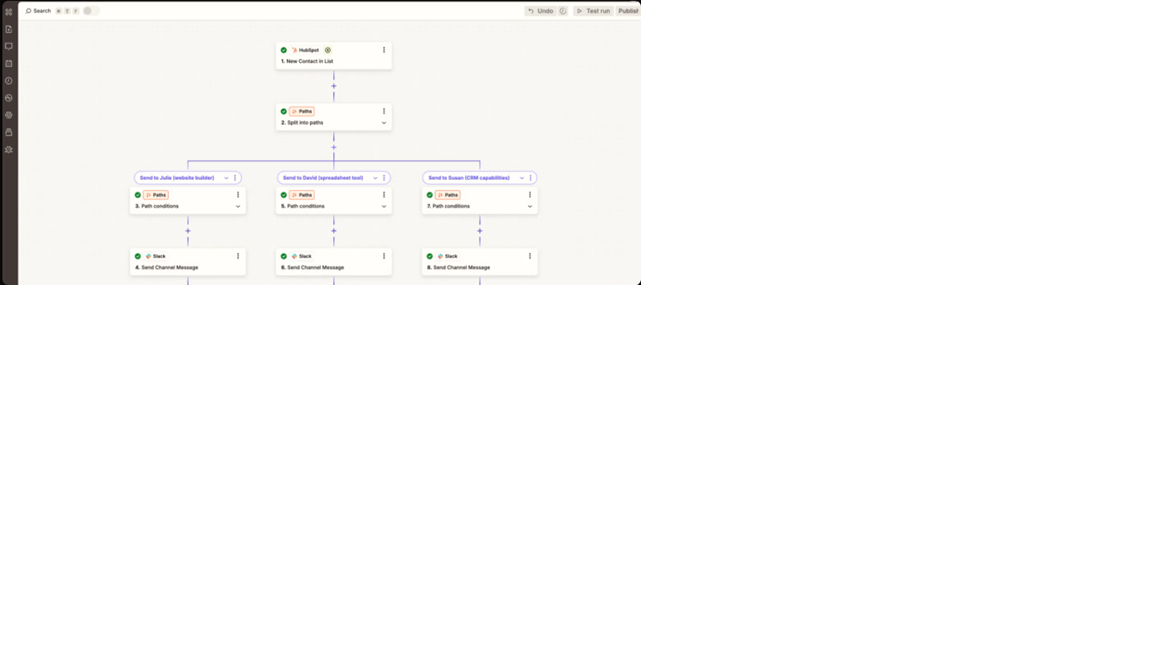
- Describing a lead-routing scenario in plain English produced a complete multi-branch Zap in under 30 seconds: a HubSpot trigger, a 3-way Paths split, and a Slack message on each branch (our own test, 2026).
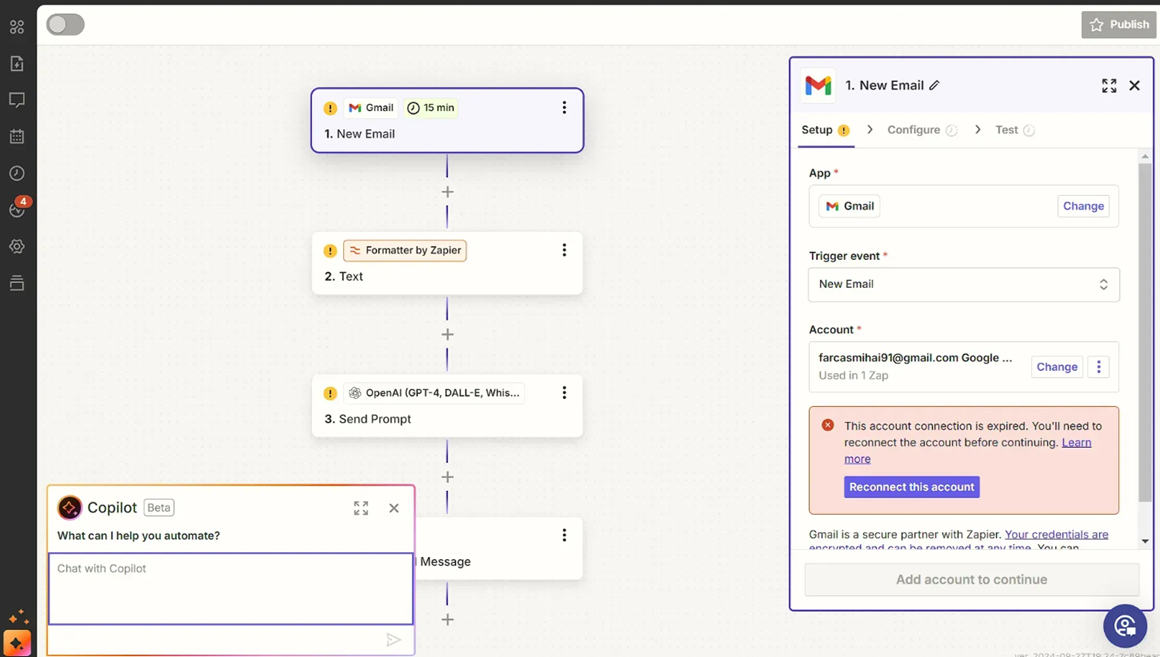
- A second test combining Gmail, a Formatter step, and an OpenAI prompt got the step sequence right, but still required us to manually reconnect and reauthenticate the Gmail account before the Zap could run — Copilot builds the structure, not the account connections.
- Copilot found the right apps in roughly 8 out of 10 cases in our broader use, but precise field mapping and picking the exact sub-folder or table often needed a manual fix afterward.
- Zapier's Free plan is real but narrow: 100 tasks/month and two-step Zaps only — AI-by-Zapier steps and multi-step automations require the $19.99/mo Professional plan (Zapier, 2026).
What Is Zapier Used For?
Zapier connects apps together so an event in one ("new form submission," "new HubSpot contact") triggers actions in others (send an email, post to Slack, add a spreadsheet row) — without writing code. Copilot is its AI layer: instead of manually picking a trigger and each action from Zapier's catalog of thousands of integrations, you describe the automation in plain English and Copilot proposes the steps (Zapier, 2026).
Copilot isn't limited to simple two-app Zaps either — it works across Zapier's broader product set, including multi-step Zaps with conditional Paths, Zapier Tables, and Forms.
What We Actually Tested
We gave Copilot two different automation briefs in plain language, with no manual trigger/action selection, to see how much of the result was actually usable as-is.
Our Test Protocol
These notes document what we did during testing — they are separate from the 5-criteria Teknexia AI Tool Evaluation Framework score in the Quick Verdict above, not a replacement or duplicate of it.
| Test | Brief given to Copilot | Result | Note |
|---|---|---|---|
| Multi-branch lead-routing Zap | Described a scenario: new HubSpot contact → split into paths → notify a different Slack channel per recipient | Generated a complete Zap in under 30 seconds: HubSpot trigger, a 3-way Paths split, and a Slack action per branch | Correct app and step selection on the first attempt |
| Gmail-to-AI processing Zap | Described an automation combining a new Gmail email, a Formatter step, and an OpenAI (GPT-4) prompt | Generated the correct step sequence, but the Gmail account connection had expired and needed manual reauthentication before the Zap could actually run | Structure was right; account connection is still a manual step Copilot doesn't handle |
The pattern across both tests, and our broader use of Copilot beyond them: it's genuinely fast at producing the right skeleton — correct apps, correct step order — in a large majority of cases. What it doesn't do is remove the need for a human pass afterward. Precise field mapping, picking an exact sub-folder or table, and connecting your own app accounts all still land on you, and anything with heavy conditional logic or nested variables is where Copilot is most likely to drop a step or get the logic wrong.
Pricing in 2026: Tasks, Not Executions
Zapier bills by "tasks" — each successfully completed action counts as one task, whether it's a Zap step, an AI-by-Zapier step, a Code-by-Zapier run, or an MCP tool call. Failed actions, triggers, and Zapier's built-in tools (Formatter, Paths, Filter, Delay, Tables, Forms) don't consume tasks (Zapier, 2026). That's a genuinely different model from n8n's per-execution billing, and worth understanding before comparing the two on price alone.
Free is $0/month for 100 tasks and two-step Zaps only — no Paths, no AI steps. Professional starts at $19.99/month billed annually ($29.99/month billed monthly) for 750 tasks, scaling up to 2 million tasks at the top end, and unlocks multi-step Zaps. Team starts at $69/month billed annually for 2,000 tasks and up to 25 users. Enterprise is custom-priced (Zapier, 2026).
Copilot itself (the chat assistant that builds the Zap) doesn't consume your task quota — it has its own daily message caps that are unlimited on paid plans. But "AI by Zapier" steps — an AI action actually running inside a live Zap — do draw from the same task pool and require Professional or higher, with cost varying by which AI model tier the step uses.
The practical read: task-based billing is easy to underestimate if a Zap runs more often than expected, and billing/overage frustration is the single most common complaint in Zapier's own user reviews (see "What Other Users Say" below) — worth budgeting for before committing to a plan based on the advertised task count alone.
What Other Users Say
Zapier's Trustpilot rating is sharply lower than what you'll typically see quoted from G2 or Capterra, and it's worth taking seriously rather than dismissing as an outlier. The dominant complaints are billing and subscription friction — unexpected charges, task-overage costs, and difficulty getting a prorated refund or downgrade on an annual plan — plus reviewers describing customer support as slow or unhelpful when a billing dispute comes up. A smaller thread of complaints covers reliability: Zaps failing silently or needing troubleshooting to get working. Even critical reviewers tend to concede the core automation product itself works; the anger is concentrated on pricing and support, not on whether Zapier can actually connect your apps.
Source: Trustpilot (retrieved 3 August 2026).
Zapier vs n8n: Which One Should You Actually Pick?
These two price automation completely differently, and that's the first thing to get straight before comparing anything else. n8n's Community Edition is free to self-host with no execution cap; its Cloud plans bill by monthly workflow executions ($20/mo for 2,500 executions on Starter, per our own n8n testing). Zapier has no free self-hosting option at all — its Free plan caps you at 100 tasks and two-step Zaps, and real multi-step or AI-powered use starts at $19.99/mo for 750 tasks.
On reliability, our own hands-on numbers for n8n are hard to beat: every execution we ran completed in 1.2 seconds or less, with individual node runs as fast as 4ms, and zero failed executions across repeated tests. We haven't yet run the same kind of raw execution-speed benchmark on Zapier, so we can't claim a head-to-head speed winner here — what we can say is that Zapier's real edge in our testing was Copilot turning a plain-English brief into a working multi-step Zap in under 30 seconds, something n8n doesn't offer as a comparable natural-language build assistant.
The practical split: if you're comfortable with (or want to learn) a more technical, node-based canvas and want the cheapest path to serious automation, n8n's free self-hosted tier is hard to beat. If you want AI to draft the automation from a plain-English description and you're fine paying per task as you scale, Zapier's Copilot is the faster on-ramp — just budget for the task-based billing model our user-review research shows catches people off guard.
| Criteria | Zapier | n8n |
|---|---|---|
| Free tier | 100 tasks/mo, 2-step Zaps only | Free self-hosted, no execution cap |
| Cheapest paid entry point | $19.99/mo (Professional, billed annually) | $20/mo (Cloud Starter, 2,500 executions) |
| AI natural-language Zap/workflow builder | ✓ Copilot, confirmed in our test | ✗ No comparable natural-language build assistant |
| Billing model | Per task (each completed action) | Per workflow execution |
| Best for | Non-technical teams who want AI to draft the automation | Technical users who want the cheapest path to serious, self-hosted automation |
If you want AI to turn a plain-English description into a working automation you can then review and adjust, Zapier's Copilot is a genuine time-saver — our own test, and our broader use of it, both show it getting the app and step selection right most of the time. It's a harder sell if you're price-sensitive at scale, since task-based billing is exactly the kind of thing that catches people off guard, per both our test and the pattern in Zapier's own Trustpilot reviews.
Does Zapier's AI Struggle With Anything?
Yes, in a specific and consistent way: Copilot is strong at picking the right apps and steps, but weaker at getting the fine details exactly right. In our test, one Zap needed a manual account reauthentication before it could run at all, and our broader use confirms Copilot can still miss precise field mapping or drop steps entirely when a request involves heavy conditional logic. Treat it as a fast first draft, not a finished automation.
Pros & Cons of Zapier
Pros
- Copilot generated a complete, correctly-sequenced multi-branch Zap from a plain-English brief in under 30 seconds in our test
- Genuinely accessible for non-technical users — removes the hardest part of automation, which is knowing which app/trigger/action to pick
- Works across Zapier's whole ecosystem, not just simple two-app Zaps — Paths, Tables, Forms, and Chatbots are all in scope
- Strong at drafting HTML-formatted emails and AI prompts as part of a Zap
Cons
- Precise field mapping and picking an exact sub-folder or table still needs manual correction in roughly 1 in 5 cases based on our broader use
- Copilot builds the Zap structure, but you still have to manually connect and authenticate your own app accounts every time
- Struggles with heavy conditional logic or nested variables — can omit steps or get the logic wrong on complex requests
- Task-based billing is the single most common complaint in Zapier's own user reviews, and easy to underestimate when scoping a plan
Frequently Asked Questions
Is Zapier actually free?
Is Zapier worth it over n8n?
How much does Zapier cost in 2026?
Does Zapier's Copilot actually work?
Our Zapier Verdict
Zapier's Copilot is a genuinely capable AI assistant for sketching out an automation in natural language — in our test, it turned a plain-English brief into a complete, correctly-sequenced Zap in under 30 seconds, twice. It's not yet a substitute for a human final check: field mapping, account connections, and complex conditional logic all still need a manual pass, and the task-based pricing model is worth understanding closely before you commit, given how often it comes up as a complaint in Zapier's own user reviews. Treat it as an excellent first draft, not a finished automation.