
Descript Review (2026): Is Text-Based Editing Worth It?


Quick Verdict
// Hands-on tested
Teknexia AI Tool Evaluation Framework
Scored against our site-wide 5-criteria framework, the same rubric used for every tool we review — see the How We Test page for the full methodology.
Overall: 7.6/ 10
Descript — best for script-first editing
If you write or outline before you record, Descript's text-based workflow is the feature most reviewers point to as its biggest time-saver.
See current pricing →How Descript works
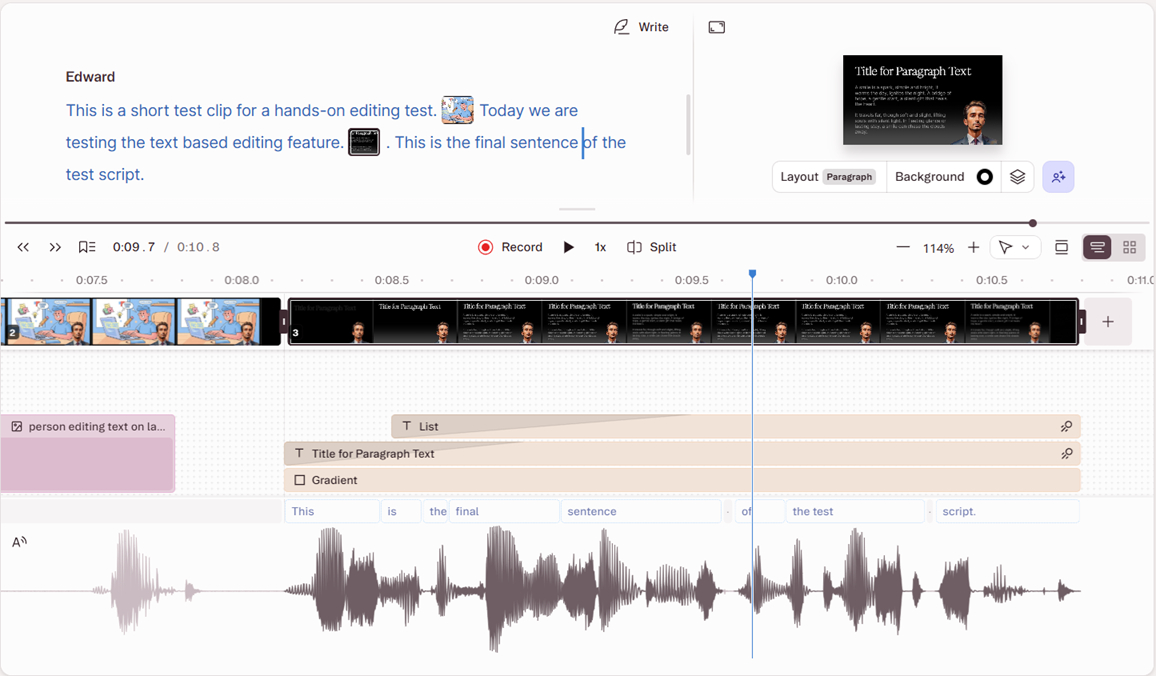
Descript transcribes your footage, then lets you edit the video by editing the transcript — delete a sentence of text and the matching video is cut. We tested this directly on a short AI-narrated clip: selecting a full sentence in the transcript and deleting it did remove the matching span from the timeline automatically, though the update wasn't instant — it took a few seconds to show up in the total run time, not the seamless, immediate cut the pitch might suggest. That test used an AI-generated script rather than real recorded footage, so it confirms the core text-deletes-video mechanic but doesn't tell us how well the one-click filler-word removal ("um", "uh") performs on natural, unscripted speech. Testing that will require a clip with natural speech disfluencies, which we'll add in a future update.
Where it shines
Podcast-to-video, tutorials, and any content that's scripted or interview-based. Descript markets its auto-transcription accuracy as one of its strongest features on clear audio — we haven't independently measured it ourselves yet.
Where it struggles
Fast-paced, music-driven edits and heavy color grading — Descript is a story editor, not a finishing suite.
Pricing
Free plan covers 1 hour of transcription per month. Paid tiers start at $12/mo (Hobbyist) and $24/mo (Creator) with 4K export and higher transcription limits.
Pros & Cons
Pros
- Text-based editing genuinely cuts edit time
- Accurate auto-transcription and captions
- Generous free tier to test the workflow
- One-click filler-word removal
Cons
- Exports slow down on long 4K timelines
- Limited color grading and effects
- Overkill for quick music-driven edits
What Other Users Say
Descript's Trustpilot base skews more critical than our own hands-on result, with reviewers most often flagging the AI credit system — describing it as consumed faster than expected — alongside occasional bugginess and frustration with how often the product changes. Ease of use for audio/video editing does come up as a positive, though it's a smaller share of the visible reviews than the credit-system complaints.
Source: Trustpilot (retrieved 28 July 2026).
How it compares
| Feature | Descript | CapCut | Premiere |
|---|---|---|---|
| Text-based editing | ✓ Yes | ✕ No | ✕ No |
| Auto captions | ✓ Yes | ✓ Yes | ✓ Yes |
| Free plan | ✓ Yes | ✓ Yes | ✕ No |