 Gamma
GammaGamma Review 2026: We Generated a Full Presentation From One Prompt


Quick Verdict
// Hands-on testedGammaTeknexia AI Tool Evaluation Framework
Scored against our site-wide 5-criteria framework, from our own hands-on test generating a real presentation on a Gamma account, combined with Gamma's own documentation and aggregated third-party reviews for the parts we didn't test directly. This is the fourth entry in our AI Productivity category, alongside Notion AI, Taskade, and Reclaim.ai.
Overall: 6.0/ 10
Gamma is an AI tool that generates presentations, documents, and web pages from a prompt, pasted text, or an imported document, then lets you keep editing and refining with an AI agent alongside manual controls. We tested it directly: a real prompt, on a real account, taken from outline to a finished, shareable deck. This is the fourth review in our AI Productivity category, and it overlaps most closely with Canva AI on the presentation side, which we compare directly below.
- We generated a complete, 7-slide presentation from a single prompt in our test, and it looked genuinely usable on the first pass, not a rough draft.
- The free plan's 400 credits are a real, one-time (not monthly) allowance, confirmed directly on our own account. A full generation cost roughly 40 credits in our test, so a free account gets somewhere around 8 to 10 full presentations before running out.
- Two friction points are worth knowing before you rely on Gamma for finished work: PPTX exports often need manual cleanup, and there's no native Google Drive, Docs, or Sheets integration.
- Beyond our own test, other users consistently point to two other honest limitations: generated layouts can look similar deck to deck, and AI-generated images inside decks sometimes look unnatural.
What We Tested, and What Happened
We ran this test on a real, active Gamma account using the Generate mode. Our prompt: "Create a professional media kit for Teknexia Hub (teknexiahub.com), an affiliate blog specializing in hands-on AI tool reviews for content creators and marketers," followed by a specific structure (title page, about section, audience, what sets the site apart, tools already reviewed, collaboration formats, and a closing call to action).
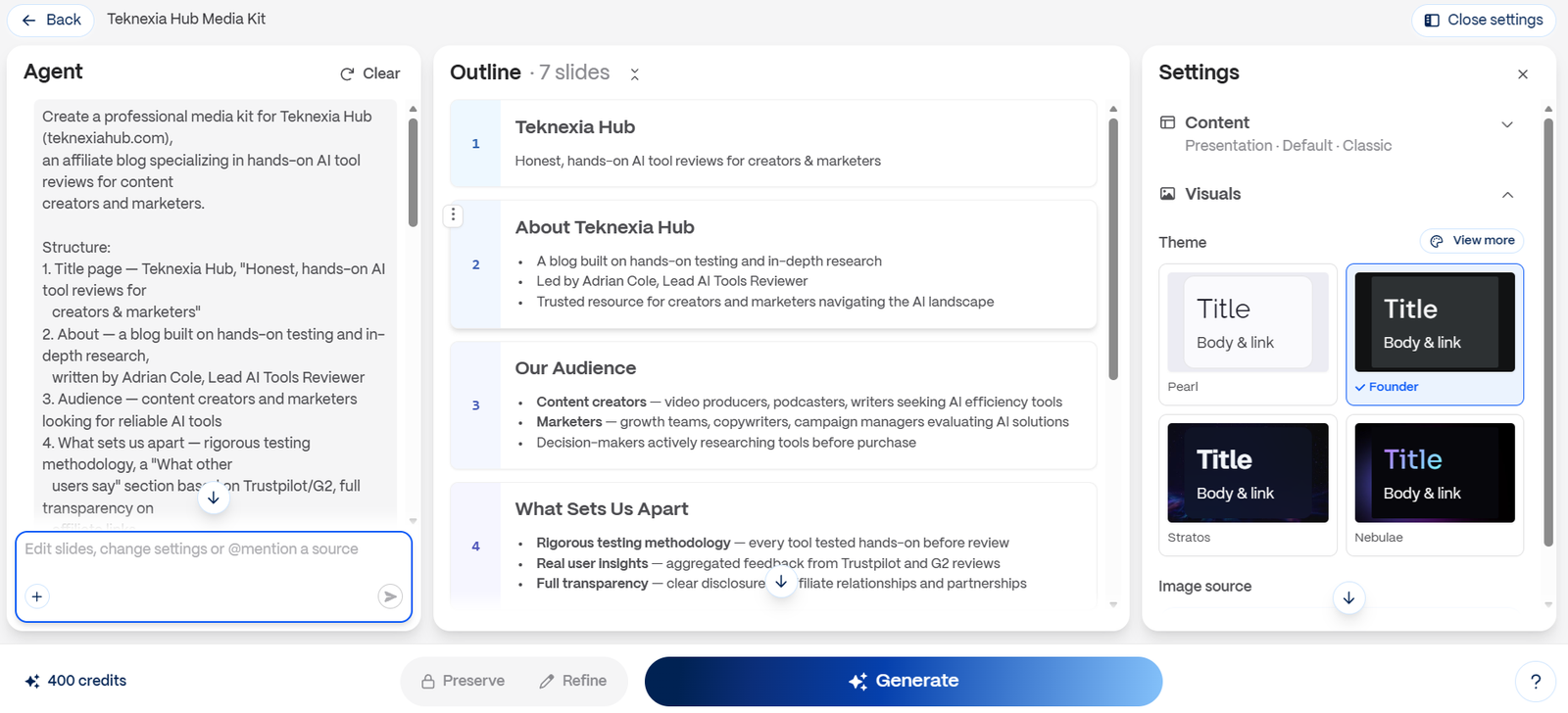
Gamma turned that prompt into a 7-slide outline within seconds, which we could review and edit before committing to full generation, a useful checkpoint that catches structural problems before you spend credits on the design pass. We picked the "Founder" theme and generated the full deck.
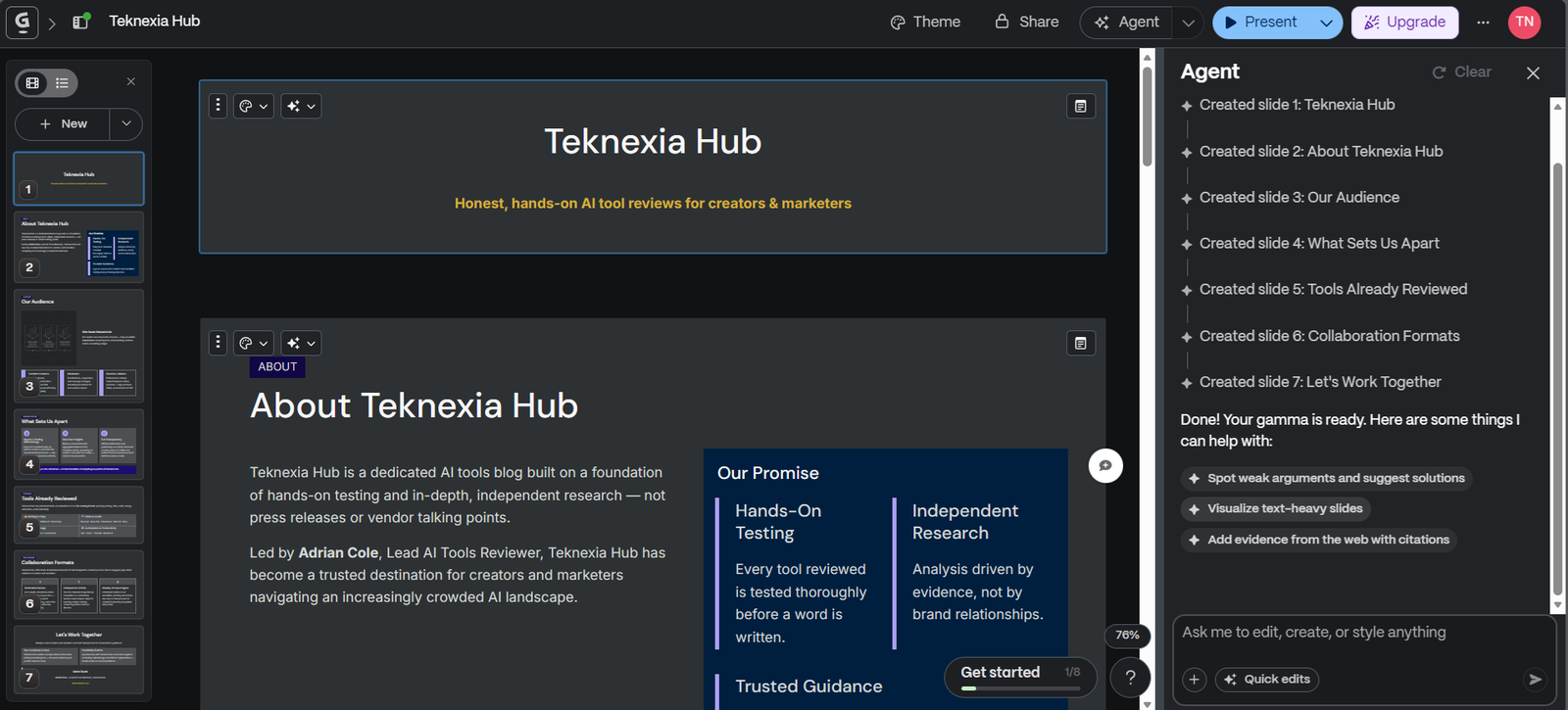
The result matched the brief closely: real, specific content in every section (not placeholder text), a consistent visual theme, and a layout that would be presentable with light editing. Gamma Agent confirmed the generation was complete and suggested follow-up actions (spotting weak arguments, visualizing text-heavy slides, adding cited evidence), which is the "global edit" capability the brief called out: you can ask for changes across the whole deck in plain language instead of opening each card individually.
What Gamma Actually Is
Gamma generates presentations, documents, and web pages from three kinds of input: a written prompt, pasted text, or an imported file. Output lives as a "card" format, a flexible, vertically extendable canvas rather than a fixed-dimension slide, and can be shared as a live web link with embeds and view analytics, exported to PDF, or exported to PPTX for use in PowerPoint. Gamma Agent sits alongside the editor for whole-deck edits in plain language.
Pricing and the Credit System, in Detail
Gamma's free plan gives 400 AI credits, a one-time allowance that does not renew monthly, confirmed directly in our own test account. A full presentation generation cost roughly 40 credits for us, which lines up with what we found researching typical costs elsewhere, putting a free account at somewhere around 8 to 10 complete presentations before the credits run out, not an ongoing free tier for regular use.
Paid tiers add monthly refreshing credit allowances, with unused credits rolling over up to 2x the monthly amount: Plus runs roughly $9 to $12 per seat per month, Pro roughly $18 to $25 per seat per month, and Ultra around $90 per month, with annual billing bringing meaningful savings on each tier. We're presenting these paid-tier figures as cross-checked against multiple third-party pricing trackers rather than a number we confirmed directly ourselves, since Gamma's own pricing page renders its numbers client-side and didn't expose them to a direct fetch. Confirm the current rate on Gamma's own pricing page before subscribing.
What Other Users Say
What Other Users Say
We want to be clear that the following comes from other users' reviews, not our own test: it's a notably rough score, and it's worth flagging that G2 and Capterra show a much higher range (roughly 3.7 to 4.3), so Trustpilot here skews toward a smaller, more dissatisfied slice of users, a pattern we've seen with other tools too. The recurring complaints on Trustpilot line up with two of the limitations we're already flagging above: reviewers describe decks looking repetitive from one generation to the next, and PPTX exports breaking, with content overflowing or crammed onto cards that don't map cleanly to PowerPoint's fixed format. AI-generated images inside decks are also a repeated complaint, described by multiple reviewers as looking unnatural. Billing and subscription-cancellation frustration shows up often enough in the negative reviews that it's worth budgeting time to check your plan settings if you subscribe.
Source: Trustpilot (retrieved 9 September 2026).
Gamma vs Canva AI
Gamma and Canva AI overlap on one specific job, generating a presentation from a prompt, but they come at it from different directions. Canva AI is a full design suite (social posts, documents, video, and more) with AI generation layered in, and we found it stronger on beginner-friendliness and general design polish in our separate test. Gamma is narrower and built specifically around generating and sharing decks, documents, and pages, with the option to publish a deck as a live web link with analytics, something Canva doesn't offer in the same way.
| Criteria |  Canva AI Canva AI | Gamma |
|---|---|---|
| Our framework score | 7.6/10 | 6.0/10 |
| Free plan model | Ongoing, shared AI quota | 400 one-time credits, not renewing |
| Shareable as a live web link with analytics | ✗ Not the focus | ✓ Yes |
| Clean PPTX export | Generally cleaner, fixed slide format | Often needs manual cleanup, per our test and user reports |
| Best for | Broad design work with AI features included | Fast first drafts and web-shared decks specifically |
Pros
- Generated a genuinely complete, usable 7-slide deck from one prompt in our test, with real content and a coherent theme
- Flexible inputs: prompt, pasted text, or an imported document all work
- Decks can be shared as live web links with embeds and view analytics, a real differentiator over static slide files
- Gamma Agent allows whole-deck edits in plain language instead of card-by-card manual work
- The 400-credit free plan genuinely lets you generate several full presentations before paying, confirmed on our own account
Cons
- PPTX export often needs manual cleanup; Gamma's flexible card format doesn't map cleanly to PowerPoint's fixed 16:9 slides
- No native Google Drive, Docs, or Sheets integration; getting content in or out means exporting and re-importing manually
- Credit consumption is hard to predict in advance, and there's no true unlimited plan for heavy use
- Per other users' reviews, not our own test: generated layouts can look repetitive across decks, and AI-generated images sometimes look unnatural
- Trustpilot rating (1.7/5) is markedly lower than G2 or Capterra, a gap worth checking yourself before subscribing
FAQ
Is Gamma's free plan actually usable?
Yes, with a real limit: 400 credits, given once and not renewed monthly. In our test, a full presentation generation cost about 40 credits, so a free account gets roughly 8 to 10 complete presentations before needing to upgrade.
Can I export a Gamma deck to PowerPoint cleanly?
Not always without extra work. Gamma's card-based format is flexible and vertically extendable, while PowerPoint uses fixed 16:9 slides, so PPTX exports often need manual cleanup, a limitation we ran into and that's also widely reported by other users.
Is Gamma better than Canva for presentations?
For a broad, polished design workflow, our separate testing favors Canva AI. For fast first drafts and decks you want to share as a live web link with analytics, Gamma's more specific focus is a genuine advantage Canva doesn't match the same way.
Does Gamma work with Google Docs or Google Drive?
Not natively. There's no built-in Google Drive, Docs, or Sheets integration, so moving content in or out of Gamma currently means exporting and manually re-importing.
Try Gamma
Gamma's free plan gives you 400 credits, enough for several real presentations, so you can judge the output quality yourself before deciding whether a paid plan is worth it.
See Gamma pricing →