
QuillBot Review 2026: We Tested the Paraphraser, Grammar Checker, and More


Quick Verdict
// Hands-on testedTeknexia AI Tool Evaluation Framework
Scored against our site-wide 5-criteria framework, from our own hands-on test on a real QuillBot account, combined with QuillBot's own pricing page for the tiers we didn't need to test directly. This is the fourth entry in our AI Writing category, alongside Jasper, Copy.ai, and Grammarly.
Overall: 7.2/ 10
QuillBot is an AI writing tool built around paraphrasing, with a grammar checker, AI detector, humanizer, and a library of templated editing tools layered around that core. We tested it on a real, active account: pasting real text into the Paraphraser, comparing modes, and exploring the wider template library. This is the fourth review in our AI Writing category, and it's the tool most often compared to Grammarly, which we cover directly below.
- QuillBot was genuinely easy to use in our test, across everything from a quick paraphrase to browsing its template library for design, resume, email, and social media content.
- Reformulation quality was good and offered plenty of usable alternatives, but our own conclusion after testing: it still needs a human pass before publishing, not a paste-and-post tool.
- The template library covers more ground than a typical paraphrasing tool: design, presentations, resumes, branding, email, social media, and printables were all present in our test account.
- QuillBot's free plan is real but capped (word limits per rephrase, fewer modes); Premium is $8.33/mo billed annually, cheaper than Grammarly's $12/mo annual Pro plan.
What We Tested, and What Happened
We ran this test on a real, active QuillBot account rather than just browsing the marketing site. We pasted a short paragraph about AI tools and content workflows into the Paraphraser and ran it through the Standard mode, then compared it against the Fluency, Humanize, Formal, Academic, and Simple modes available in the same panel, alongside a synonym-frequency slider.
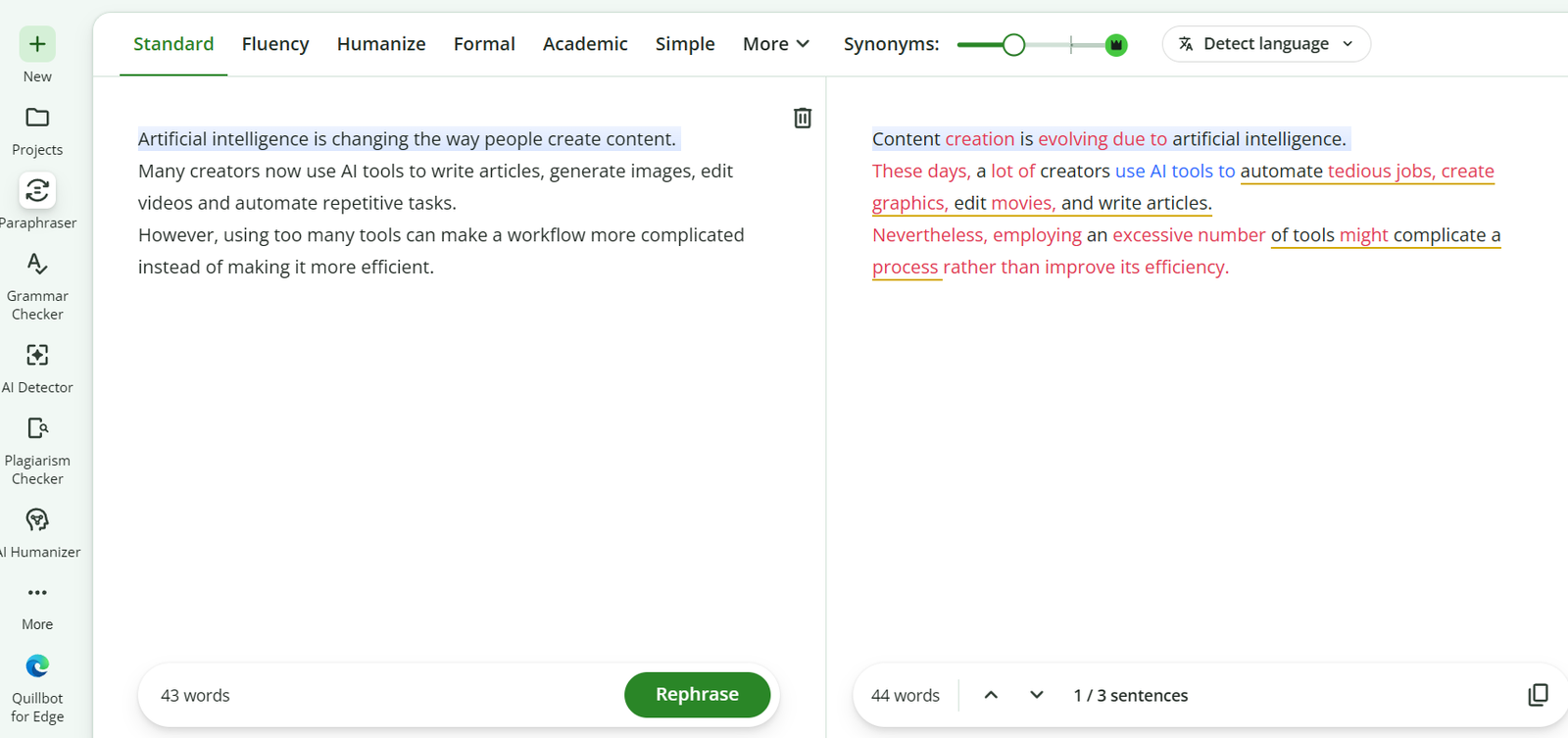
The reworded version kept the original meaning while genuinely varying sentence structure and word choice, not just swapping in a thesaurus synonym here and there. That said, a few of the substitutions changed the tone slightly in ways we'd want to double-check before using the output as-is, which is exactly why we're not scoring output quality as a simple "excellent" here: QuillBot gives you real, usable reformulation ideas, but the final read-through is still on you.
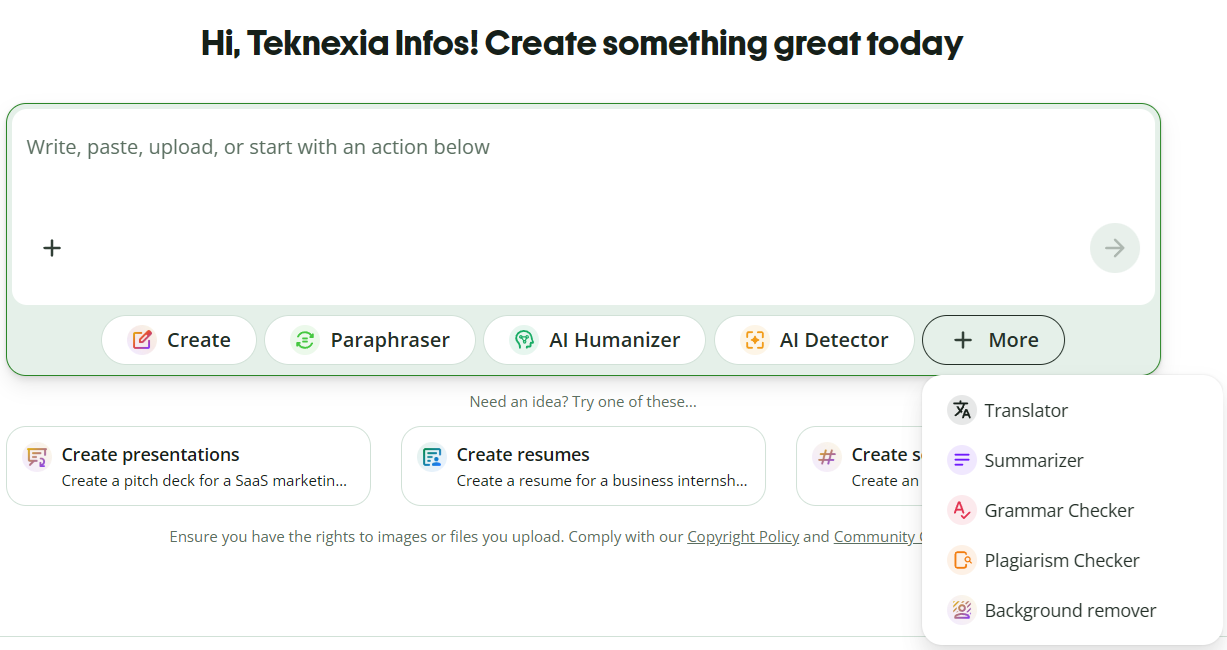
Beyond the Paraphraser, we explored QuillBot's wider dashboard, which surfaces Create, Paraphraser, AI Humanizer, AI Detector, and a "More" menu covering Translator, Summarizer, Grammar Checker, Plagiarism Checker, and Background Remover.
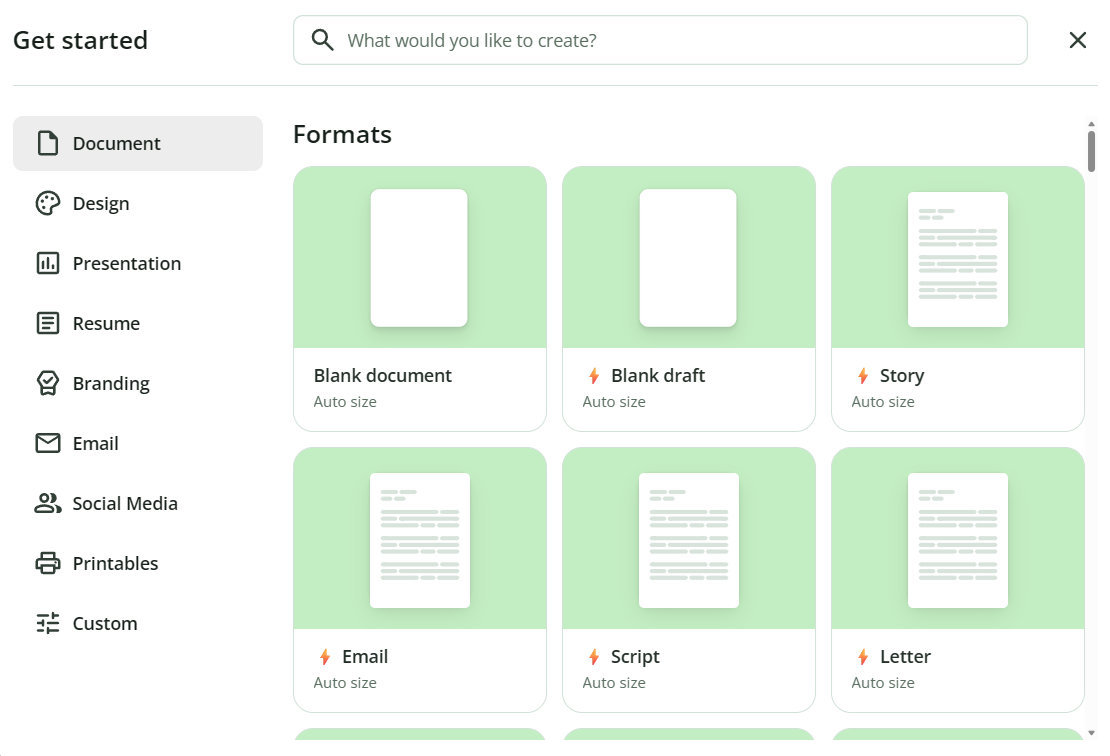
We also opened the "Get started" template menu, which turned out to cover more ground than we expected from a tool best known for paraphrasing: Document, Design, Presentation, Resume, Branding, Email, Social Media, and Printables categories, each with its own set of starter templates.
What QuillBot Actually Is
QuillBot is best known for its paraphrasing tool, which rewrites text across multiple modes (Standard, Fluency, Humanize, Formal, Academic, Simple, and more) with an adjustable synonym slider. Around that core, QuillBot has built out a Grammar Checker, AI Detector, AI Humanizer, Plagiarism Checker, Translator, Summarizer, and a template-driven editor covering documents, presentations, resumes, branding assets, email, social media posts, and printables, according to what we found in our own test account.
Pricing, in Detail
QuillBot's pricing (cross-checked against third-party pricing trackers, since QuillBot's own pricing page blocked our automated access):
- Free: $0/mo, basic paraphrasing with a word cap per rephrase and access to fewer modes, plus a basic grammar check. Usable for occasional light editing, not for heavy daily use.
- Premium — $19.95/mo billed monthly, or $13.31/mo billed quarterly ($39.95/quarter), or $8.33/mo billed annually ($99.95/year): unlimited words, all paraphrase modes, and expanded access to the Plagiarism Checker, AI Detector, and AI Humanizer.
We'd recommend confirming the exact current rate on QuillBot's own pricing page before subscribing, since we saw references to an intermittent promotional annual rate that isn't guaranteed to be live when you check.
What Other Users Say
QuillBot holds a strong 4.8 out of 5 on Trustpilot, from 13,961 reviews, with about 87% of reviews at five stars, and the company replying to essentially all negative reviews within about a week, based on what we found directly on Trustpilot's own page. That's a notably high volume and score for a tool in this category, and it lines up with what we found in our own test: a straightforward, reliable core paraphrasing experience.
QuillBot vs Grammarly
QuillBot and Grammarly are the two tools most often compared in this category, and for good reason: both check grammar and both live in the same "AI writing assistant" bucket. But they're built around different strengths. QuillBot's core identity is paraphrasing and reformulation, with grammar checking as one tool among several. Grammarly's core identity is grammar and clarity correction, with a smaller paraphrasing feature by comparison. If you spend more time reworking existing sentences than fixing typos, QuillBot is the closer fit; if the reverse is true, Grammarly is.
| Criteria | QuillBot |  Grammarly Grammarly |
|---|---|---|
| Core strength | Paraphrasing & reformulation | Grammar & clarity correction |
| Cheapest paid tier (annual) | $8.33/mo (Premium) | $12/mo (Pro) |
| Template/editing library | ✓ Yes, design, resume, email, social, printables | ✗ Not a focus |
| Trustpilot rating | 4.8/5 (13,961 reviews) | Lower, per our Grammarly review |
| Best for | Writers reworking and varying existing text | Writers who want grammar and clarity checking first |
Pros
- Genuinely easy to use, confirmed at every skill level we tested it from
- Wide range of reformulation ideas across multiple paraphrasing modes, not just single-synonym swaps
- Template library goes well beyond paraphrasing: design, presentations, resumes, branding, email, social media, and printables
- Strong, high-volume Trustpilot rating (4.8/5, 13,961 reviews)
- Annual Premium pricing ($8.33/mo) undercuts Grammarly's annual Pro plan
Cons
- Output still needs a human read-through before publishing; some reformulations shifted tone slightly in our test
- Free plan caps word count per rephrase and limits which paraphrase modes are available
- Monthly Premium pricing ($19.95/mo) is steep compared to the annual rate
- QuillBot's own pricing page blocked our automated verification, so we cross-checked rates against third-party trackers instead
FAQ
Is QuillBot free to use?
Yes, there's a real free plan, but it caps the word count per rephrase and limits which paraphrase modes you can use. Premium removes those caps starting at $8.33/mo billed annually.
Can I publish QuillBot's output as-is?
We wouldn't recommend it without a final read-through. In our test, QuillBot generated genuinely useful reformulations, but some shifted tone slightly, so a human check before publishing is still worthwhile.
Is QuillBot better than Grammarly?
They're built for different jobs. QuillBot's strength is paraphrasing and reformulation, with a wide template library beyond that. Grammarly's strength is grammar and clarity correction. Pick based on which task you actually do more often.
Does QuillBot do more than paraphrasing?
Yes. In our test account, QuillBot also included a Grammar Checker, AI Detector, AI Humanizer, Plagiarism Checker, Translator, Summarizer, and a template library covering documents, presentations, resumes, branding, email, social media, and printables.
Try QuillBot
QuillBot's free plan lets you test the Paraphraser and basic grammar checking before deciding whether Premium's unlimited words and full mode access are worth it for your workflow.
Try QuillBot free →