
Kittl Review 2026: We Tested the AI Design Tool for Print-on-Demand


Quick Verdict
// Hands-on testedTeknexia AI Tool Evaluation Framework
Scored against our site-wide 5-criteria framework, based on a real Kittl account: a documented project in Kittl's editor, combined with Kittl's own pricing page for the tiers we didn't need to test directly. This is the fourth entry in our AI Image Tools category, alongside Ideogram, Canva AI, and Leonardo AI.
Overall: 7.4/ 10
Kittl is a browser-based design tool built around AI-assisted graphics, typography, and product mockups, aimed squarely at print-on-demand sellers and merch designers rather than general image generation. We tested it on a real, active account with a genuine project: an AI-generated graphic taken through Kittl's mockup and export tools. This is the fourth review in our AI Image Tools category, and it sits closest in positioning to Canva AI, which we compare directly below.
- Despite the sheer number of tools packed in, our tester found Kittl genuinely easy to pick up, with an "enormous" range of creative options available from the start.
- The AI Logo Generator was a standout for our tester, described as "addictive" to use and a real differentiator versus other tools in this category.
- Two honest limits our tester ran into directly: loading times slow down on more detailed designs, and the AI token limits felt restrictive enough to affect how efficiently generative work got done.
- The free plan has no commercial license, so it's really a trial for the workflow rather than a usable free tier for anyone selling designs, and Kittl isn't the right pick for complex projects that need extreme vector precision.
What We Tested, and What Happened
We ran this test on a real, active Kittl account, working inside the project editor rather than just browsing the marketing site. Starting from a single AI-generated graphic, we used Kittl's chained tools directly on the canvas: Dynamic Mockups to place the design on a product, Remix to branch off variations, and the Vectorize, Upscale, and Reframe tools available in the right-click menu on any generated asset.
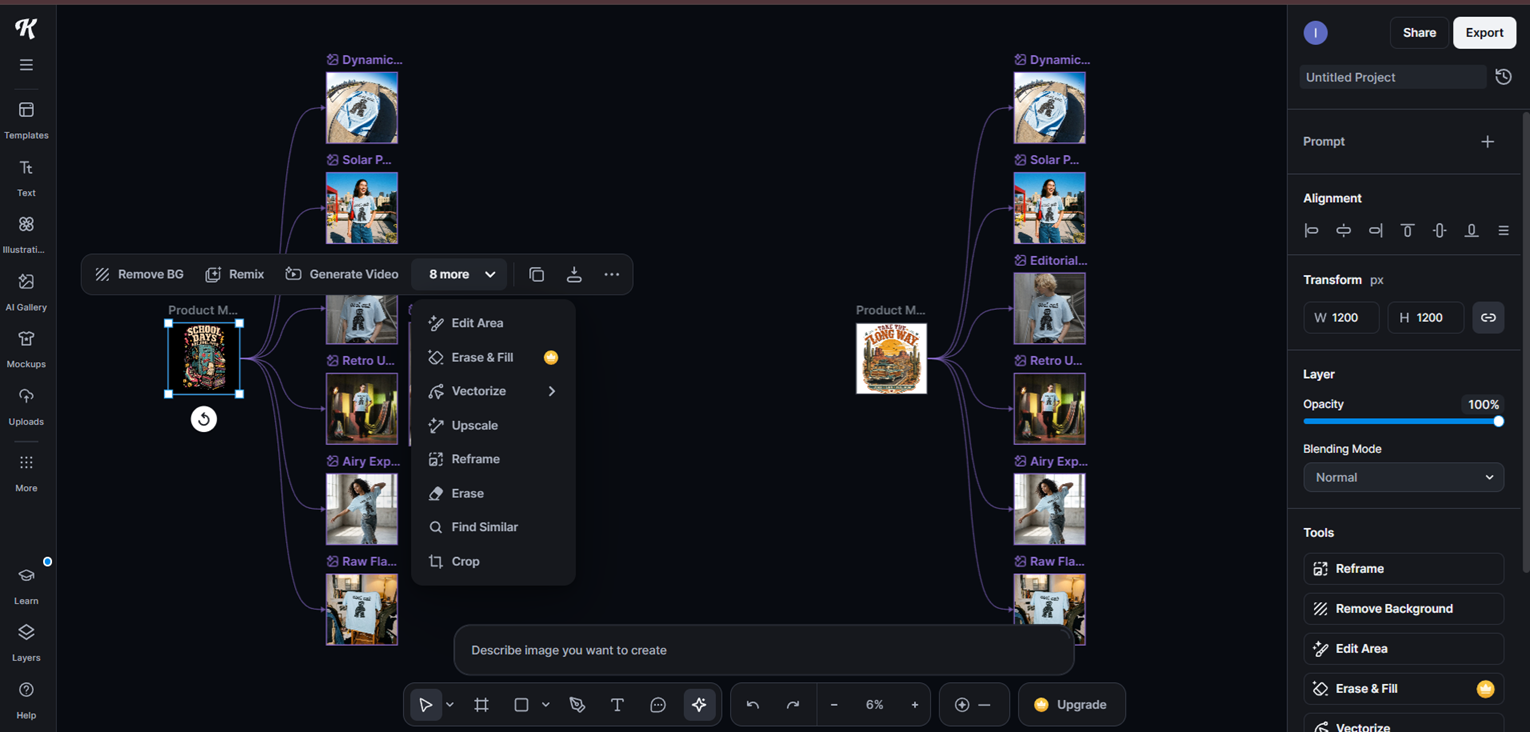
What stood out is that Kittl doesn't treat a generated image as a finished output the way a lot of pure image generators do. Each result stays live on the canvas as a node you can keep acting on: turn it into a t-shirt mockup, generate a second colorway from the same source, vectorize it for print, or upscale it, all without exporting and re-importing anywhere. For a print-on-demand workflow specifically, that chaining is the actual product, not the base image generation itself.
Beyond that one documented project, here's our tester's own account of using Kittl, translated from their original notes:
"The Kittl interface is very complete and easy to pick up. There's a huge range of choice and a lot of creative possibilities available. The AI Logo Generator is a real plus, and it's honestly addictive to use. I was really impressed by the work some designers share, their creations and their creative universes, and it's very motivating to learn how to develop my own visuals from that.
That said, while Kittl performs well for brand design work, it can hit real limits on complex projects that need extreme vector precision. It's a genuinely useful AI-assisted design tool for content creators, but it won't fit every graphic design need. Loading times were slow at times, especially with more detailed designs, and the AI token limits felt restrictive for generative work, which affected how efficiently I could iterate. On the plus side: it's easy to use, easy to learn, the creation process is straightforward, the tools are beginner-friendly, and the template library is huge."
What Kittl Actually Is
Kittl combines a design canvas (text, templates, illustrations, fonts) with AI generation and editing tools layered on top: AI image and video generation, an AI Logo Generator, background removal, vectorization, upscaling, reframing, and product mockup generation for apparel and merch. It's positioned for creators doing print-on-demand, sticker/merch design, and vintage-style typography work, where the output needs to go straight into a commercial product rather than stay as a standalone image. Kittl also runs a marketplace of templates and design assets from independent designers, which our tester called out specifically as motivating to browse when developing their own visuals.
Pricing, in Detail
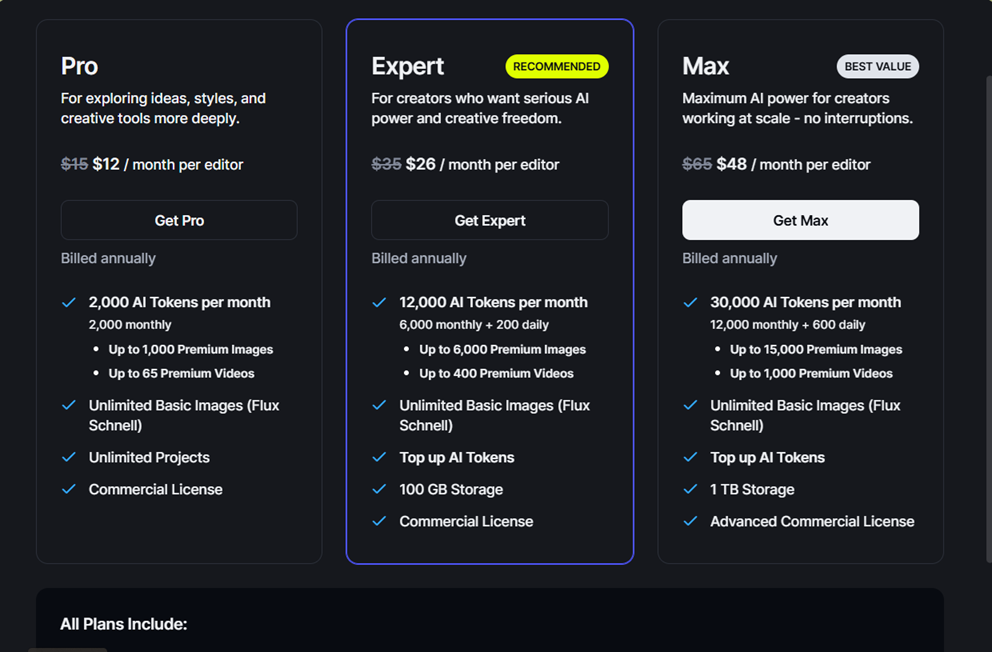
Kittl's pricing, from our own screenshot of the live pricing page:
- Free: personal use only, no commercial license, limited to a curated set of templates. Fine for testing the tool, not usable for selling anything.
- Pro — $12/editor/month billed annually (a promotional price shown as reduced from $15): 2,000 AI Tokens per month, up to 1,000 premium images or 65 premium videos, unlimited basic images, unlimited projects, and a commercial license.
- Expert — $26/editor/month billed annually (promotional, reduced from $35, marked "Recommended"): 12,000 AI Tokens per month (6,000 monthly plus 200 daily), up to 6,000 premium images or 400 premium videos, 100GB storage, and a commercial license.
- Max — $48/editor/month billed annually (promotional, reduced from $65, marked "Best Value"): 30,000 AI Tokens per month (12,000 monthly plus 600 daily), up to 15,000 premium images or 1,000 premium videos, 1TB storage, and an advanced commercial license.
Since the pricing page showed these as reduced, promotional rates rather than standing prices, treat the strikethrough figures ($15/$35/$65) as the baseline to expect once any promotion ends.
Kittl vs Canva AI
Kittl and Canva AI are the two closest tools in our AI Image category by positioning: both combine a design canvas with AI generation rather than being a pure image generator. The difference is focus. Canva AI is a general-purpose design suite (social posts, documents, presentations, video) with AI features layered in. Kittl is narrower and deeper on one specific job: taking a graphic from AI-generated to print-ready, with mockups, vectorization, and commercial licensing built around that specific workflow.
| Criteria |  Canva AI Canva AI | Kittl |
|---|---|---|
| Genuinely usable free plan (no card) | ✓ Yes | ✗ Free plan has no commercial license |
| Cheapest full-access entry point | $15/mo (Pro) | $12/editor/mo (Pro, promotional annual price) |
| Built for print-on-demand mockups | ✗ Not the focus | ✓ Yes, built-in mockup generation |
| Full design suite (docs, video, social) built in | ✓ Yes | ✗ Graphics and merch design only |
| Best for | Creators who want AI generation bundled into a full design workflow | Print-on-demand sellers who need AI graphics to become sellable products |
What Other Users Say
We weren't able to load Kittl's Trustpilot page directly for this article (it returned an access error on our end), so rather than print a specific star rating we couldn't verify ourselves, we're describing it qualitatively: third-party review aggregation we could see suggested a strongly positive rating with a large review volume, which lines up with what independent design-tool roundups (Style Factory, ecomm.design, G2, Product Hunt) generally say about Kittl, that it sits well-regarded between Canva and Adobe Illustrator for print-on-demand and vintage-graphics work. We'd recommend checking Kittl's current Trustpilot page yourself for an exact figure before treating any number as final.
Pros
- Easy to pick up despite the large tool set, according to our tester's hands-on experience
- AI Logo Generator is a genuine standout, described by our tester as addictive to use
- Chains AI generation directly into mockups, vectorization, upscaling, and reframing on one canvas, without exporting between tools
- Huge template library and a marketplace of independent designer assets to draw from
- Clear commercial-license tiers built specifically for sellers, not bolted on as an afterthought
Cons
- Loading times slow down noticeably on more detailed, complex designs, a friction point our tester ran into directly
- AI token limits felt genuinely restrictive during generative work, not just a theoretical cap
- Not built for projects that need extreme vector precision
- Free plan has no commercial license at all, so it functions as a trial rather than a usable free tier for sellers
- Narrower scope than Canva: no documents, presentations, or general social content tools
FAQ
Is Kittl free to use?
There's a free plan, but it's personal-use only with no commercial license, so it's not usable for selling designs or merch. Paid tiers start at $12/editor/month (billed annually, promotional price) for a commercial license.
Is Kittl better than Canva for print-on-demand?
For print-on-demand specifically, yes, Kittl is more purpose-built: it includes product mockup generation and vectorization aimed at sellable merch. Canva AI is broader and cheaper if you also need documents, presentations, or social content, not just merch graphics.
Does Kittl include commercial usage rights?
Only on paid plans. The free plan is personal use only. Paid tiers (Pro, Expert, Max) include a commercial license, with Max including an "advanced" commercial license for larger-scale use.
What are AI Tokens in Kittl?
AI Tokens are Kittl's usage currency for AI generation (images and video). Each plan includes a monthly allowance (2,000 on Pro up to 30,000 on Max), and additional tokens can be purchased as a top-up if you run out.
Try Kittl
Kittl's free plan lets you explore the editor and AI tools before committing, though you'll need a paid tier for any commercial use of what you create.
Try Kittl free →