
Reclaim.ai Review 2026: We Tested AI-Powered Calendar Scheduling


Quick Verdict
// Hands-on testedTeknexia AI Tool Evaluation Framework
Scored against our site-wide 5-criteria framework, based on a real Reclaim.ai account: a documented test session on the free Lite plan, combined with the account owner's own day-to-day use of the tool and Reclaim's public pricing page for the tiers we didn't need to pay for ourselves. This is the third entry in our AI Productivity category.
Overall: 7.6/ 10
Reclaim.ai (now "Reclaim.ai from Dropbox," following Dropbox's acquisition of the company) is an AI scheduling assistant that sits on top of Google Calendar and automatically places your tasks, habits, and focus time into open slots based on priority and how long you estimate each thing will take. We tested it on a real, active account: one documented planning session captured in screenshots, plus the account owner's broader day-to-day use of the tool. This is the third review in our AI Productivity category, alongside Notion AI and Taskade.
- Reclaim doesn't silently rewrite your calendar. Changes go into a "Preview Mode" queue first, and you have to click "Review & apply changes" before anything is actually scheduled.
- In our test, a mix of daily habits, recurring deep-work blocks, and one-off tasks was placed into realistic-looking open slots across the coming week, not just dumped into the nearest free gap.
- The Lite plan is free forever and actually usable, not a disguised trial, though its 1-week scheduling range is a real limitation for anyone planning further ahead.
- Our tester's overall conclusion, from using the tool day to day and not just in this one test session: it meaningfully cuts down on manual calendar management, especially when their schedule changes unexpectedly.
What We Tested, and What Happened
One honest note upfront: we did not run a genuine multi-day longitudinal test with screenshots at every stage. What we have is one documented planning session on a real, active Reclaim.ai account (the free Lite plan), plus a written account from that account's owner, who uses Reclaim regularly and reported on their broader day-to-day experience with it, not just this one session.
For the documented session, we asked Reclaim to schedule a batch of new recurring commitments: a daily 30-minute SEO research session, a daily 30-minute content planning session, a 30-minute workout three times a week, and a 2-hour deep work block three times a week. Reclaim did not apply any of this immediately. Instead, it opened a "Preview Mode" side panel listing exactly what it was proposing to add, with a "Review & apply changes" button and a "Discard changes" option sitting in a banner at the bottom of the screen. Nothing touched the live calendar until that button was clicked.
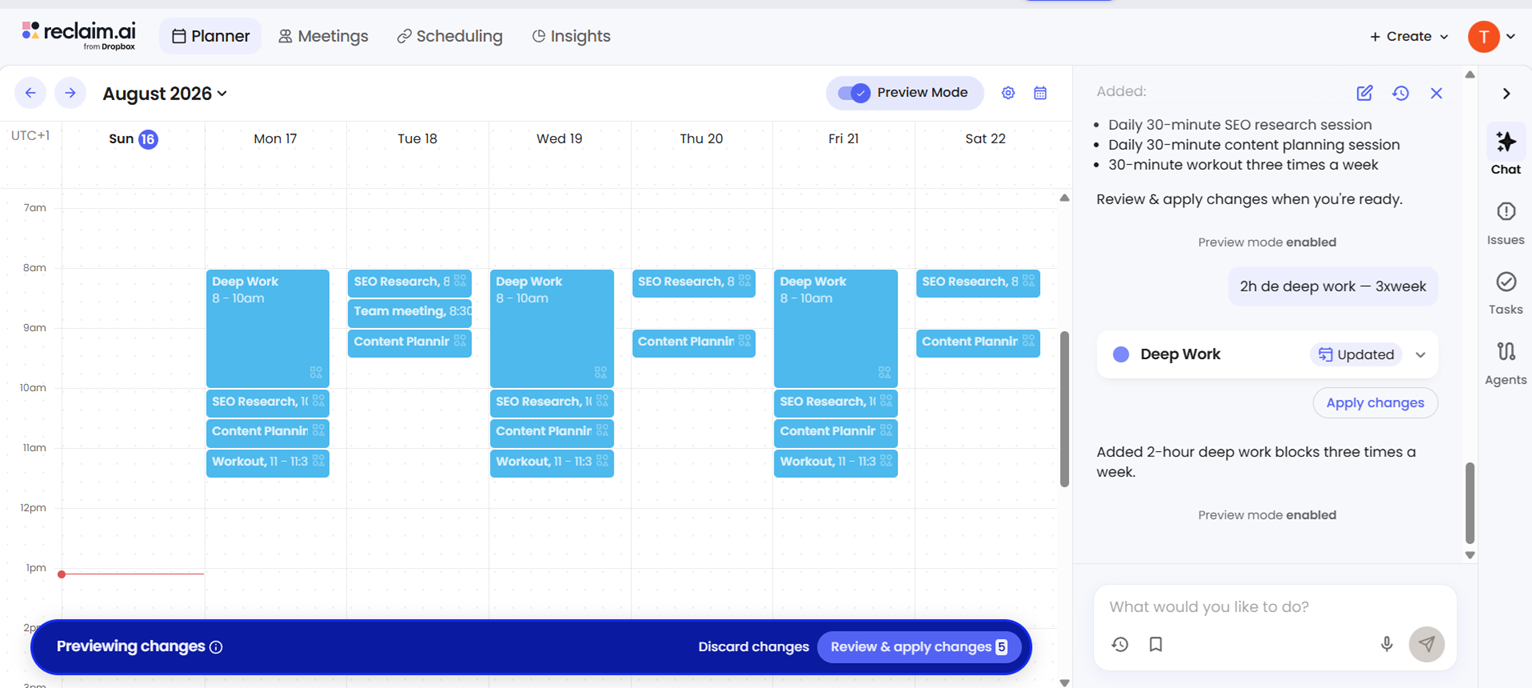
Once applied, the proposed blocks landed in the calendar in a way that looked coherent: the two daily sessions sat back to back most mornings, the workout habit rotated across different weekdays rather than always claiming the same slot, and the deep work blocks were spread out rather than stacked. That confirmation step is worth calling out clearly, because it cuts against the idea of a fully "hands-off" AI calendar: Reclaim proposes, but a human still has to approve before anything becomes real.
What Reclaim.ai Actually Is
Reclaim.ai works by having you add three kinds of things: tasks (one-off, with a time estimate and a due date), habits (recurring personal or team routines, like a workout or a standing planning session), and Smart 1:1s or meetings that need a slot found automatically. You set a priority and how long something should take, and Reclaim's algorithm finds room for it around your existing meetings, rebuilding the plan automatically whenever something changes: a new meeting gets added, a task runs over, or you manually move something. It also includes Buffer Time (breathing room around back-to-back meetings), Focus Time (protected blocks defended from new meeting requests), and Meeting Quality tools that flag or discourage low-value recurring meetings.
Pricing, in Detail
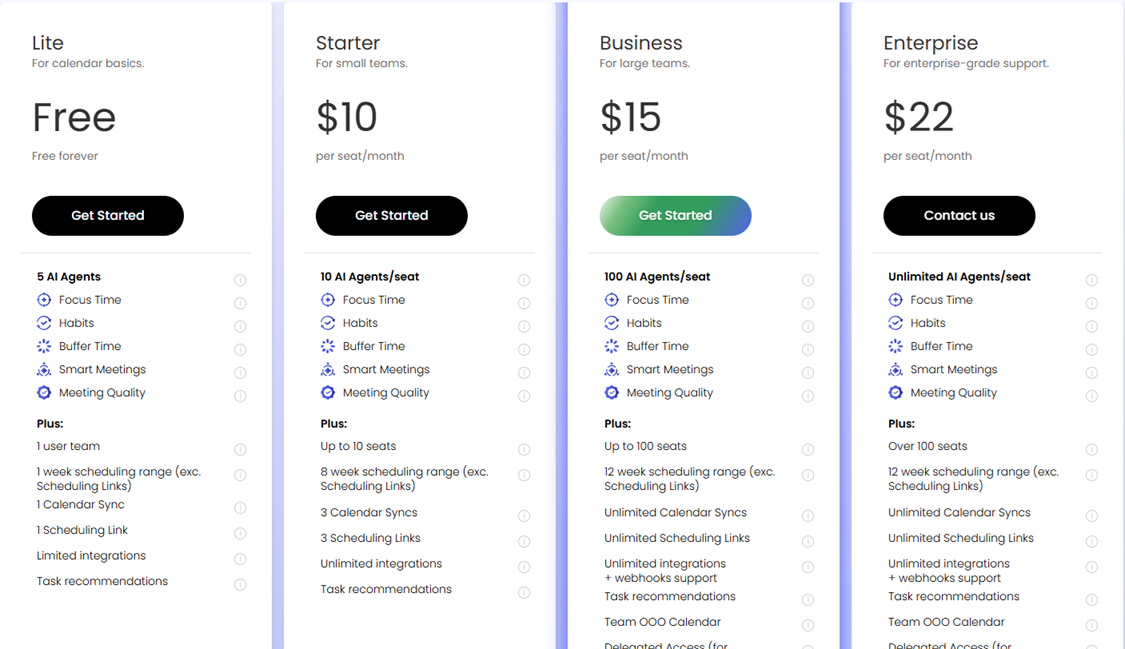
Reclaim.ai's pricing (verified against the live pricing page, with our own screenshot below):
- Lite — Free forever: 1 user, 5 AI Agents, Focus Time, Habits, Buffer Time, Smart Meetings, Meeting Quality, a 1-week scheduling range, 1 calendar sync, 1 scheduling link, and limited third-party integrations.
- Starter — $10/seat/month billed annually (or $12/seat/month billed monthly): up to 10 seats, 10 AI Agents per seat, an 8-week scheduling range, 3 calendar syncs, 3 scheduling links, and unlimited integrations.
- Business — $15/seat/month billed annually (or $18/seat/month billed monthly, Reclaim's "Most Popular" tier): up to 100 seats, 100 AI Agents per seat, a 12-week scheduling range, unlimited calendar syncs and scheduling links, plus webhook support and a Team OOO calendar.
- Enterprise — $22/seat/month, annual billing only: over 100 seats, unlimited AI Agents, delegated access, and SSO/SCIM provisioning for larger organizations. Reclaim also runs a time-limited "30% off today" promo banner on the pricing page from time to time, so treat any promo price as temporary, not the standing rate.
What Users Report
From our own tester, who uses Reclaim.ai regularly and not just for this review:
"I no longer worry as much about priorities or manually planning my time. Reclaim brings in my personal tasks, and all I have to do is give a time estimate for my calendar to get organized automatically. It helps me focus on the most urgent tasks, be more efficient during my available working hours, and set realistic goals.
I use Reclaim and I particularly appreciate its ability to automatically reorganize my schedule when something unexpected comes up. Its integration with Google Calendar, Fellow, and Slack is simple and practical. I can also manage multiple calendars, schedule my tasks and appointments, avoid unnecessary meetings, and automatically show my colleagues when I'm available.
Since I cut back on my working hours, Reclaim has helped me manage my workload better and get the essentials done in the time I have available. For me, it's become a genuinely effective, game-changing way to organize my day-to-day."
Beyond our own account, review platforms tell a mixed story worth being upfront about. On G2, Reclaim.ai holds a strong rating (around 4.8/5 from 120+ reviews). On Trustpilot, the picture looks different: a small number of reviews with a notably lower average, with recurring complaints about the free plan being scaled back over time and difficulty fully disconnecting Reclaim's Google Calendar access after closing an account. We weren't able to load Trustpilot's page directly to pull an exact, current figure for this article, so we're deliberately not printing a specific star rating we couldn't verify ourselves. That said, the gap between the two platforms is large enough that it's worth checking Trustpilot yourself before deciding, especially if account-deletion cleanliness matters to you.
Reclaim.ai vs Notion AI and Taskade
Reclaim.ai, Notion AI, and Taskade all show up in searches for "AI productivity tools," but they solve different problems. Notion AI is a writing and knowledge-base assistant bolted onto a workspace, and it won't touch your calendar. Taskade is an AI-native workspace for tasks, docs, and light automation across a team. Reclaim.ai does one specific thing: it owns your calendar and automatically places tasks, habits, and focus time into it based on priority and time estimates. If what you actually need is your calendar organized around what matters most, Reclaim is the more direct tool of the three; if you need a shared workspace for docs and team tasks, Notion AI or Taskade fit better.
Pros
- Turns a list of tasks, habits, and time estimates into an actual calendar plan without manual block-by-block scheduling
- Automatically rebuilds the plan when something unexpected happens, according to our tester's regular use
- Free Lite plan is genuinely usable long-term, not a disguised trial
- Clean integrations with Google Calendar, Slack, and Fellow
- Handles multiple calendars and can auto-share your real availability with colleagues
Cons
- Not fully hands-off: schedule changes sit in a Preview Mode queue and need a manual "Review & apply" click before they go live
- Lite's 1-week scheduling range is limiting if you plan more than a few days ahead
- Trustpilot reviews (small sample) skew notably more negative than G2's, particularly around free-plan changes and account-deletion cleanup
- Enterprise pricing requires annual billing, with no monthly option at that tier
FAQ
Is Reclaim.ai actually free?
Yes, the Lite plan is free forever for a single user, with real functionality (Focus Time, Habits, Buffer Time, Smart Meetings, Meeting Quality) rather than a time-limited trial. The trade-off is a 1-week scheduling range and limited integrations, so paid tiers start at $10/seat/month (billed annually) for an 8-week range and more integrations.
Does Reclaim.ai automatically apply changes to my calendar without asking?
Not in our test. Proposed changes appeared in a "Preview Mode" panel first, and we had to click "Review & apply changes" before anything was actually added to the calendar.
Who owns Reclaim.ai?
Reclaim.ai was acquired by Dropbox and is now marketed as "Reclaim.ai from Dropbox," while continuing to operate as its own product at reclaim.ai.
What calendars does Reclaim.ai support?
Google Calendar is the primary supported calendar for scheduling. It also integrates with tools like Slack, Fellow, Zoom, and various other apps depending on your plan.
Try Reclaim.ai
Reclaim.ai's Lite plan is free to use with no time limit, so you can test whether AI-scheduled tasks and habits actually fit your workflow before paying anything.
Try Reclaim.ai free →