Grammarly Review 2026: We Tested It, and We Need to Talk About Cancellation


Quick Verdict
// Hands-on testedTeknexia AI Tool Evaluation Framework
Scored against our site-wide 5-criteria framework, from our own hands-on test proofreading a real document on a live Grammarly account, combined with Grammarly's public pricing page and documented user complaints for the parts we didn't test directly. This is the canonical score for Grammarly, the third entry in our AI Writing category.
Overall: 6.2/ 10
Grammarly is a writing assistant built around real-time grammar, clarity, and tone checking, with newer AI features like tone rewriting and a "Humanizer" tool layered on top. We tested it directly: a real document, checked and corrected through the live app on an active account, checked against Grammarly's own pricing page and documented user complaints for the parts we didn't test directly. This is the third review in our AI Writing category, and it's labeled Hands-on tested for the parts we verified directly.
- Grammarly caught real, specific errors in our own test document and made them easy to fix in one click (Teknexia Hub testing, August 2026).
- Constant pop-ups and upgrade prompts interrupted our writing flow directly — including one promoting a paid AI-detection feature that appeared inside the correction panel itself.
- We're flagging this clearly rather than burying it in a pros/cons list: auto-renewal and cancellation difficulty is a serious, well-documented complaint pattern for Grammarly, not a small inconvenience.
- Our overall conclusion: a genuinely useful everyday writing tool, undercut by how it handles interruptions and billing.
What We Tested, and What Happened
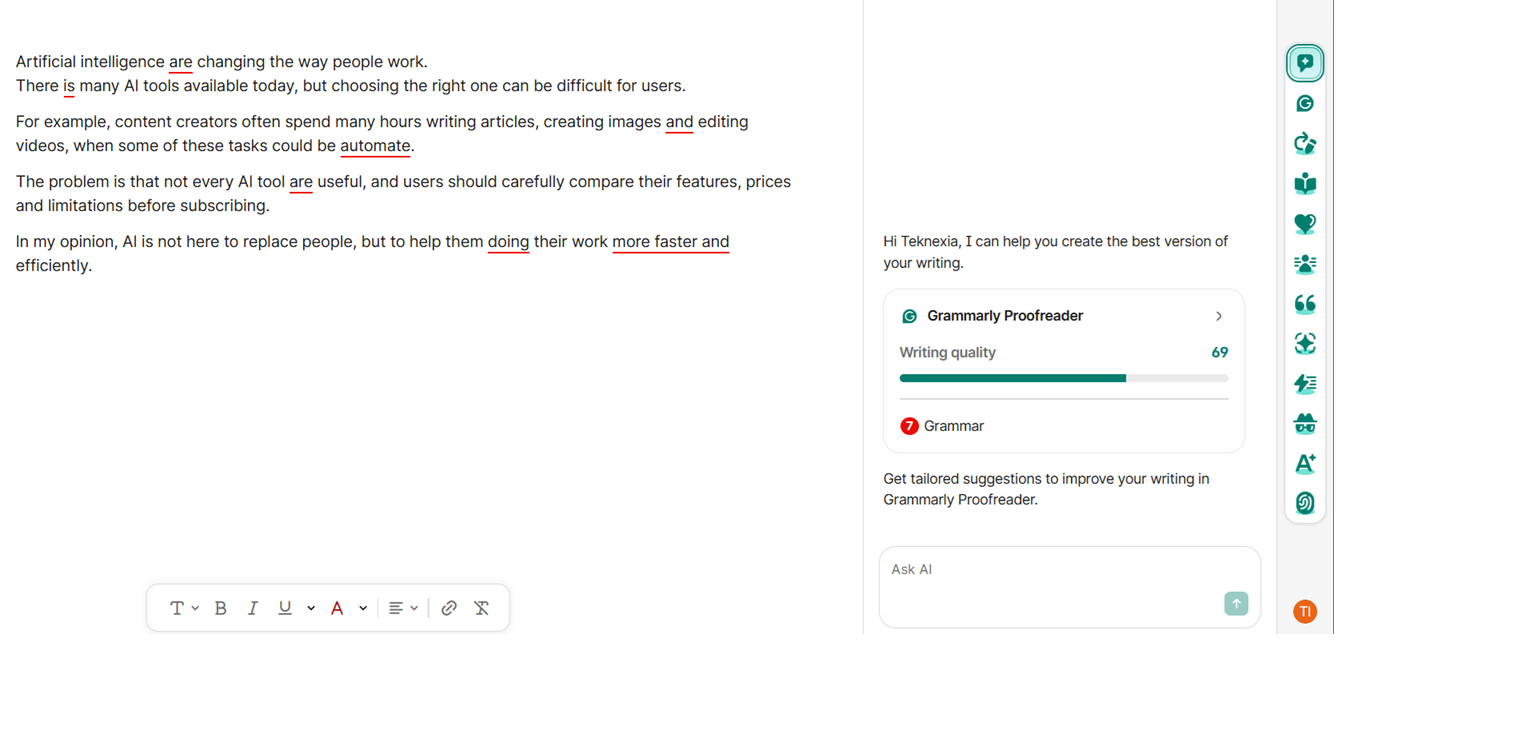
We ran this test on an active Grammarly account, pasting in a real short passage to proofread: “Artificial intelligence are changing the way people work. There is many AI tools available today, but choosing the right one can be difficult for users. For example, content creators often spend many hours writing articles, creating images and editing videos, when some of these tasks could be automate. The problem is that not every AI tool are useful, and users should carefully compare their features, prices and limitations before subscribing. In my opinion, AI is not here to replace people, but to help them doing their work more faster and efficiently.”
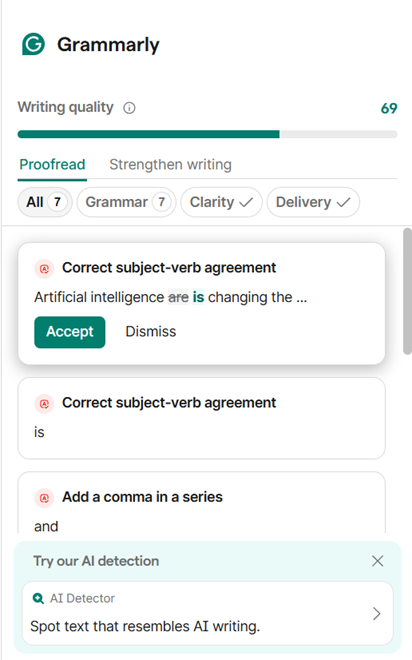
Grammarly caught the errors we'd expect a proofreader to catch: “are” corrected to “is” for subject-verb agreement (twice), “automate” flagged for the missing “-d,” and a missing comma in a series. The document scored 69 for writing quality, with 7 grammar issues flagged, and each suggestion could be accepted or dismissed individually. That core loop worked well and was genuinely easy to use.
Our Test Protocol
These notes document what we did during testing — they are separate from the 5-criteria Teknexia AI Tool Evaluation Framework score in the Quick Verdict above, not a replacement or duplicate of it.
| Test | Prompt | Result | Note |
|---|---|---|---|
| Grammar & clarity check | A short passage with deliberate subject-verb agreement and comma errors (full text above) | Writing quality 69/100, 7 grammar issues correctly flagged and fixable individually | Accurate on the errors we checked |
| Suggestion review | — (same document) | Correct fixes overall; a few suggestions reworded more of the sentence than the error required | Occasional over-correction |
| Interruptions during editing | — (same session) | A "Try our AI detection" upgrade prompt appeared inside the suggestions panel itself | Confirmed disruptive, not a one-off |
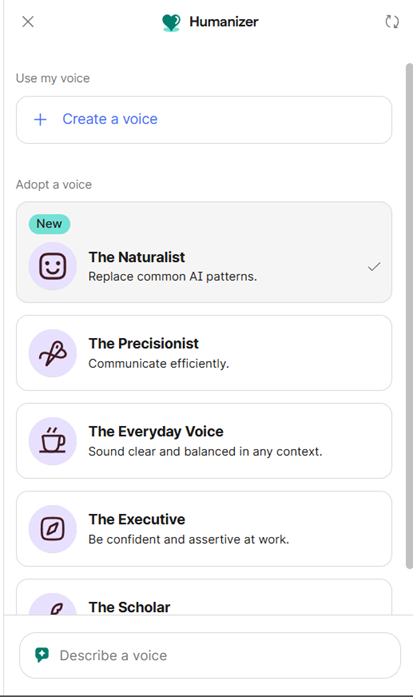
| Humanizer feature | Opened the Humanizer tool | Five preset voice styles (The Naturalist, Precisionist, Everyday Voice, Executive, Scholar) plus a custom "Describe a voice" option | Present and easy to find |
What we didn't test
One proofreading pass and a look at the Humanizer tool tell us the core correction engine works and that the upsell friction is real, but they don't cover the rest of the platform. We haven't tested Grammarly's browser extension, its desktop or mobile apps, tone rewriting at length, plagiarism detection, or the Business/Enterprise tiers ourselves. We also did not personally go through a full subscribe-then-cancel cycle; the renewal and cancellation issues below are drawn from Grammarly's own billing terms and a well-documented pattern of third-party complaints, not a cancellation we triggered ourselves. For those, this review leans on that documentation rather than our own use, and we'll expand it as we test more of the platform.
A Warning Worth Taking Seriously: Auto-Renewal and Cancellation
We're putting this in its own section instead of folding it into a pros/cons list, because it deserves to be read on its own. Grammarly's paid plans auto-renew by default, and a consistent pattern shows up across Better Business Bureau complaints and other consumer reports: users report being charged on renewal without a clear warning, and then finding it difficult to get a refund once the charge has gone through. One complaint we found cited a $144 annual charge with a refund request that was refused; others describe support going unanswered for weeks after an unexpected renewal. Grammarly's own policy is that it generally does not refund the unused portion of a term once it renews.
None of this means Grammarly is uniquely bad at billing, and we did not personally trigger a renewal or attempt a cancellation ourselves to confirm these reports firsthand. But the pattern is specific and recurring enough, across independent sources, that we think it deserves a direct warning rather than a passing mention: before you subscribe, check the renewal date in your account settings, and if you plan to cancel, do it several days before that date rather than after.
What Grammarly Actually Is
Grammarly is a writing assistant that checks grammar, clarity, tone, and delivery in real time, across a browser extension, desktop app, and web editor, with AI features including tone rewriting, an AI detector, and the Humanizer tool we saw in our own test (Grammarly, 2026). In 2026, Grammarly folded its old Premium and Business plans into a single Pro tier, and the company has been expanding beyond pure proofreading under a broader "Superhuman" AI assistant brand.
Grammarly Pricing and the Free Plan, in Detail
Grammarly's own pricing page is JavaScript-rendered and doesn't expose its numbers to a simple page fetch, so we cross-referenced multiple independent sources against Grammarly's own documented billing terms rather than relying on a single source.
| Plan | Monthly | Quarterly | Annual |
|---|---|---|---|
| Free | $0 | — | — |
| Pro | $30/mo | $20/mo | $12/mo |
| Enterprise | Custom | Custom | Custom |
What Users Report
Trustpilot's own site returned an automated bot-detection challenge when we tried to verify Grammarly's exact rating directly, the same block we've run into reviewing other tools. Third-party sources report figures ranging from roughly 4.1 to 4.5 out of 5 across more than 10,000 reviews; since we couldn't confirm a single figure against Trustpilot's own page, we're reporting the range as third-party data, not a number we verified ourselves.
What we can report, cross-referenced across multiple independent sources, are recurring patterns:
- Recurring positives: accuracy of grammar and spelling corrections, and ease of use, come up consistently — matching what we found in our own test.
- Recurring complaints: automatic renewal charges and slow or unhelpful customer support around billing are named specifically and repeatedly, consistent with what we found researching the renewal issue above — this isn't an isolated complaint pattern.
What Other Users Say
We could not access Trustpilot directly to confirm a single figure. Recurring themes across the sources we found: strong praise for correction accuracy and ease of use, alongside a specific, repeated pattern of complaints about automatic renewal charges and support response times, consistent with what we found researching Grammarly's billing practices directly.
Sourced from multiple third-party review aggregations and the Better Business Bureau (retrieved 15 August 2026); Trustpilot's own page could not be accessed directly.
Grammarly vs Jasper vs Copy.ai
These three tools solve different problems, which matters more than a single score comparison: Grammarly corrects and refines writing you've already drafted, while Jasper and Copy.ai generate new content from a brief. Jasper is reviewed here as Hands-on tested; Copy.ai is reviewed based on documented research rather than our own direct test, which we're flagging here since it affects how much weight to put on that column.
| Criteria | Grammarly | Jasper | Copy.ai |
|---|---|---|---|
| Core use case | Correction & editing of existing writing | Content generation from a brief | Content generation for GTM teams |
| Framework score | 6.2 / 10 | 7.4 / 10 | 5.4 / 10 |
| Free plan | Yes, 100 AI prompts/mo, confirmed hands-on | No free plan, 7-day trial (card required) | No free plan |
| Entry paid price | $12/mo (Pro, billed annually) | $59/mo | $29/mo (5 seats) |
| Pricing value score | 4/10 — penalized for renewal/cancellation issues | 6/10 | 4/10 |
| Review method here | Hands-on tested | Hands-on tested | Research-based, not hands-on tested |
Pros & Cons of Grammarly (2026)
Pros
- Caught real grammar and clarity errors accurately in our own test document, confirmed hands-on
- Suggestions were clear and easy to act on, even without an editing background
- Genuinely useful across everyday writing tasks: grammar checking, document editing, and export
- Free plan includes 100 AI prompts a month, confirmed on our own account, no card required
- The Humanizer tool offers real preset options for adjusting tone and reducing AI-sounding phrasing
Cons
- Auto-renewal and cancellation difficulty is a serious, well-documented complaint pattern, not a minor inconvenience — see our dedicated section above before you subscribe
- Constant pop-ups and upgrade prompts interrupted our own writing flow, including one inside the correction panel itself
- Some suggestions over-corrected sentences more than the actual error required, in our own test
- We did not test the browser extension, mobile apps, or Business/Enterprise tiers ourselves
- We could not confirm a single Trustpilot rating; Trustpilot blocked our direct access
Frequently Asked Questions
Does Grammarly have a free plan?
Is it hard to cancel a Grammarly subscription?
Are Grammarly's corrections accurate?
How does Grammarly compare to Jasper and Copy.ai?
Our Grammarly Review Verdict
Grammarly does the core job well. Our test document had real, specific errors, and Grammarly caught them accurately, explained them clearly, and let us fix each one individually, no editing background required. That part of the experience earned the praise it usually gets. But our test also surfaced two honest problems we won't soften: the app interrupted our own writing flow repeatedly, including an upgrade prompt that appeared inside the correction panel itself, and Grammarly's auto-renewal and cancellation practices carry a serious, well-documented pattern of complaints that goes beyond a simple pricing gripe. We didn't trigger a renewal or cancellation ourselves to confirm that pattern firsthand, but it's specific and recurring enough across independent sources that we think every reader considering a paid plan should know about it before they subscribe, not after. We haven't yet tested Grammarly's browser extension, mobile apps, or its Business and Enterprise tiers ourselves, so treat those parts of this review as resting on Grammarly's own documentation until we do. This verdict is Hands-on tested for the parts we verified directly: accurate corrections, a genuinely useful daily tool, undercut by interruptions and a billing pattern worth taking seriously.